Reference
Troubleshooting
The problems the product itself tells you about, what causes each one, and how to fix it.
Checked against the live product 5 Oct 2026 Changelog Copy as Markdown
Each answer below covers a problem Truffle reports on screen or a setting that has to be in place. Start with the heading closest to what you see. If your problem is not here, the help center has more. Help is also in the ? menu in the sidebar.
Getting candidates in
Why didn’t my Indeed applicants import?
Almost always, the Indeed setting “Send an individual email each time someone applies” is unticked. Adding your Truffle import address in Indeed only tells Indeed who to notify. That checkbox is what sends each application. Without it, Indeed sends summaries, and nothing imports. See Import applicants from Indeed.
Check each step of the setup:
- On the position, open
Get candidatesand turn onAuto-import applicants. Copy the import address it shows. Every position has its own. - In Indeed, open the job, choose Edit job post, then Application method. Under “Application updates and access to candidates on Indeed”, add your import address.
- On the same screen, tick “Send an individual email each time someone applies”. Save the job, then confirm.
- Indeed attaches a resume only when the applicant provided one. In the job’s application settings, require a resume, and in the application update email settings, turn on attaching it.
If a position has had nothing import for a few days, Truffle flags it. Emails Truffle cannot import show in the position’s import activity with the reason and what to do, and your account gets an email when imports start failing. Accounts more than 14 days past cancellation, or blocked, stop importing.
Indeed emailed my import address asking it to create an account
You do not need to do anything. Indeed sends that invitation whenever an address is added, including on correctly set up jobs. It has no effect on whether applications reach Truffle, and Truffle shows you that it arrived.
Why is a forwarded application waiting instead of importing?
Truffle accepts forwards from a teammate’s sign-in address, and notifications from Indeed, LinkedIn and ZipRecruiter, without review. Email from any other sender waits for a manager or owner to choose Import once, Always allow for that exact address, or Ignore. Unreviewed emails expire after 14 days. To avoid the wait, forward from the email address you sign in with.
Why was an imported candidate invited automatically, or not invited?
It follows how the position is set up. On an Apply first position, imported candidates wait in the candidate list and nothing is sent until you invite them. On a one-sitting position, or one with no resume step, they are invited to their interview automatically. The exception is a candidate whose only address is Indeed’s relay address (one at indeedemail.com): Truffle never emails that address, so they are not invited, and their profile tells you to message them in Indeed or add their own email. When their resume carries an email address, Truffle uses that one instead.
Why was my resume upload refused?
Uploads take PDF or DOCX files, up to 5 MB each and 50 per upload, and you confirm an employer attestation first. Scanned PDFs are read with text recognition. An upload that is still refused says why.
Candidate links and emails
A candidate says their link doesn’t work
Ask what the page says.
- “This interview link is incomplete” or “This application link is incomplete” means the link was cut off or mistyped. The page lists three steps to get a working link. A link with stray characters on the end is repaired and opens on its own.
- The candidate’s own deadline has passed. A link with a completion deadline stops accepting submissions after it. Extend the deadline from the candidate’s row, or for several candidates at once.
- The position has expired. Its link shows an expired page. Reopen the position or extend its deadline.
- The position is closed. Closing stops the link and careers page the same day. Reopen it with
Reopen position. - The candidate was deleted. A deleted candidate’s interview link stops working, and deletion cannot be undone.
A candidate started but can’t get back in
A candidate returning to a started screening enters their email and sees “Check your email for a link to continue your application”. The emailed link is the only way back in. It works on another device. Only the invitation deadline and the position’s expiry stop a resume.
A candidate can’t or won’t record video
Point them to Request an alternative on the welcome page. They give a reason, and the request appears on your Home and in the candidate list, where you mark it handled. Requests go to your Accommodation contact email, or to the account owner if none is set. For problems during the screening itself, the Need help? link in the screening header opens support chat.
Why isn’t a candidate getting reminders?
Check these in order:
- The reminders are switched off for the position, under Candidate emails and reminders.
- The candidate is suppressed. They unsubscribed, or someone recorded an opt-out, and every send path checks that record.
- You uploaded their resume, or they are waiting on an
Apply firstposition. Neither gets email until you invite them.
Why can’t I send another reminder?
Manual reminders have a 24-hour wait between sends for the same candidate.
Why are candidate replies going to Truffle?
Companies created before 17 September 2026 keep their previous routing, where replies reach Truffle, until an owner or admin picks an option. Choose Reply to the sender or Use one address in Settings, under Company, Candidate email. See Customize candidate emails.
Why is the personalized note missing from an email?
{personalized_note} is left blank when there is nothing specific to say about the candidate. The completion email only includes a note if your template adds the tag.
Setting up a position
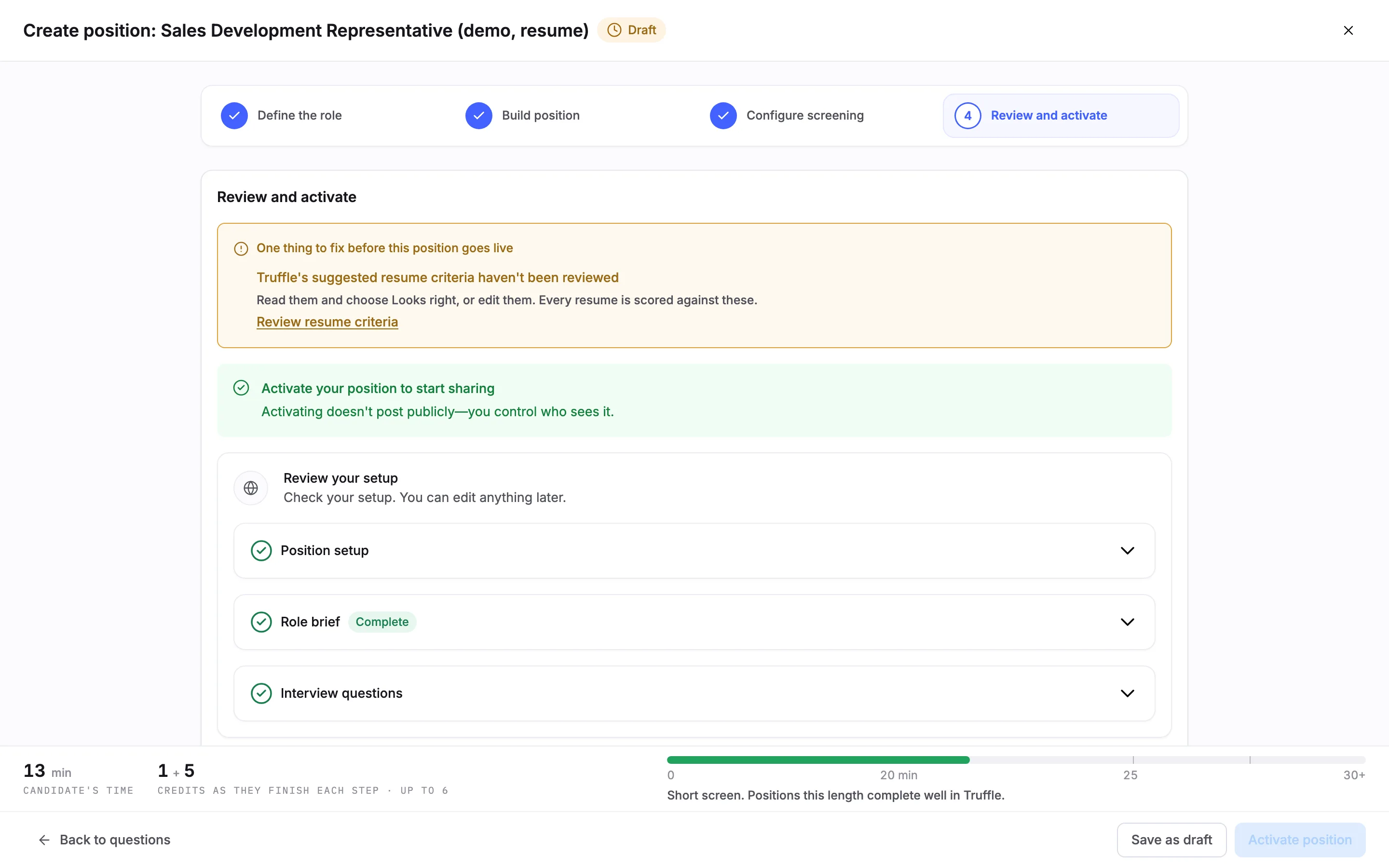
Why can’t I activate my position?
Review and activate lists everything that blocks go-live as rows that link to the fix, and Activate position stays off until they are cleared. The blockers are:
- A position description under 200 characters. Define the role shows the count as you type.
- Resume criteria Truffle drafted that nobody has reviewed. Review reads
Truffle's suggested resume criteria haven't been reviewed, withReview resume criteria. - Qualification checks Truffle drafted that nobody has reviewed. Review reads
Truffle's suggested qualification checks haven't been reviewed, withReview qualification checks. - Resume scoring switched on with no criteria.
To clear a drafted section, read it and choose Looks right, or edit it.
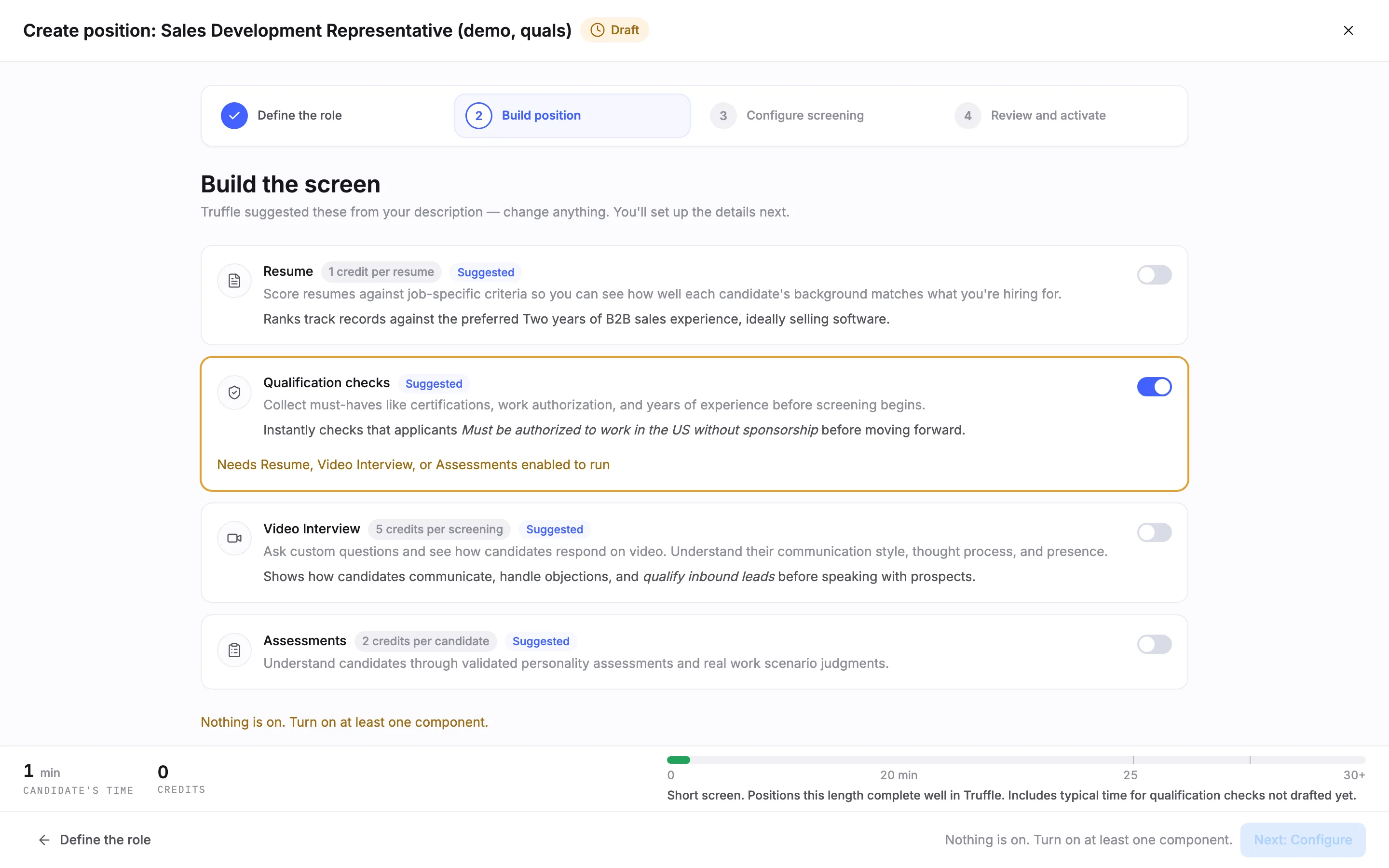
Why won’t Next: Configure work?
At least one component has to be on, or the page reads Nothing is on. Turn on at least one component. Qualification checks cannot run alone. With only checks on, the card reads Needs Resume, Video Interview, or Assessments enabled to run. Switch on one of those three.
Why can’t I save the Personality section?
Every trait needs a choice, and the section says how many are left, such as 4 traits still need your selection before saving. At least one trait must be set to something other than Not important.
Why can’t I create a qualification check?
Create check stays off until the rule is complete, and the form says what is missing.
Why can’t I add my own interview question?
The fairness check reads your question as you type. This question can't be added as written means the question needs the change shown before it can be added. Potential bias risk means you can still add it after you acknowledge the flag, with an optional business reason. A custom question is limited to 150 words, and an interview holds up to 10 questions.
Candidates don’t see my edits to a live position
Edits to a live position are saved as a draft. Candidates keep seeing the current version until you publish from Review with Publish changes. A position with a waiting draft shows an Unpublished chip on the positions list.
I can’t delete, duplicate or reopen a position
- Delete is only available on closed or archived positions, for the position’s owner, account owners and admins.
- Duplicate is disabled while a position is archived.
- An archived position must be unarchived before it can be reopened.
- Reopening tells you anything that has to be fixed before the position can go live again, and links to
Edit position.
I can’t find a position
Archived positions are hidden from the main list. Owners and admins find them with the Archived filter. Global search does not return deleted positions or demo jobs.
Scores and results
Why is a score missing?
- The candidate has not completed the screening. The AI analysis runs when a candidate finishes and moves to
For Review. - The signal cluster shows only what the position measures. Overall appears only when a position has two or more score types.
- A signal reads
Not scoredorOpted out. A tooltip on the label explains it. - A personality trait you set to Not important reads
Not scored. - Environment Fit shows an aligned count and a signal tier, never a percentage.
- The resume summary is held until after the video interview.
Why is there no Clarity read on a candidate?
Clarity read (beta) is off by default and applies only to interviews completed after you turn it on. Earlier interviews do not get one. It reads English only.
Why doesn’t a resume score show in Ashby?
Resume screening does not post a score into Ashby. Ashby gets the completed status and a View in Truffle link to the full breakdown. Interview match scores and rolled-up assessment scores do post. In Pinpoint, assessments come back as a tier only.
Reviewing
Why can’t I see what the team thinks of a candidate?
The Team section stays locked until you submit your own review. This keeps each review independent.
Why can’t I change the scorecard?
A scorecard locks once criterion ratings have been submitted, so the criteria cannot change after reviews start.
A key press changed a candidate’s status
In Magic Review, A advances, H holds and R rejects. Shortcuts with a modifier key, such as refresh, pass through to your browser. To undo a decision, choose Clear decision from the Decide menu.
Why can’t I download a PDF of a candidate?
The PDF needs a selection that includes interview responses. Exporting several candidates as one zip of PDFs is on annual plans only.
Why am I not getting completion emails?
Notification settings are per person. In Settings, Notifications, you may have chosen only candidates above a match score threshold, or turned the emails off.
Integrations
Why can’t I connect an integration?
Connecting needs a paid plan. On a free account the Integrations page shows “Integrations are available on paid plans”, and on a trial the Ashby card is locked.
Ashby results stopped arriving
Check the Ashby card on the Integrations page. It shows Connected, Degraded or Action needed, and when results last flowed. Reconnect generates a new Truffle key to paste into Ashby. The old key stops working as soon as you reconnect.
A Pinpoint action doesn’t offer my position
Each Pinpoint action only offers open positions set up for it. Closed, archived and expired positions refuse new sends. Screen resume with Truffle needs a PDF or DOCX resume up to 5 MB. If you replaced the key, the old one keeps working for 7 days.
Account and billing
My workspace says the account is on hold
A failed payment opens a grace period with a warning banner. If it is not resolved, the workspace moves to a hold state. The “account on hold” message links to the billing page, where you update the card on file. The plan card warns ahead of time when your card expires before the next payment.
I cancelled by mistake
Before the end date, choose Undo cancellation on the billing page, or use the undo link in the cancellation email.
I can’t see billing history
Billing history is visible to owners and admins only.
I can’t change my email address
Your email address is read-only in Settings. Contact support to change it.
What it does not do
- Truffle never signs in to Indeed. Imports work only when Indeed sends an individual email for each application.
- Email from unrecognized senders is not imported until a manager or owner reviews it, and expires after 14 days.
- A position does not go live with a short description or unreviewed drafted criteria or checks.
- Clarity read does not apply to interviews completed before it was turned on.
- Deleted candidates cannot be restored, and their interview links stop working.
- Integrations, the API and Zapier do not work on a free account.
Related
See something here that doesn't match what you see in Truffle? Tell us and we'll fix the page.