Guide
Set up a one-way video interview
By the end you have a position with a one-way video interview, previewed as a candidate and ready to activate.
10 min · 12 steps · Captured from the live product 5 Oct 2026 Changelog Copy as Markdown
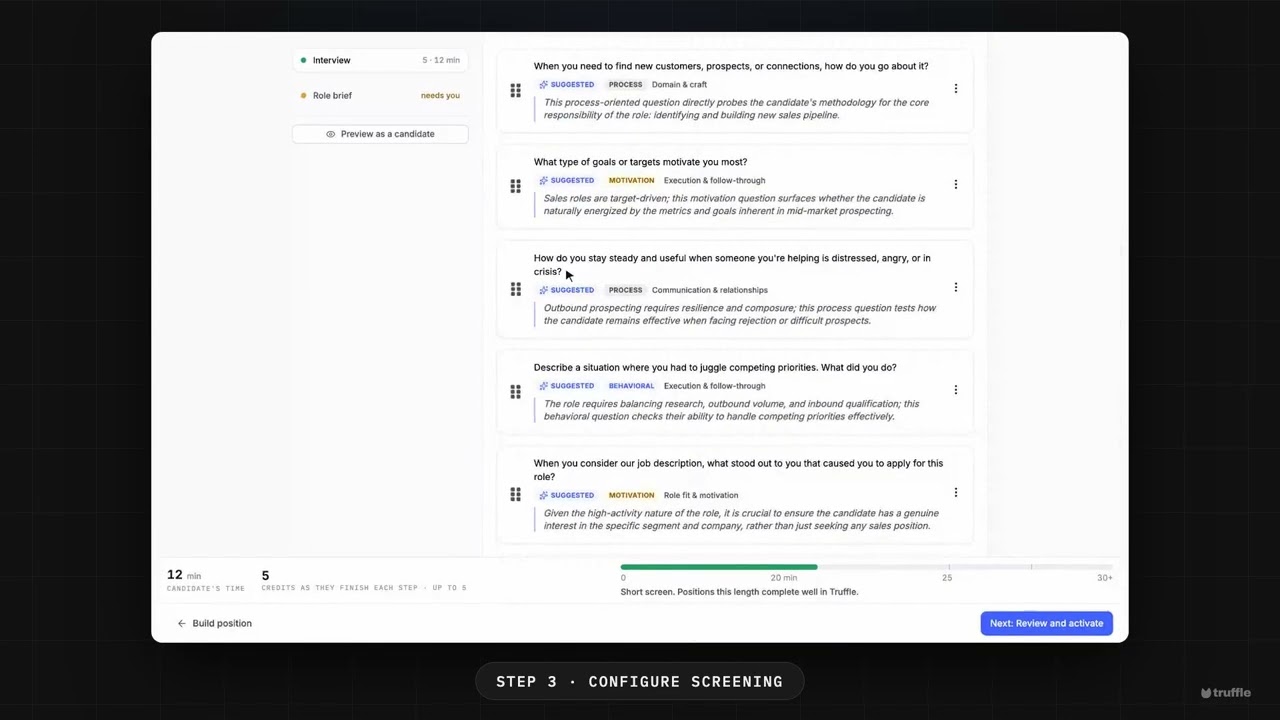
Key moments and transcript
- 0:00 Define the role
- 0:14 Build the position, then configure screening
- 0:47 Review and activate, then what happens next
Here's a one-way video interview, set up in a few minutes. Let's build one. Start a new position, and describe the role. Give it a title, and a description in plain language. Truffle reads it, to suggest your screen. On Build position, Truffle suggests what candidates go through. Video Interview is already on, with a summary of the interview it set up. In interview setup, you choose how people answer. Time to think, time to answer, retakes, and video or audio. Truffle drafts five questions from the role. Open a question's menu to swap one from the bank, or write your own. Then preview it as a candidate, so you see what they'll see. Last, review and activate. Put your brand on it, and activate. Every answer comes back scored against your criteria, with the reasoning shown. You decide who moves on. Start free at hiretruffle.com.
Before you start
- A Truffle account. The 7-day free trial works: 30 credits, no credit card.
- A job description of at least 200 characters. Truffle drafts the interview questions from it, and a position cannot go live on less.
1Define the role
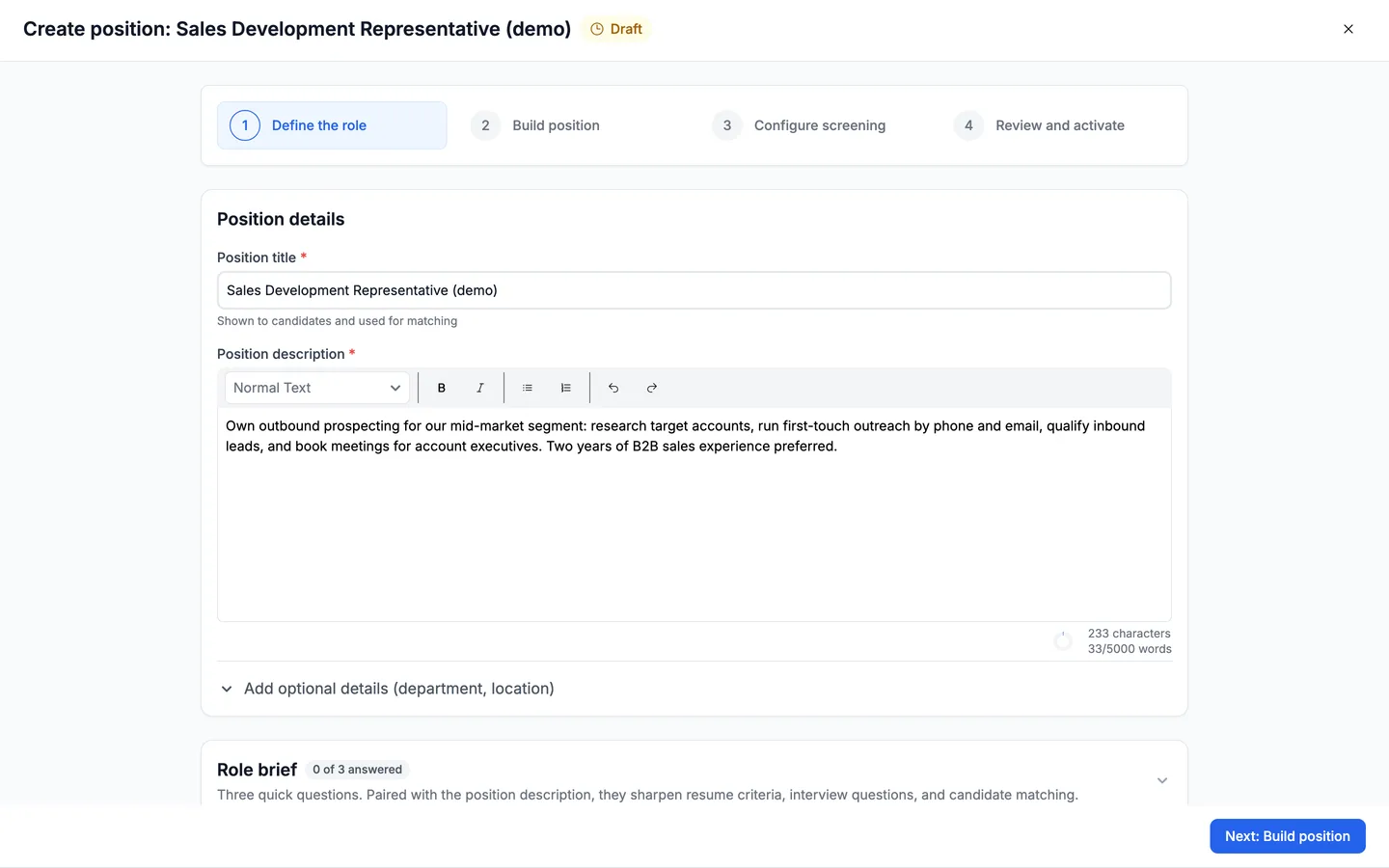
From your positions list, choose Create position. The wizard opens on Define the role, the first of four steps: Define the role, Build position, Configure screening, and Review and activate. Enter a Position title and a Position description. Truffle reads the description back as Thin, Workable or Strong, and uses it to suggest the screen and draft the interview questions. The Role brief further down the page is optional. Choose Next: Build position.
2Keep Video Interview switched on
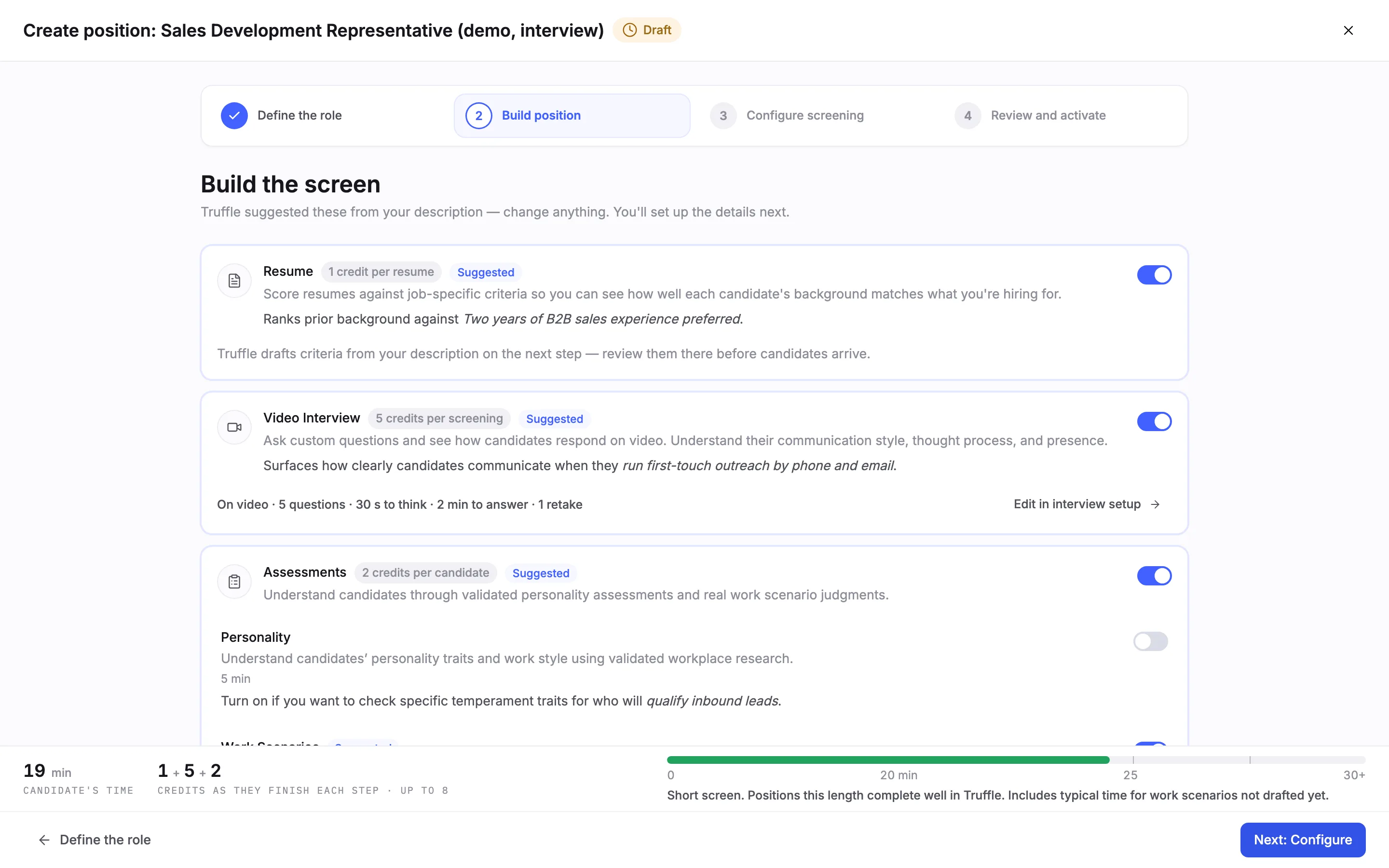
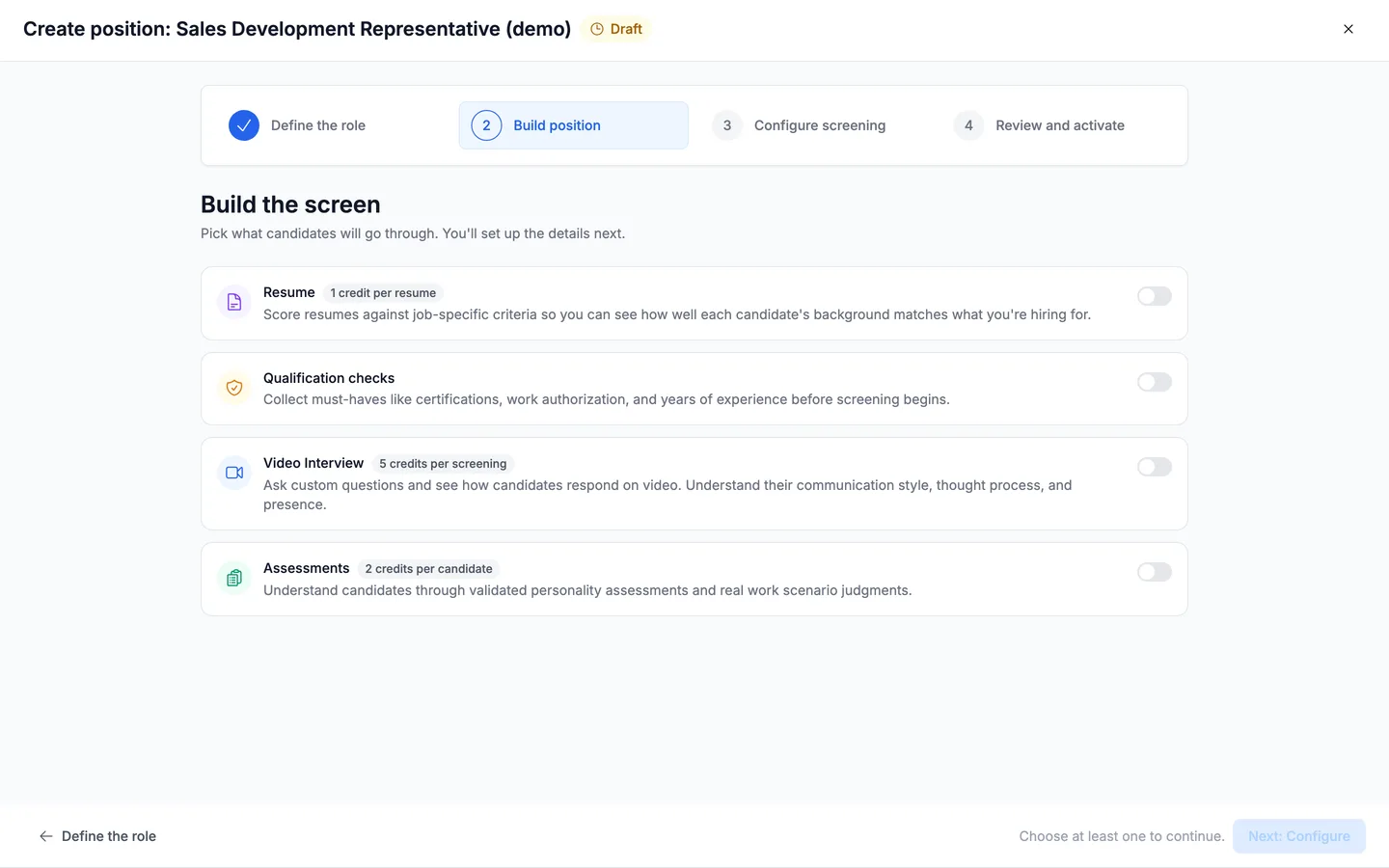
Build the screen arrives with Truffle's suggestions already switched on, each marked Suggested with a line on why it fits the role. Video Interview costs 5 credits per screening, charged only when a candidate submits the interview. Its card shows a summary of the interview Truffle set up, here five questions on video with 30 seconds to think, 2 minutes to answer and 1 retake. Leave the switch on. Clicking it turns the interview off.
3Switch off what this position does not need
Every other component stays switchable. To run the interview on its own, switch off Resume and Assessments. The footer updates as you go: the candidate's time (12 minutes for this interview) and the credits charged as candidates finish each step (5). When you are ready, choose Edit in interview setup on the Video Interview card. It opens Configure screening on the interview.
Note. Keeping Resume on is fine. Truffle then drafts resume criteria on Configure screening, and you have to mark them Looks right or edit them before the position can go live.
4Set how candidates answer
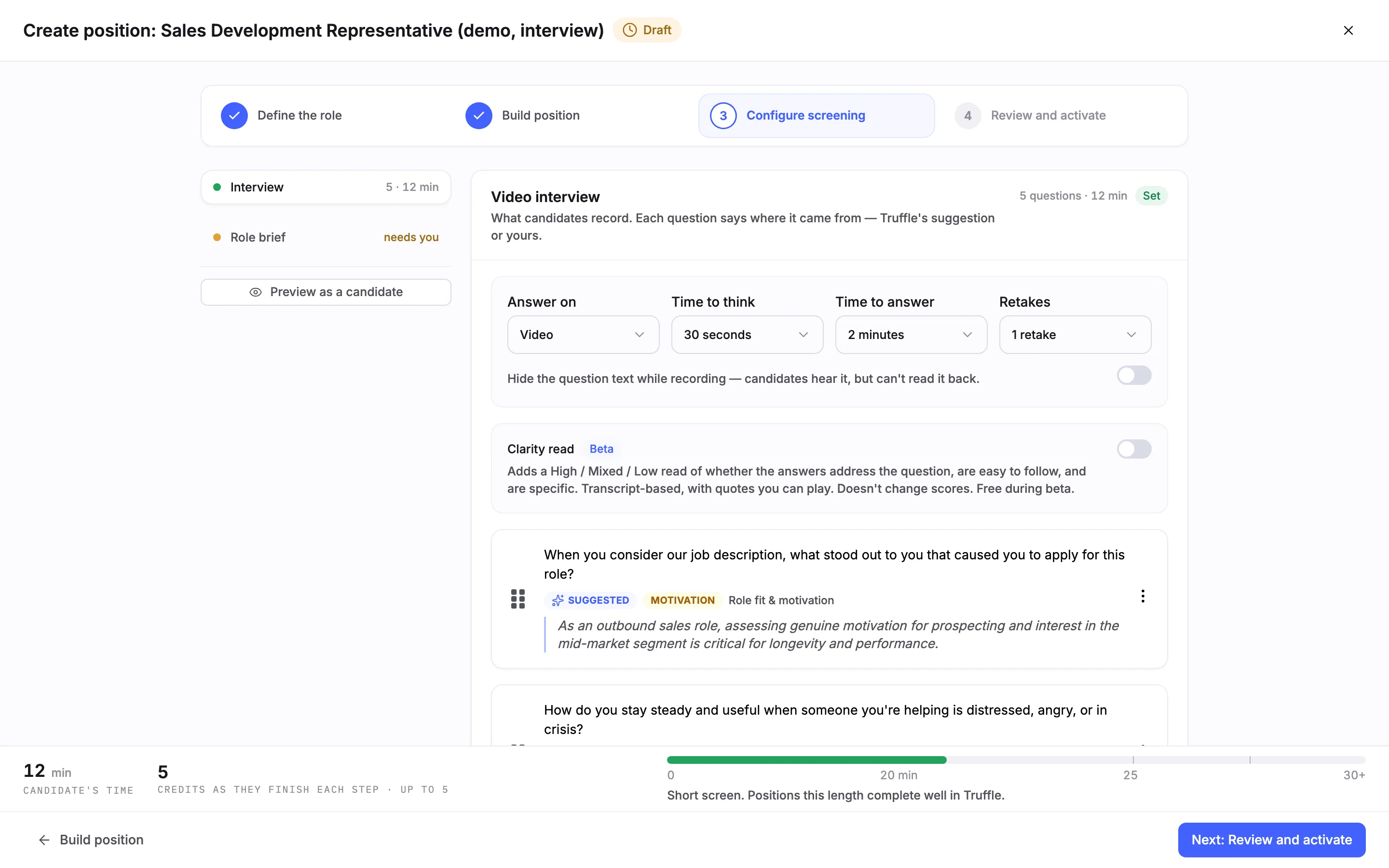
Configure screening lists your sections on the left, each with a state, and opens on Video interview. The settings row at the top applies to every question. Answer on is Video or Audio. Time to think runs from None to 5 minutes, or Unlimited. Time to answer is 1, 2 or 3 minutes. Retakes runs from No retakes to 3 retakes. Below it, you can hide the question text while candidates record, so they hear the question but cannot read it back. Clarity read (beta) is off by default. Turned on, it adds a High, Mixed or Low read of whether answers address the question, are easy to follow, and are specific. It does not change scores.
5Review the drafted questions
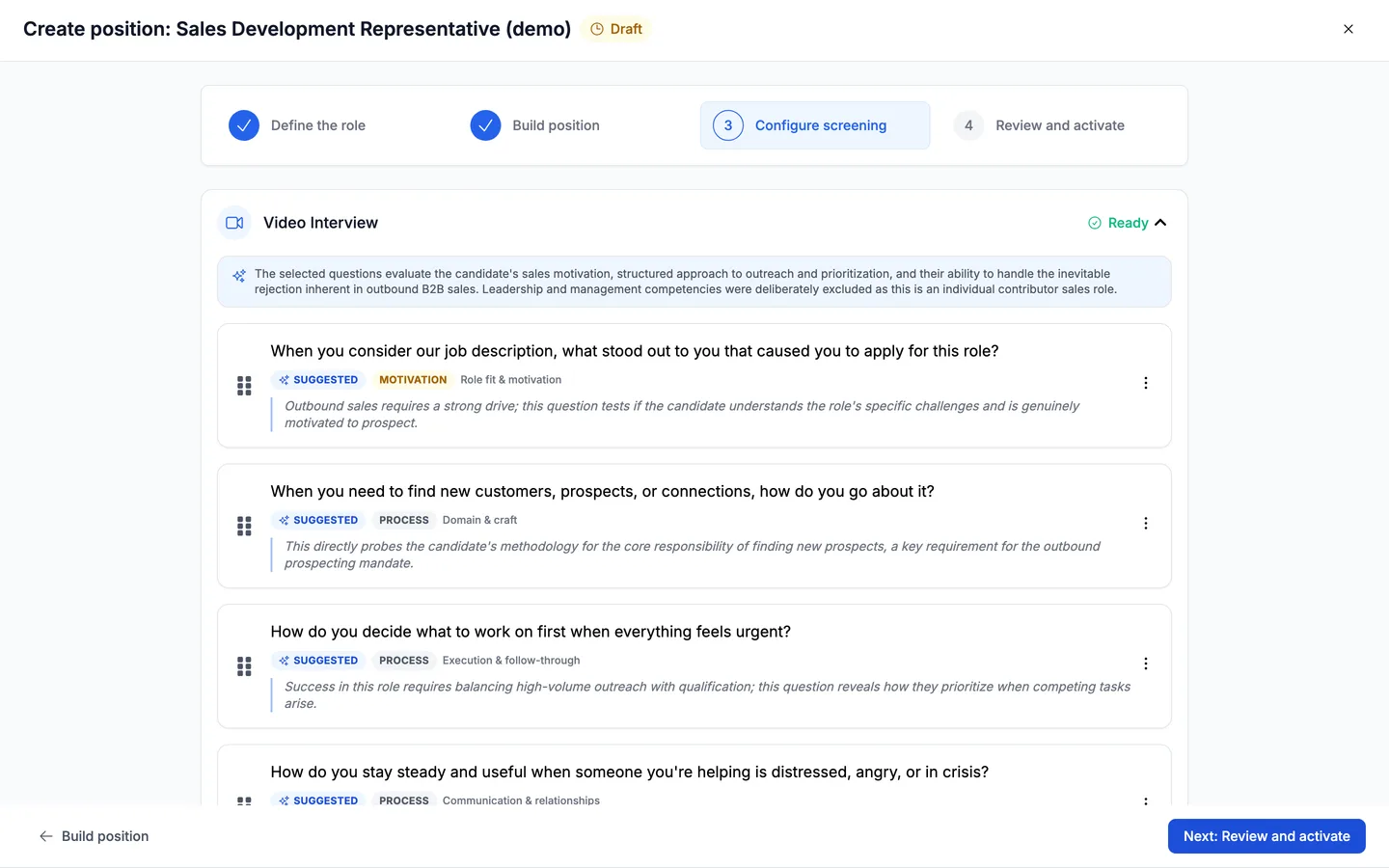
Below the settings are the questions Truffle drafted from your description. The number it suggests depends on the role type. Each question carries a Suggested pill, the question type (motivation, process, behavioral), the area it covers, such as Domain & craft or Execution & follow-through, and a line on why it was chosen for this role. Drag the handle on the left of a question to reorder. An interview holds up to 10 questions.
6Open a question's menu
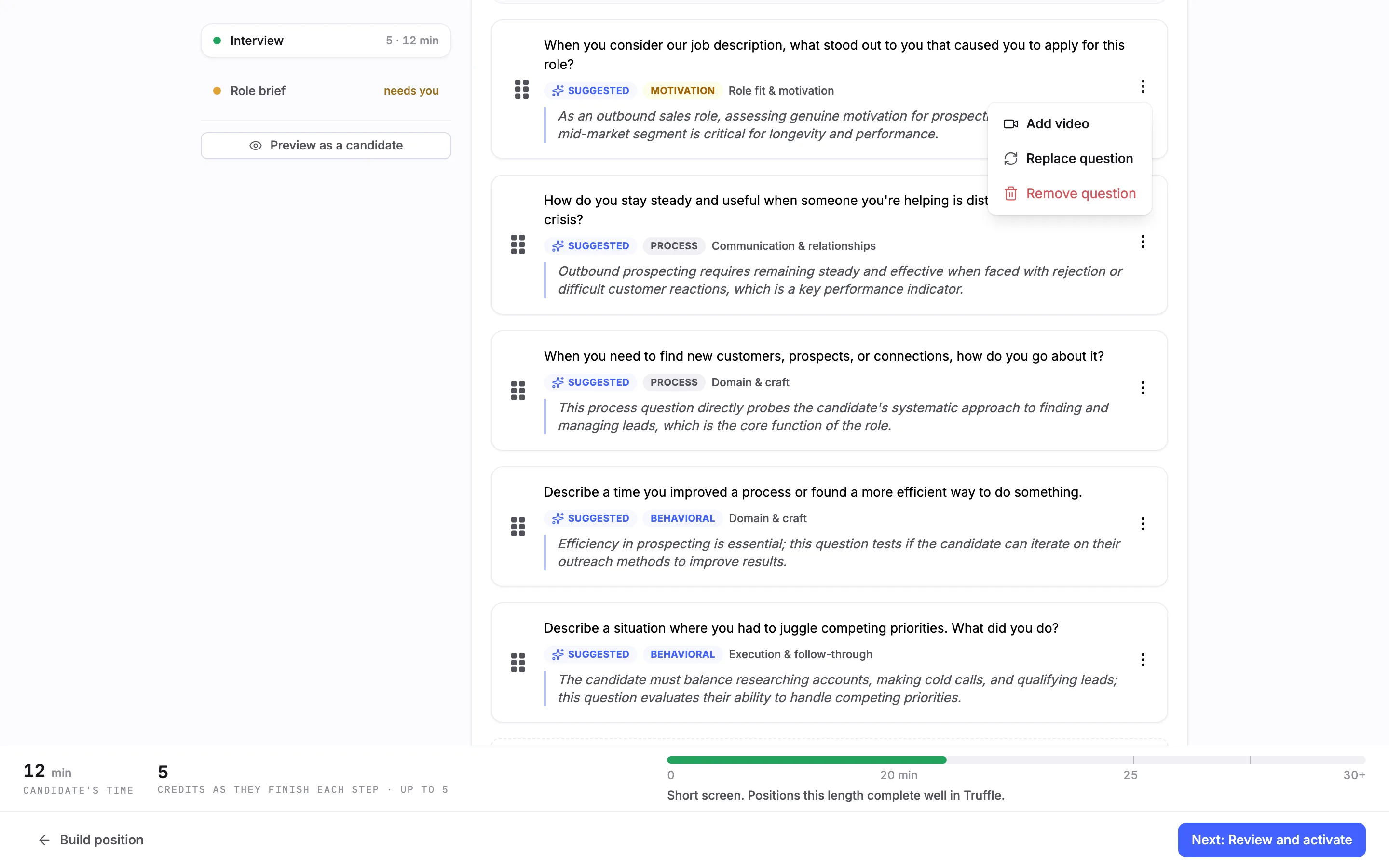
Each question has a menu on its right with three actions. Add video attaches a pre-recorded video to the question. Replace question swaps it for another. Remove question deletes it from the interview.
7Swap a question from the bank
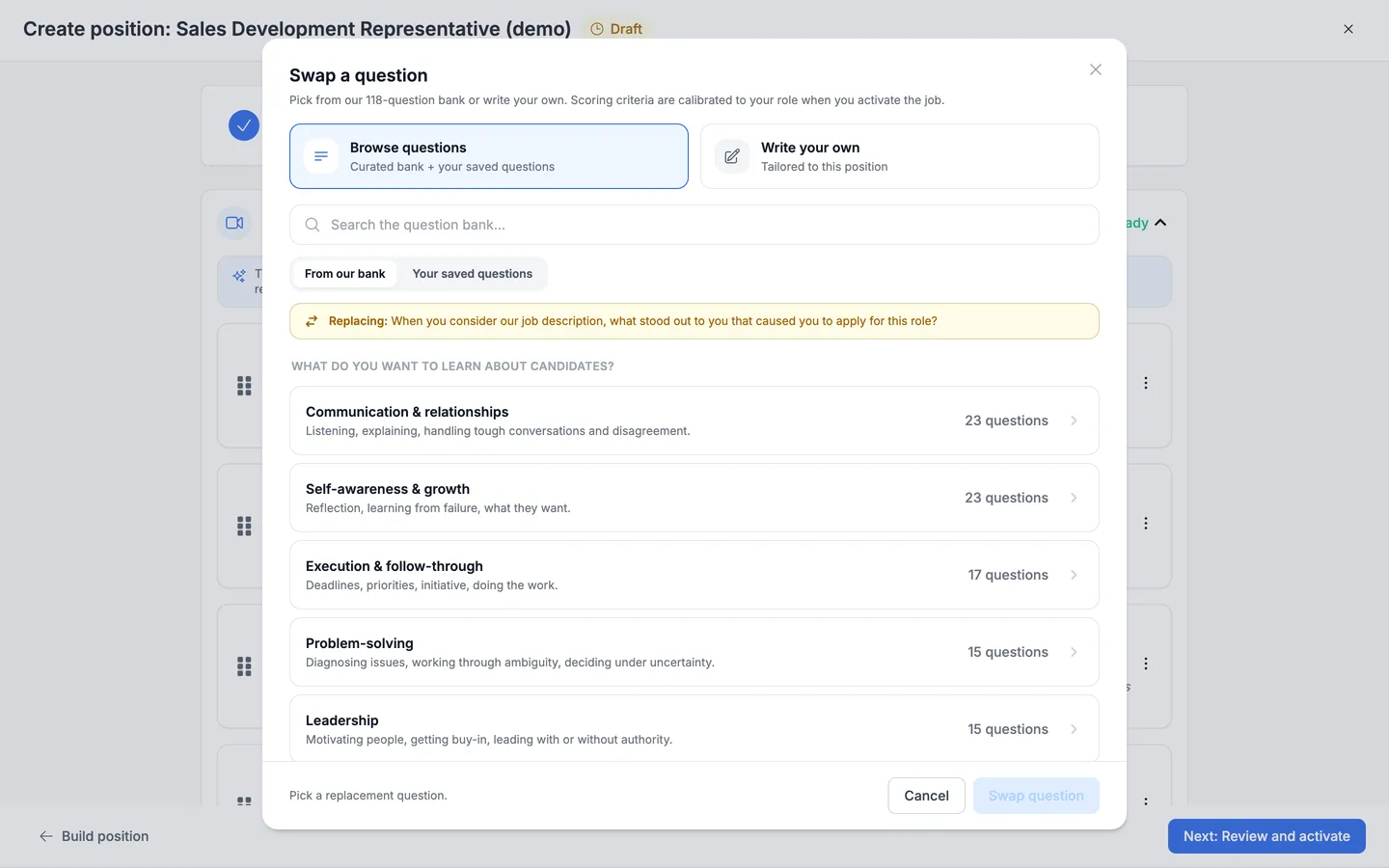
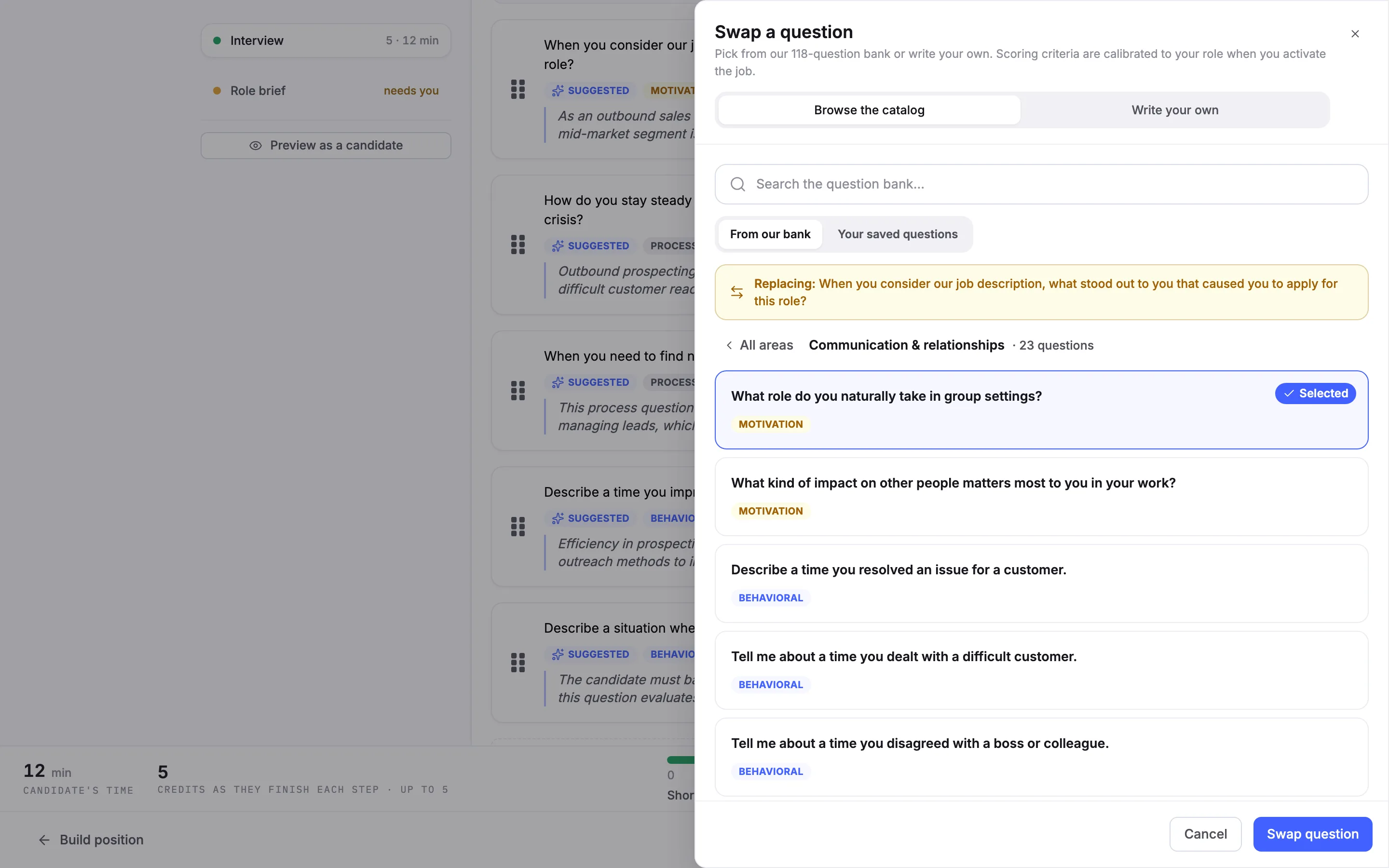
Replace question opens the Swap a question panel on Browse the catalog. The question you are replacing is named at the top. Search the bank, switch between From our bank and Your saved questions, or browse by what you want to learn about candidates: Communication & relationships, Self-awareness & growth, Execution & follow-through, Problem-solving, Leadership, Domain & craft, and Role fit & motivation. Each area shows how many questions it holds, and the area of the original question is marked.
8Pick the replacement
Open an area, select a question, and choose Swap question. The new question takes the old one's place in the list, marked Yours instead of Suggested. Add a question below the list opens the same panel to add a question instead of replacing one.
9Or write your own
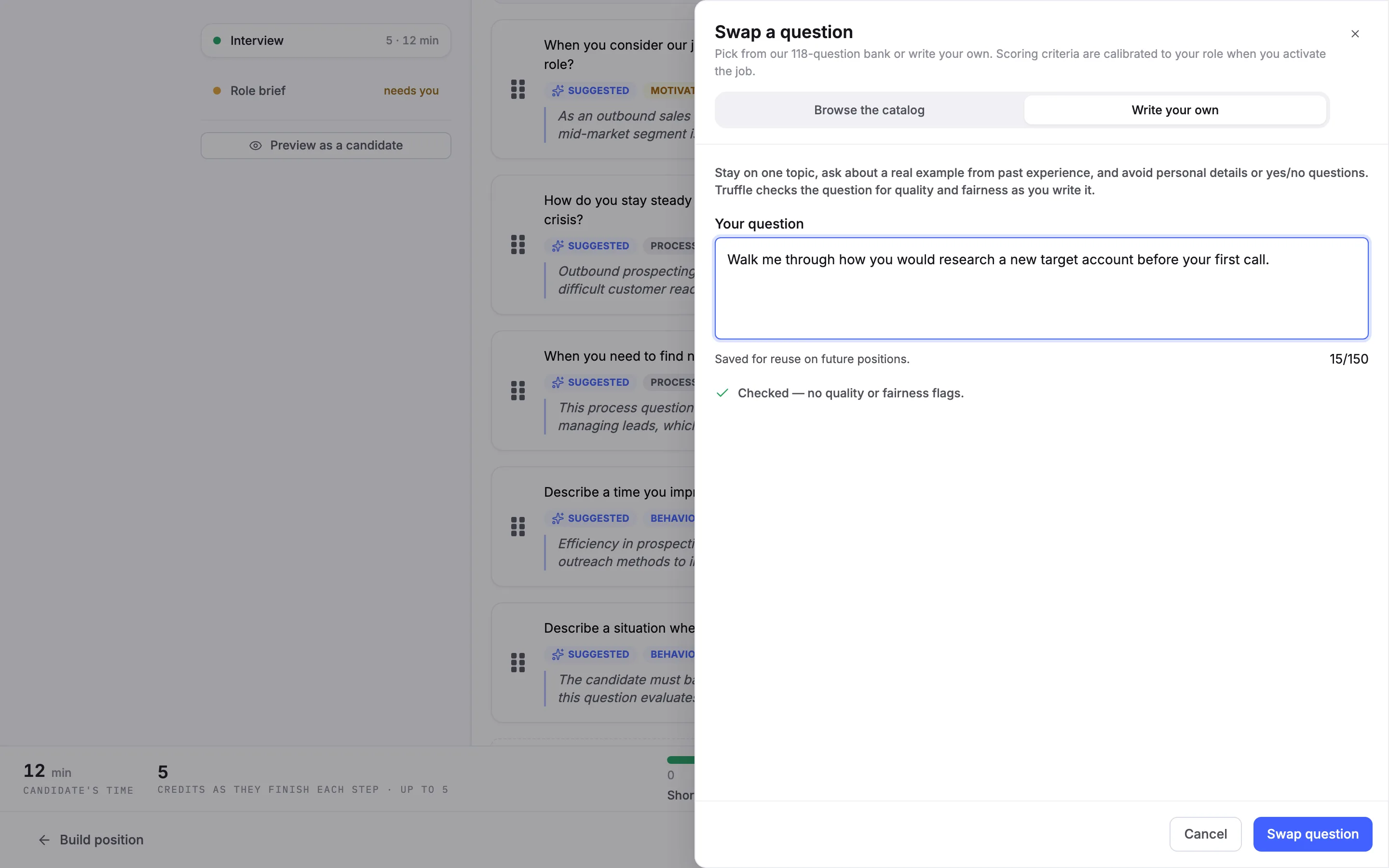
Switch the panel to Write your own and type the question under Your question, up to 150 words. Truffle checks it for quality and fairness as you type. A question that passes is marked as checked with no flags. A risky one shows Potential bias risk with a suggested rewrite, or This question can't be added as written with the change it needs. Questions you write are saved for reuse on future positions.
Note. The fairness check is guidance, not legal advice.
10Preview it as a candidate
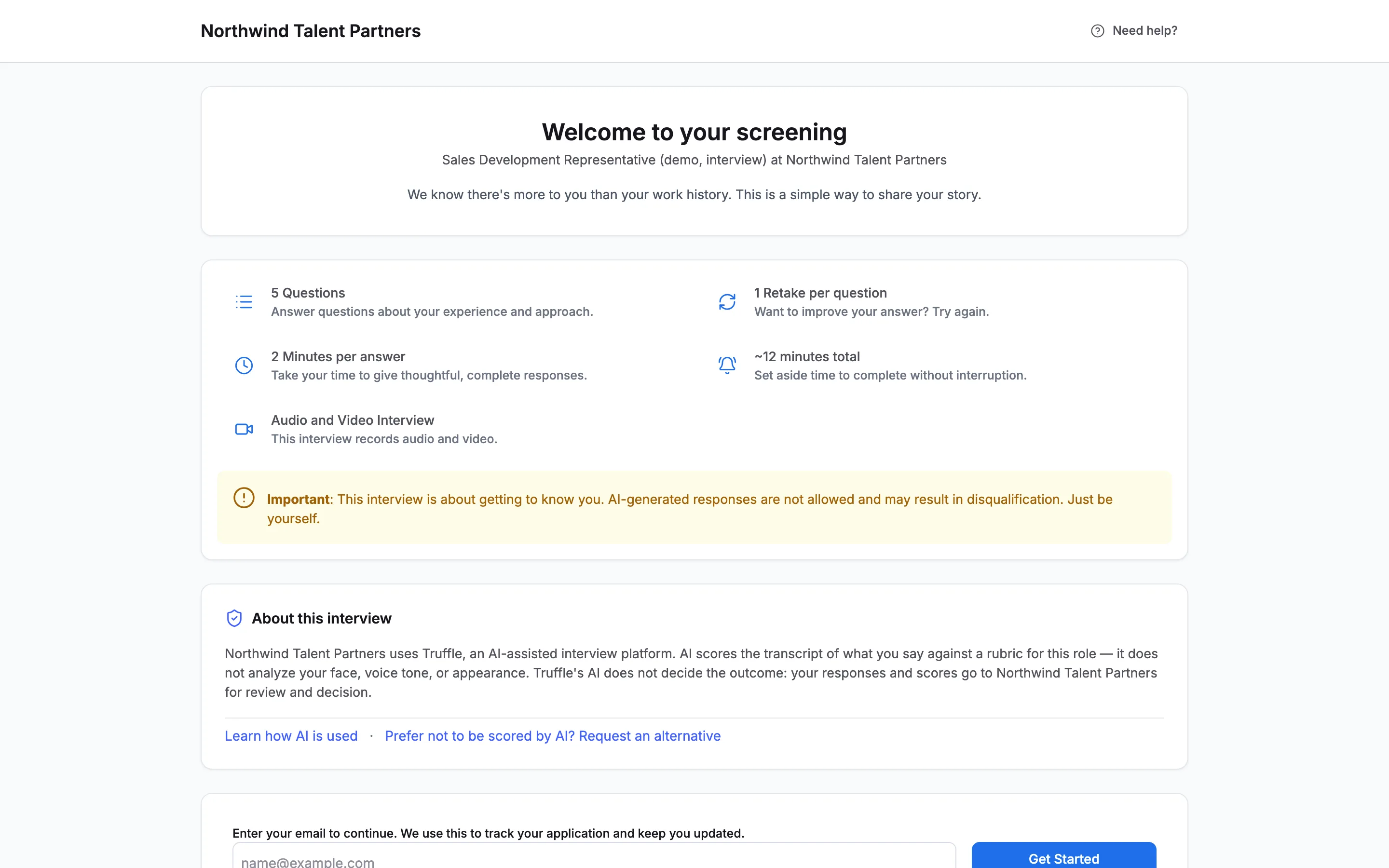
Choose Preview as a candidate under the section list. It opens the candidate's page in a new tab with a private preview link, so it works on a draft. This one shows Welcome to your screening with the interview's shape: 5 questions, 2 minutes per answer, 1 retake per question, about 12 minutes in total, recorded on audio and video. Below that is the notice telling candidates how AI is used.
11Move to Review and activate
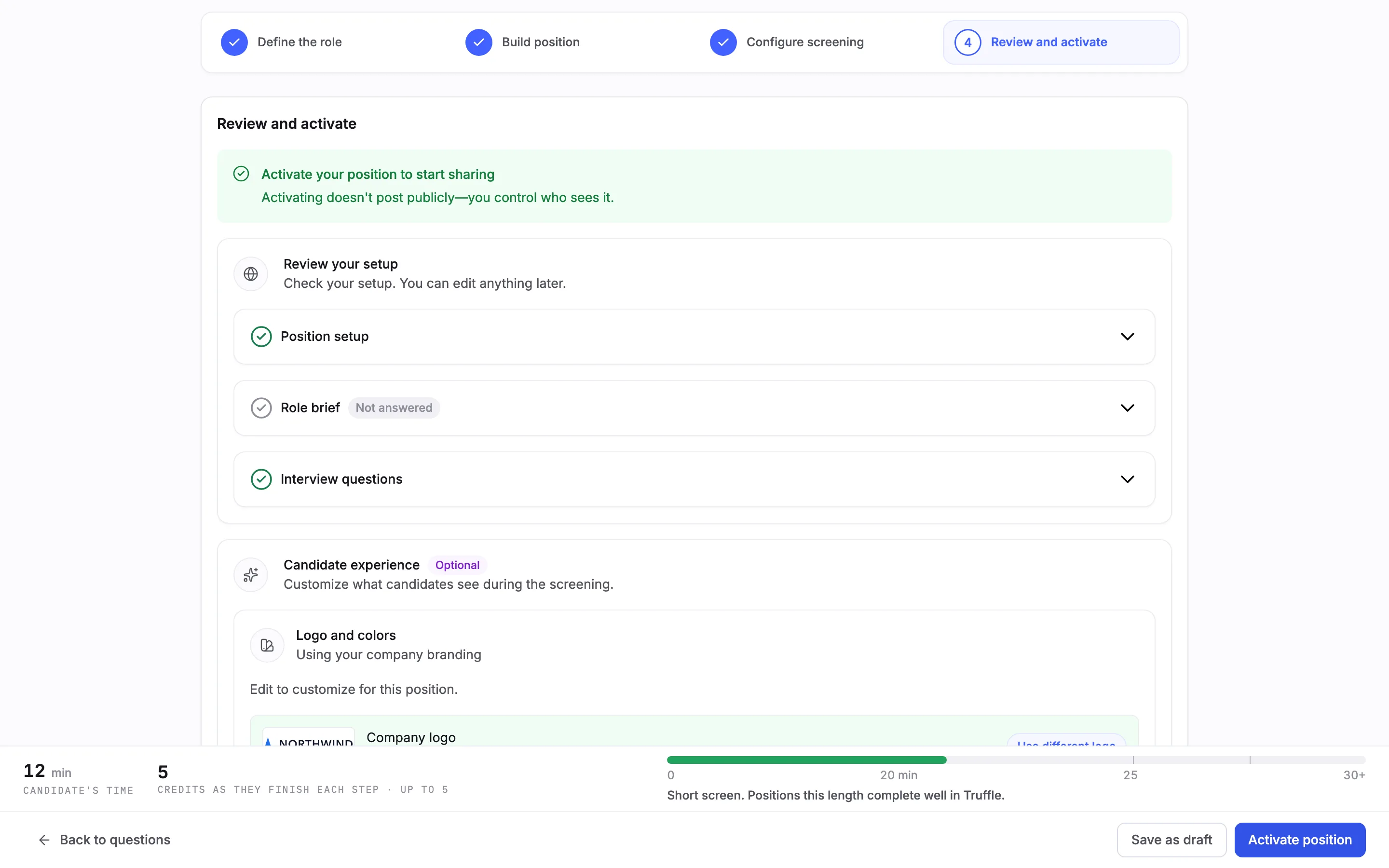
Choose Next: Review and activate. Truffle first shows Building your position while it calibrates scoring criteria for each question, which usually takes about 20 seconds. Then Review your setup lists Position setup, Role brief and Interview questions. Expand Interview questions to check the final list. It has an Edit button if you want to change it.
12Brand it and activate
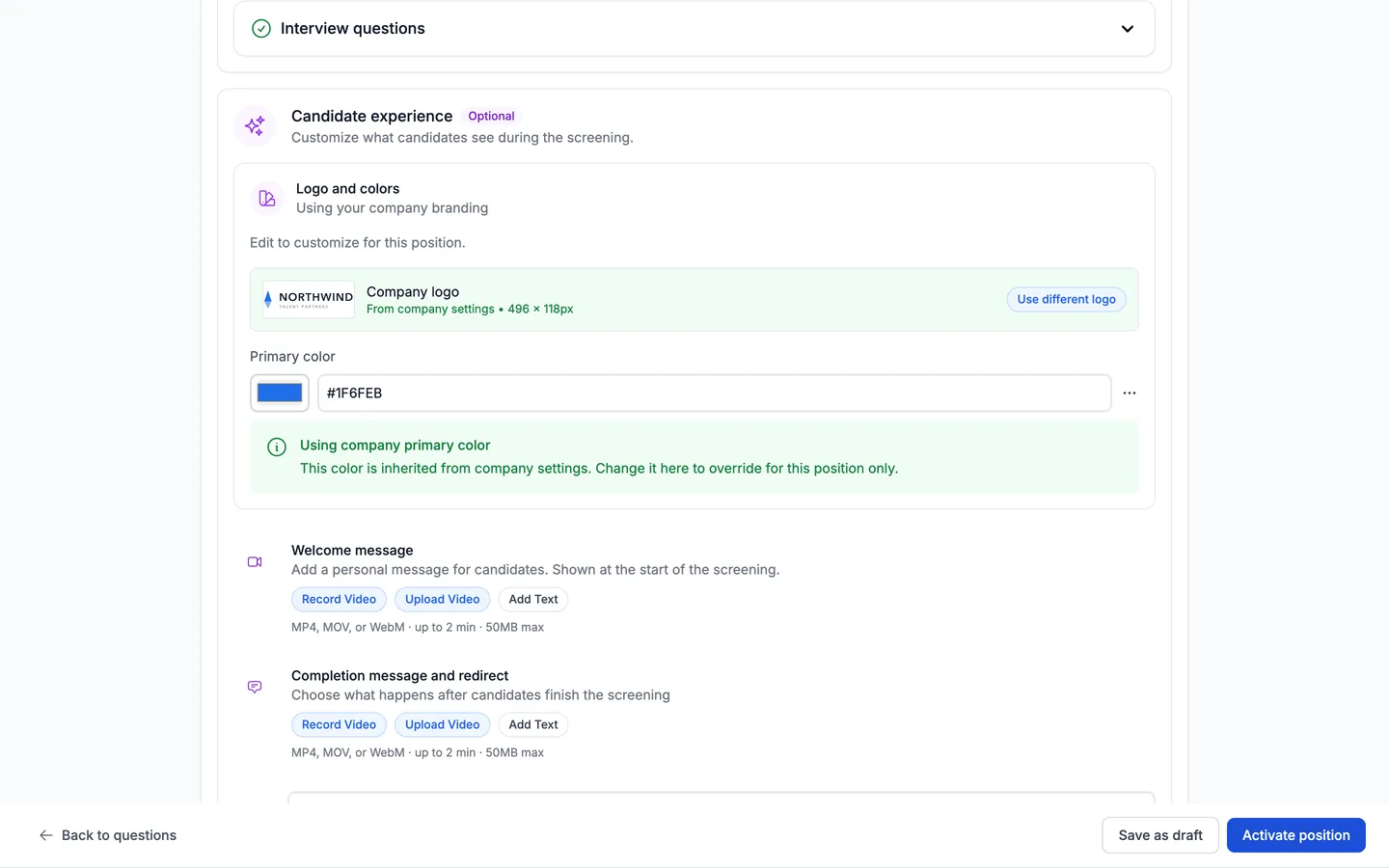
Under Candidate experience, the logo and primary color come from your company settings, and you can change either for this position only. Add a Welcome message shown at the start, and a Completion message and redirect for the end, each as a recorded video, an uploaded video, or text. When it looks right, choose Activate position, or Save as draft to finish later.
Note. Activating does not post the position anywhere. You decide who gets the link.
Questions
Do candidates need to install anything or book a time?
No. Candidates open a link and record their answers on their own device, on their own time. There is nothing to schedule and nothing to install. They complete the interview in one sitting.
How many credits does a video interview cost?
5 credits per completed interview. A credit is charged only when a candidate submits the interview, so a candidate who never starts or does not finish costs nothing. The 7-day free trial includes 30 credits, with no credit card.
Can I use a video interview without resume screening or assessments?
Yes. Every component on Build position stays switchable. Switch off Resume and Assessments and the position runs the interview on its own.
Does Truffle write the interview questions for me?
It drafts them from your job description, and the number it suggests depends on the role type. Each drafted question shows its type, its area, and why it was chosen. You keep, reorder, replace, or remove any of them, or write your own.
Can I change thinking time, answer time, or retakes?
Yes. They sit at the top of the Video interview section on Configure screening and apply to every question: Answer on (Video or Audio), Time to think (None to 5 minutes, or Unlimited), Time to answer (1 to 3 minutes), and Retakes (No retakes to 3 retakes). Build position shows a read-only summary with a link back to them.
Does Truffle decide who passes the interview?
No. AI scores the transcript of each answer against a rubric for the role and shows you the scores. A score never rejects anyone. The only automatic rejection in Truffle is a qualification check you set to Reject automatically. You review the candidates and make the call.
Can I edit the questions after the position is live?
Yes. Open the position, then Settings, then Edit position, and go to the Interview section. You can reorder, add, or remove questions there.
Related
See something here that doesn't match what you see in Truffle? Tell us and we'll fix the page.