Guide
Screen resumes with AI criteria
By the end you have a position that scores every resume against criteria you reviewed, and you know where to read each candidate's resume score and the evidence behind it.
8 min · 11 steps · Captured from the live product 5 Oct 2026 Changelog Copy as Markdown
Key moments and transcript
- 0:00 Define the role
- 0:20 Build the position
- 0:34 Configure screening
- 0:52 Review and activate, then what happens next
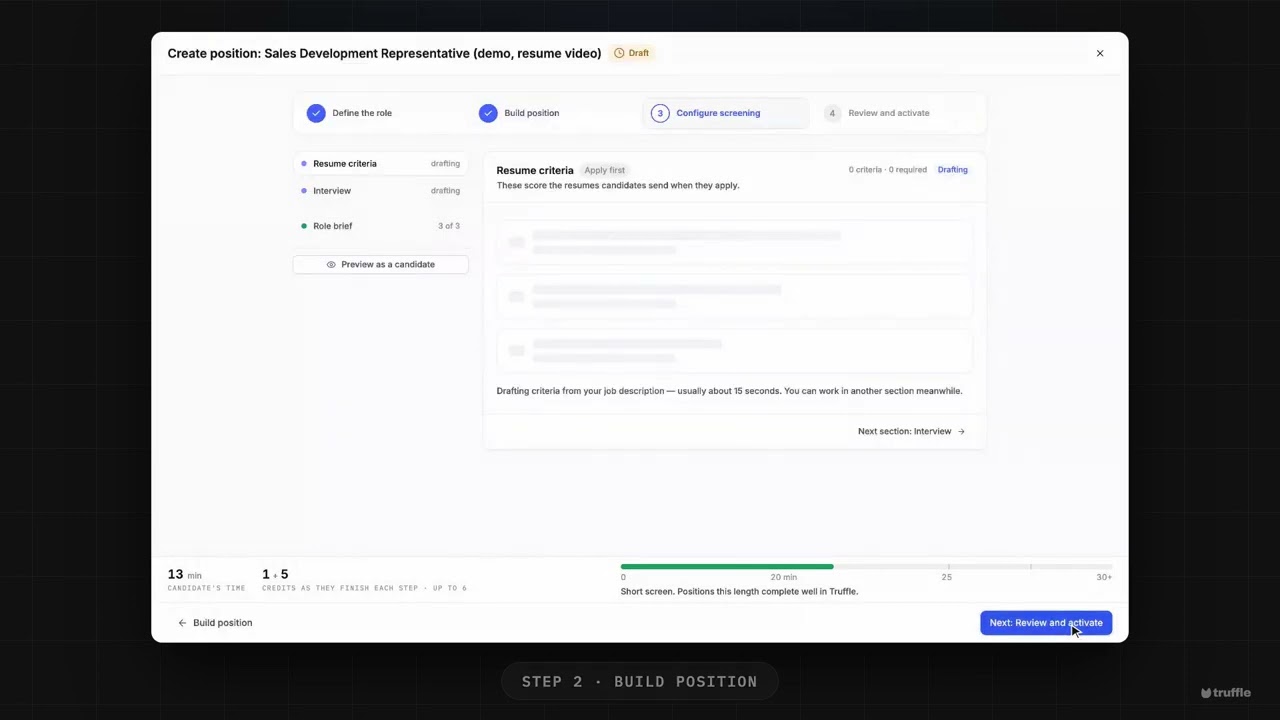
Here's resume screening against your own criteria, set up in a few minutes. Let's build one. Start a new position. Give it a title, and describe the role in plain language. Then answer the role brief: three quick questions, like who would struggle here, even if their resume looks great. On Build position, Resume arrives already on, marked Suggested. Then choose how the position runs. Apply first, and you pick who continues, or apply and finish in one sitting. On Configure screening, Truffle drafts your resume criteria from the description and the brief. They arrive suggested, not reviewed. If they're right, choose Looks right. Then mark what a resume must show as required, and edit anything that's off. Last, review your setup, and activate. Every resume comes back scored against your criteria, with the reasoning shown. You decide who moves on. Start free at hiretruffle.com.
Before you start
- A Truffle account. The 7-day free trial works: 30 credits, no credit card.
- A position description of at least 200 characters. Truffle drafts the resume criteria from it, and a position cannot go live on less.
1Define the role
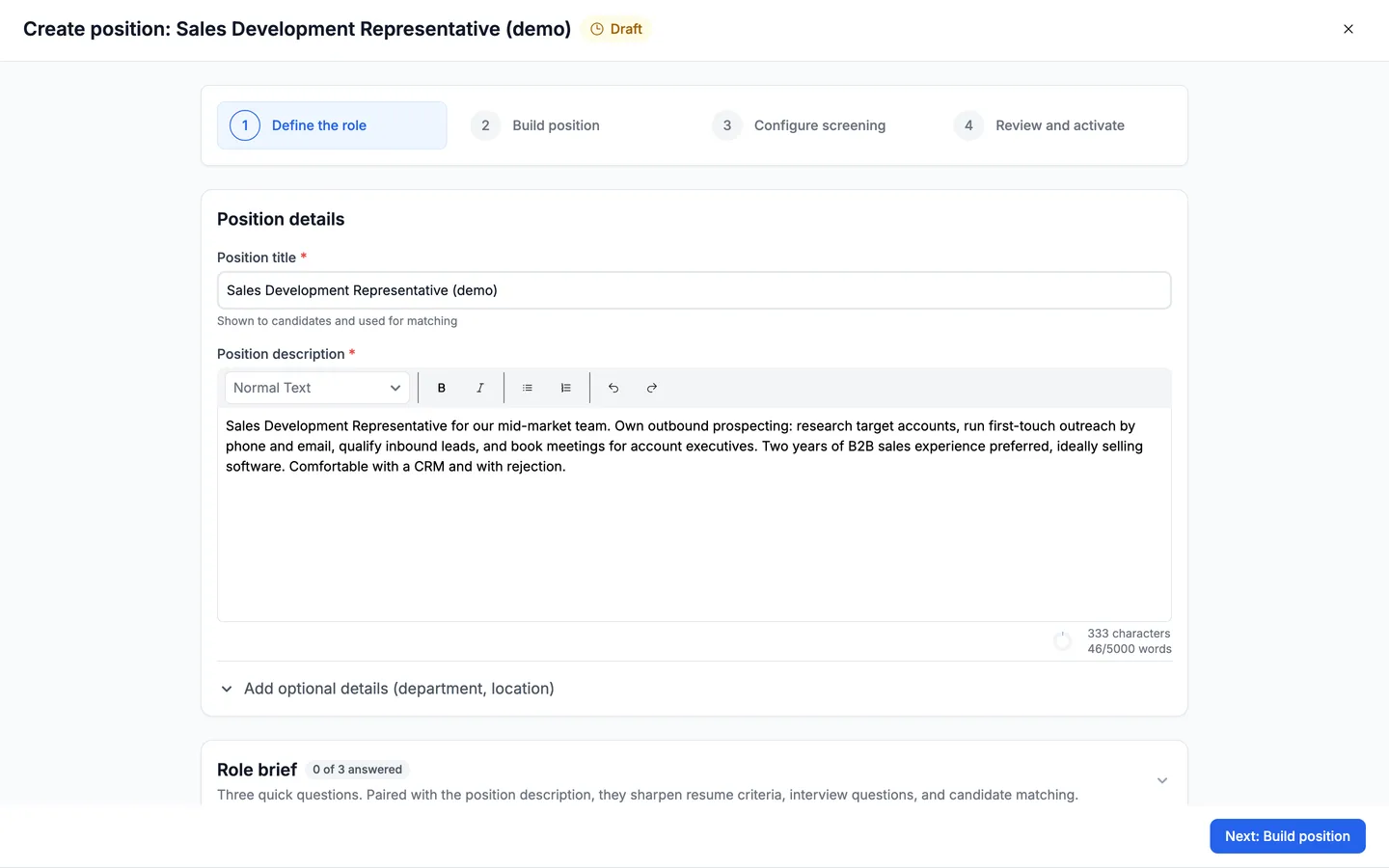
Start a new position. On Define the role, enter a Position title and a Position description. Name the experience that matters, where it was earned, and the tools the person will use. Truffle uses the description to suggest resume criteria and interview questions, and reads it back as Thin, Workable or Strong.
2Answer the role brief
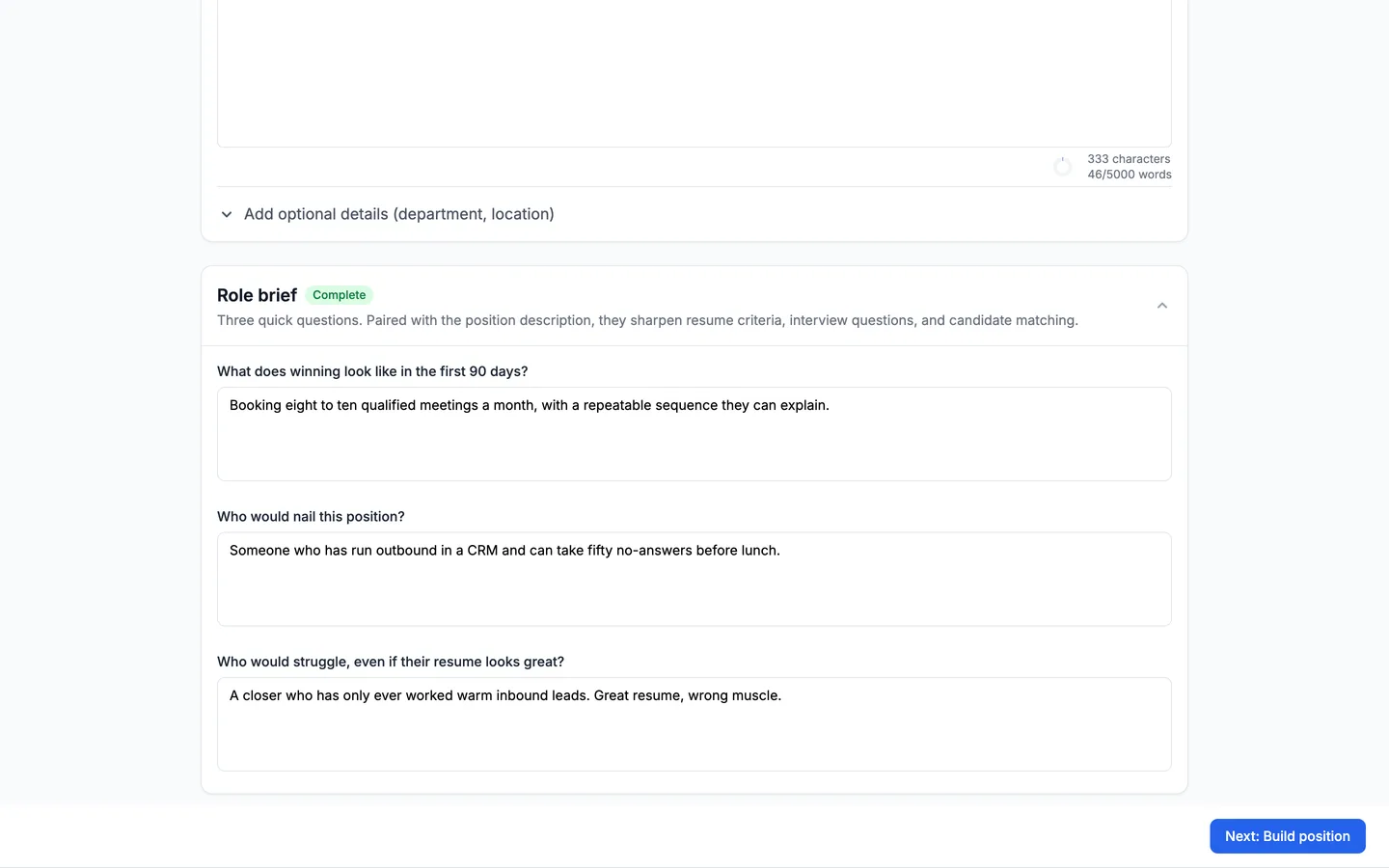
Below the description is the Role brief: three optional questions that sharpen resume criteria, interview questions, and candidate matching. They are What does winning look like in the first 90 days?, Who would nail this position?, and Who would struggle, even if their resume looks great? Answer them here, before Truffle drafts the criteria. The card shows Complete when all three are answered. Then choose Next: Build position.
Note. A sentence per question is enough. Even one answer sharpens the criteria. If you skip it, the Role brief waits in the Configure screening list marked needs you, and you can answer it there.
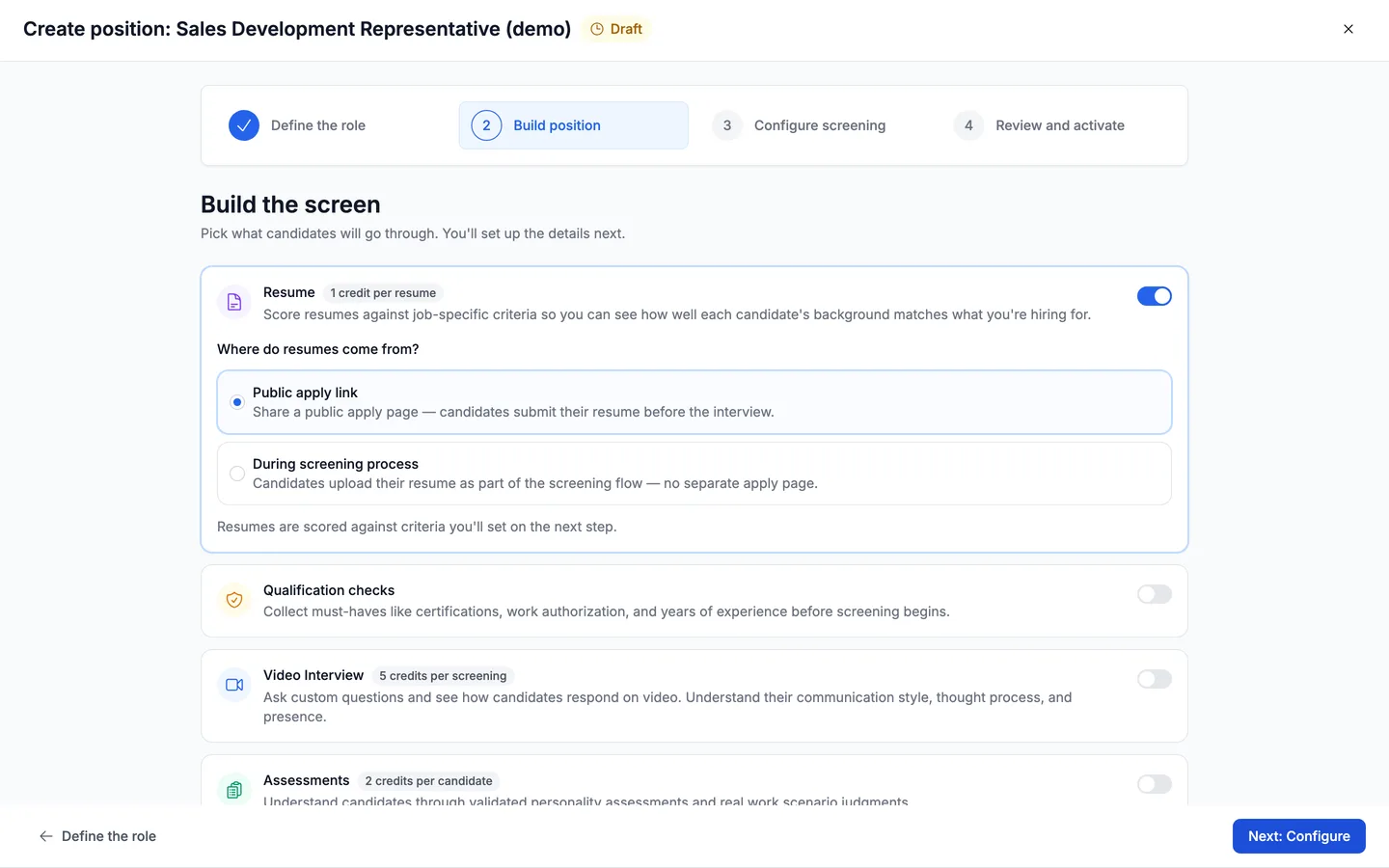
3Keep Resume switched on
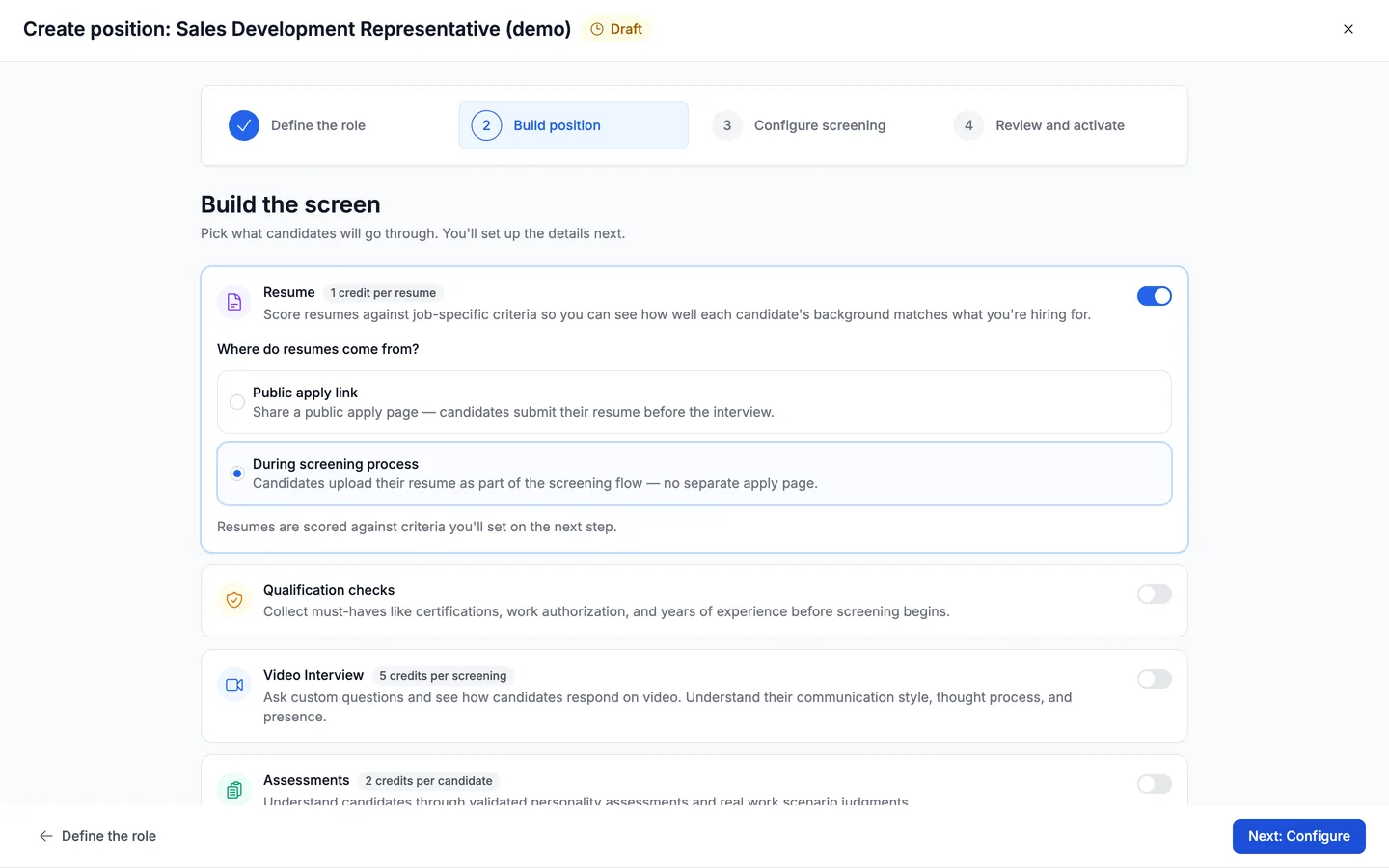
Build the screen arrives with Truffle's suggestions already switched on. Resume costs 1 credit per resume and carries a Suggested badge with a line on why it fits this role. Leave the switch on. Clicking it turns resume scoring off. Switch the other components on or off for this position. This guide keeps Video Interview on and switches Assessments off.
4Choose what candidates do
Under the components, How this position runs asks What do candidates do? Choose Apply first, you pick who continues: candidates send a resume, it is scored against your criteria and ranked, and they wait in your list until you invite them to the next step. Or choose Apply and finish in one sitting: candidates give their resume and record the video interview in the same session, and you review everything together. Each option shows its flow, and What this costs prices both. Credits are charged per step a candidate finishes. Then choose Next: Configure.
Note. Check which option is selected. In our capture the block read Truffle suggests apply first while the position was set to one sitting. With Resume as the only component, there is no question to answer: every resume lands in one list for you to review.
5Read the drafted criteria
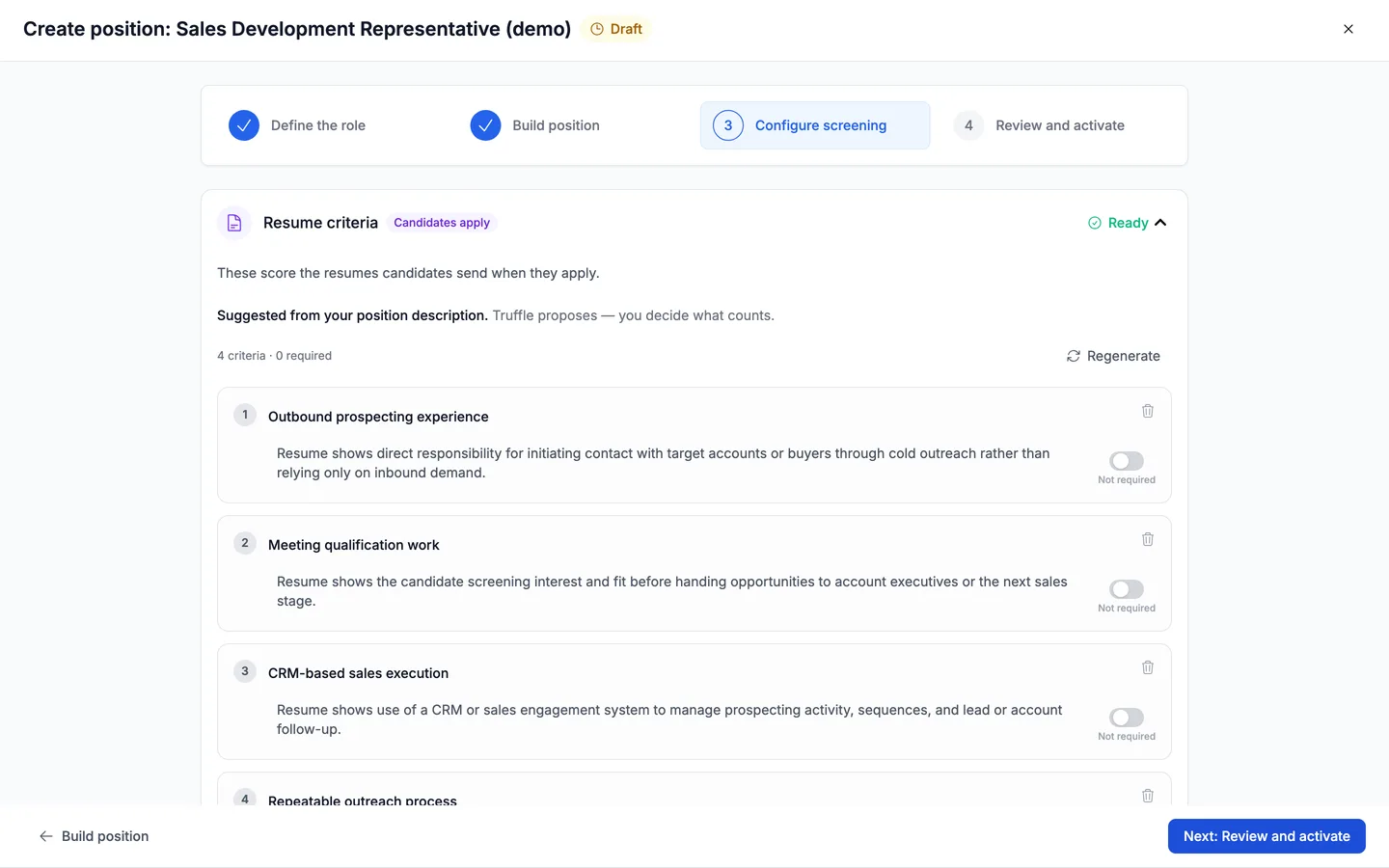
Configure screening lists your sections on the left, each with its state, and opens on Resume criteria, tagged with the option you chose. Truffle drafts the criteria in the background, usually in about 15 seconds. They land as Suggested, not reviewed, with a count such as 4 criteria · 0 required. These score the resumes candidates send. Each criterion has a label and a description of the evidence a resume should show. Click either to edit it, use the bin to remove a criterion, or choose Add criterion to write your own.
Note. Regenerate redraws the whole set. It asks first, because it replaces your current criteria, including your edits. See examples of strong criteria shows what specific looks like.
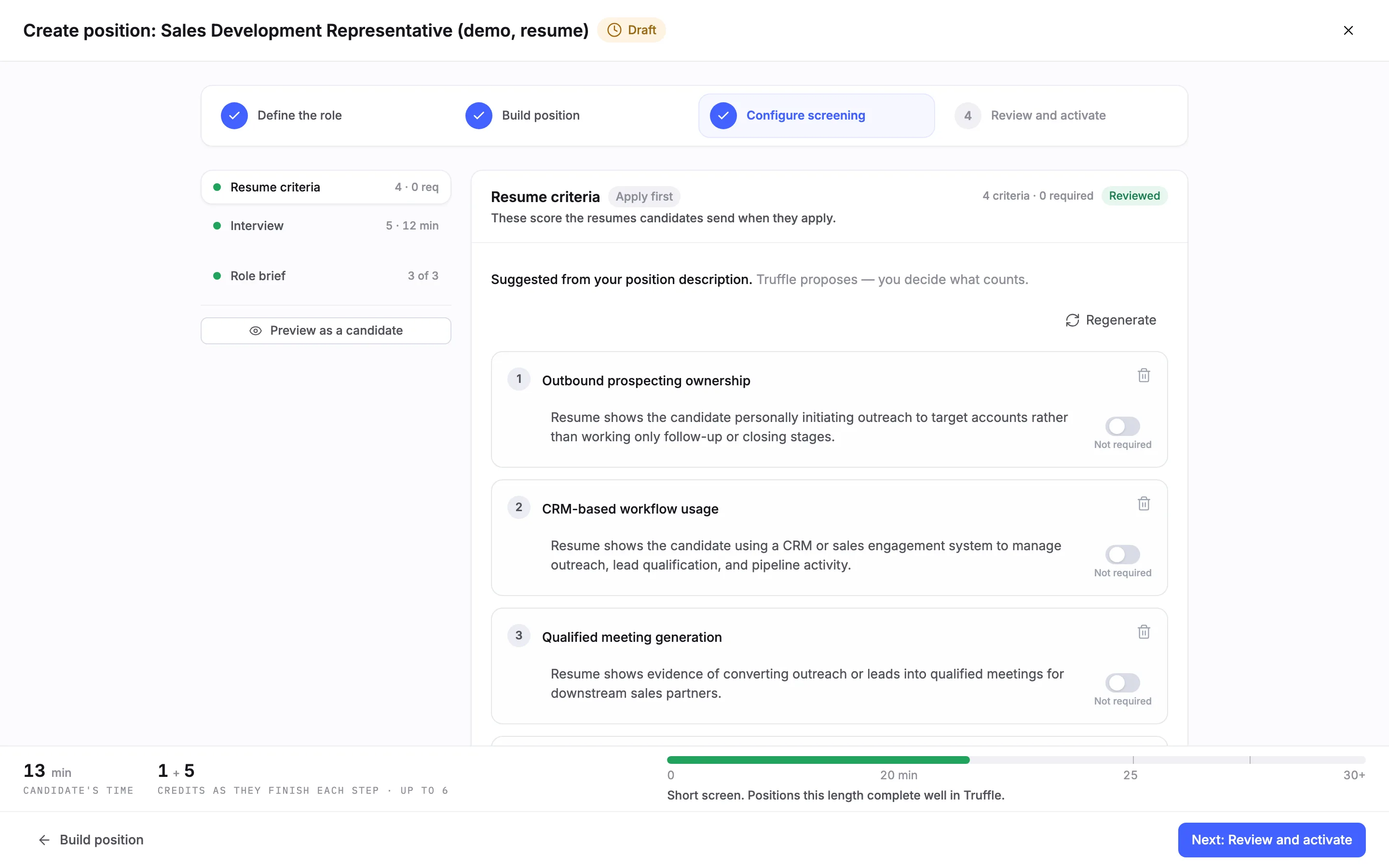
6Mark the criteria reviewed
When the set says what you would look for yourself, choose Looks right. The section changes to Reviewed and the list on the left shows the count. Editing a criterion also counts as reviewing it. A position with resume scoring on cannot go live while its drafted criteria are still unreviewed.
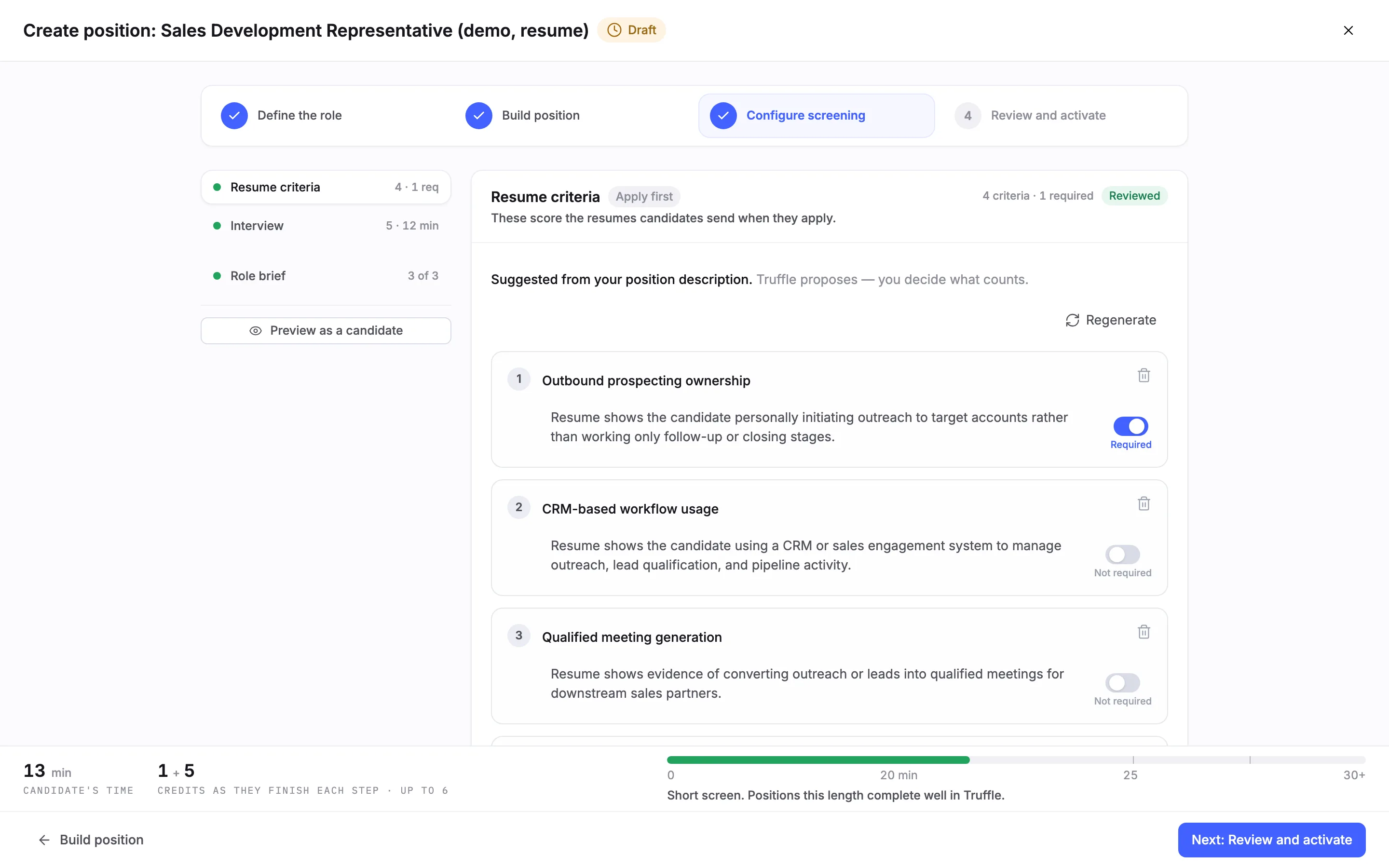
7Mark the must-haves as required
Every criterion starts as Not required. Switch one to Required when a resume should show it, and the count in the header updates, here to 4 criteria · 1 required. On a candidate's resume results, each criterion is labelled Required or Nice to have.
Note. A required criterion does not reject anyone. The only automatic rejection in Truffle is a qualification check set to Reject automatically.
8Review and activate
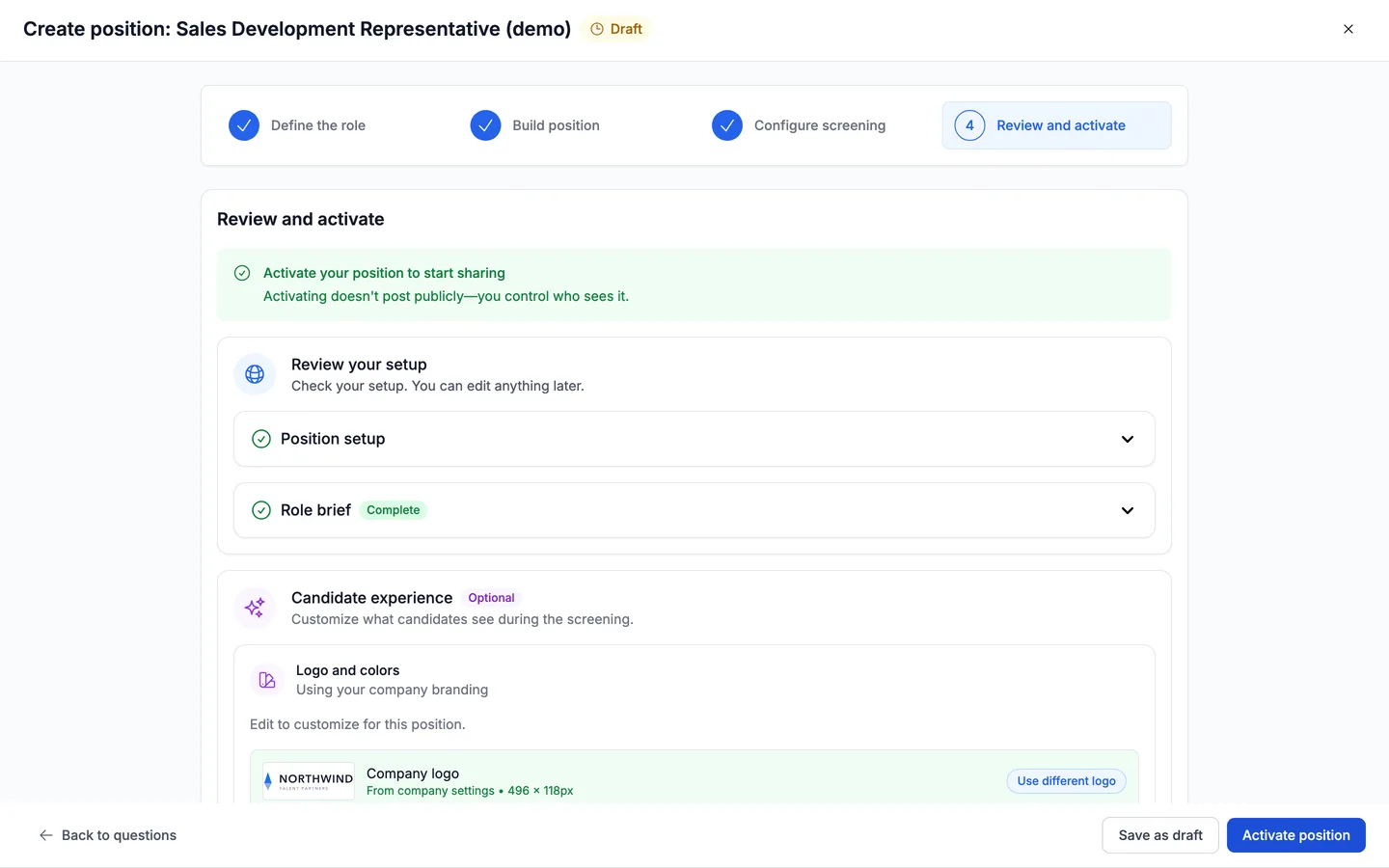
Choose Next: Review and activate. Review your setup lists Position setup, Role brief and the other parts of the screen. When nothing blocks go-live, choose Activate position, or Save as draft to finish later.
Note. If the criteria are still unreviewed, Review says Truffle's suggested resume criteria haven't been reviewed and Activate position stays off. Review resume criteria takes you back to the section.
9Find scored resumes on the Resume tab
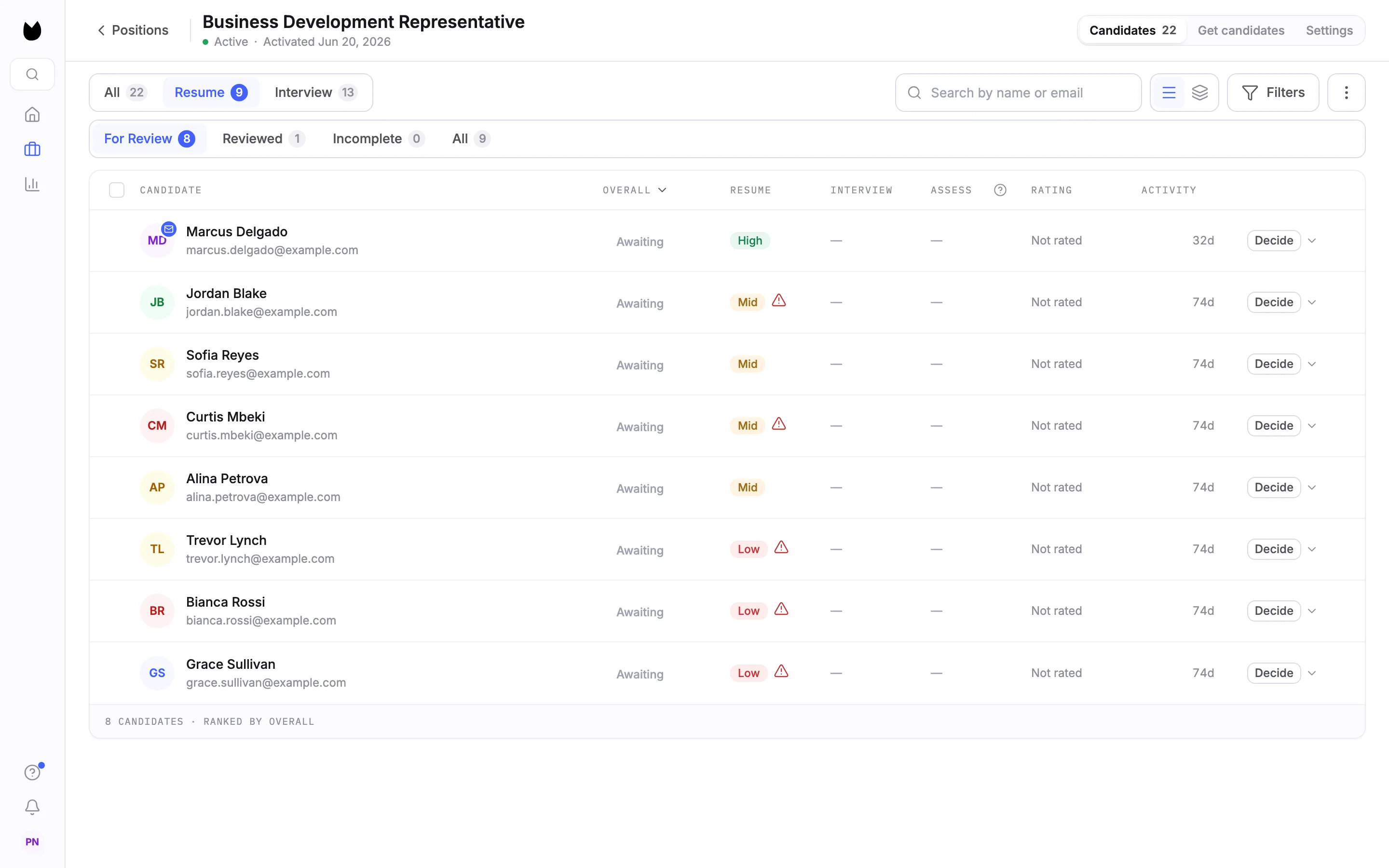
Once candidates apply, open the position's candidate list and choose the Resume tab. Each candidate shows a resume signal of High, Mid or Low, the list is ranked by Overall, and Decide is on every row. The scores sort the list. You decide who continues.
10Open a candidate's resume results
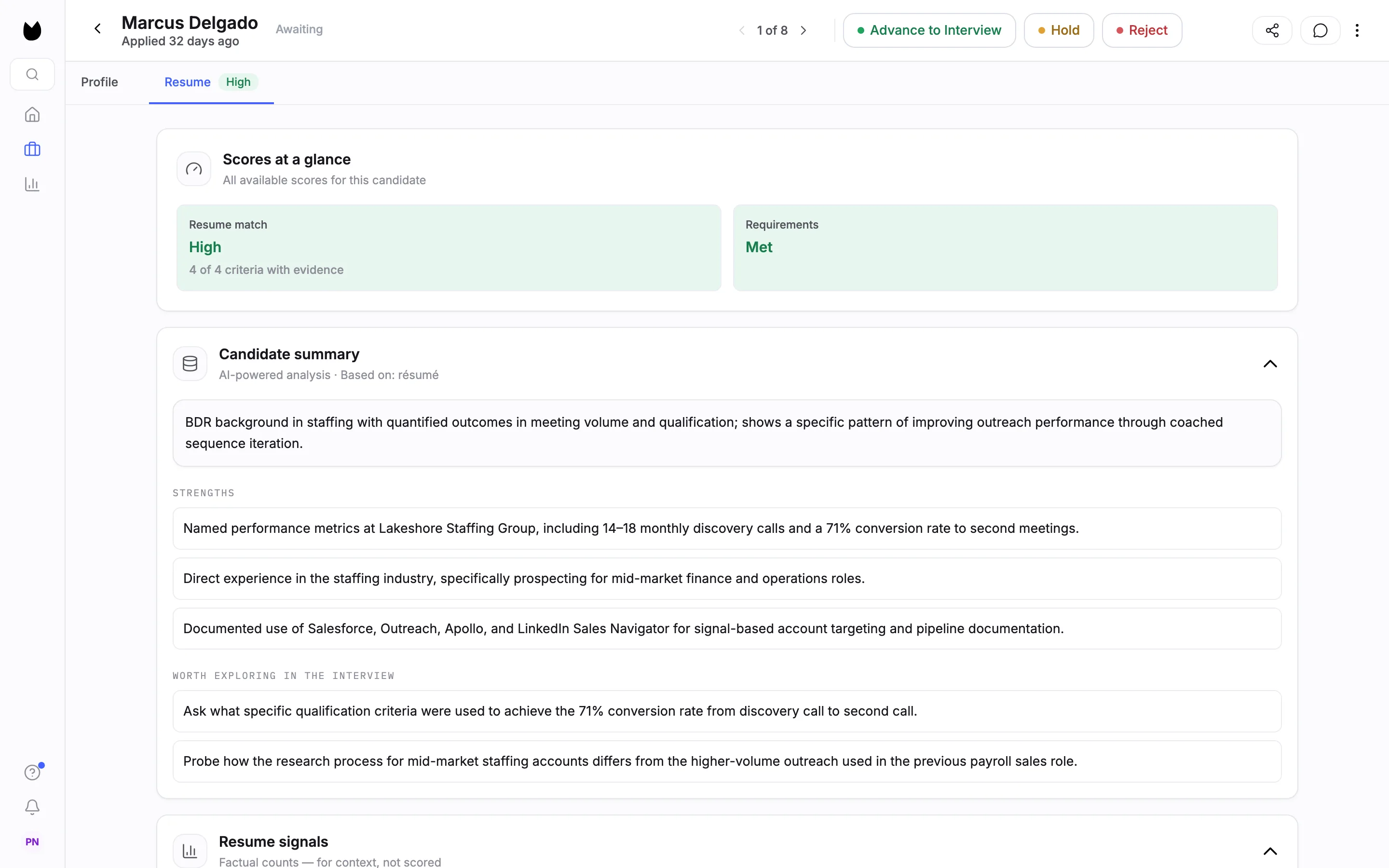
Open a candidate to see their Resume tab. Scores at a glance shows the Resume match and how many criteria have evidence, such as 4 of 4. Below it are a Candidate summary with strengths and points worth exploring in the interview, and Resume signals, factual counts such as average tenure that are shown for context and not scored. Advance to Interview, Hold and Reject sit at the top.
11Check the evidence per criterion
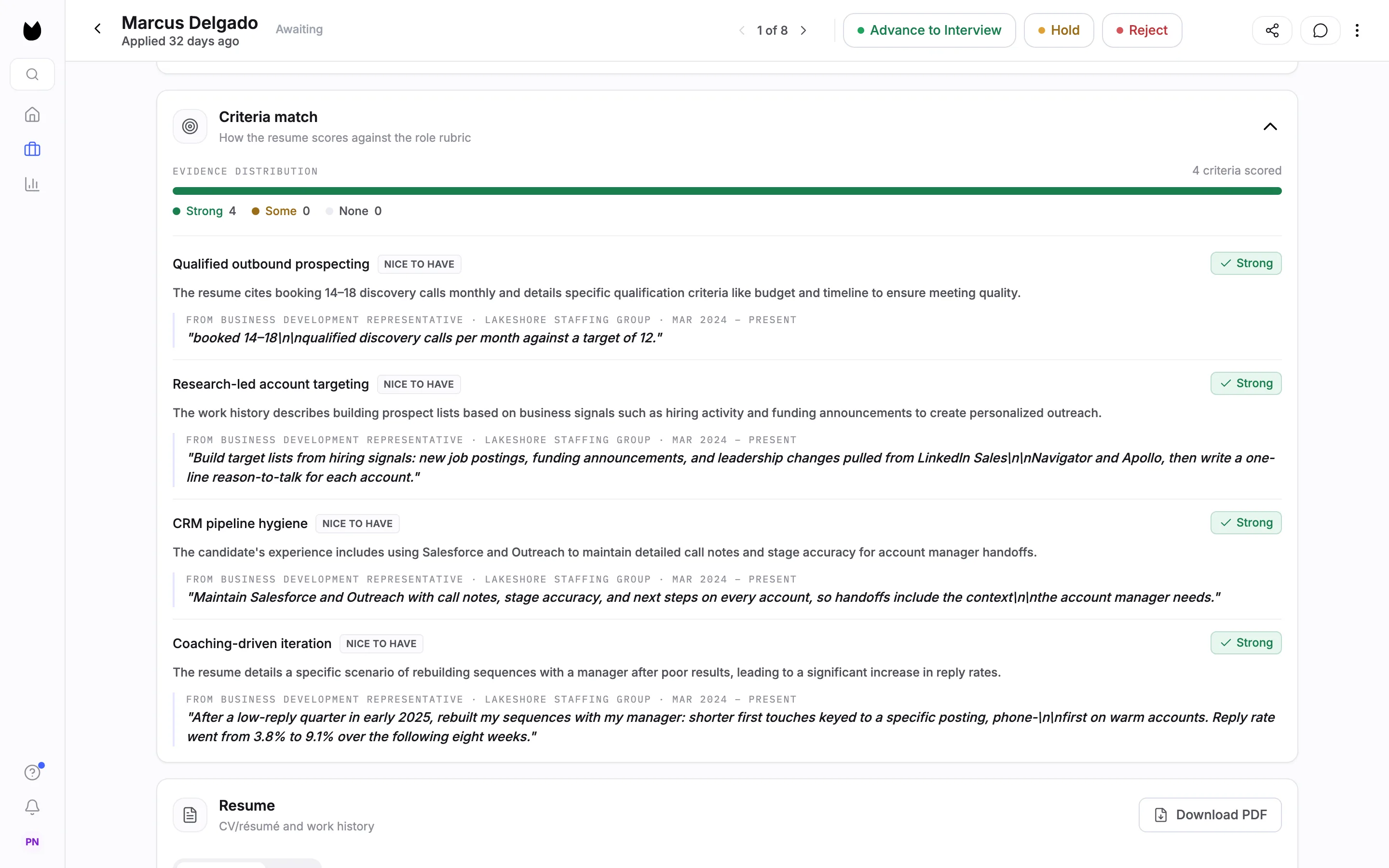
Further down, Criteria match shows how the resume scores against each of your criteria. Each criterion is rated Strong, Some or None, labelled Required or Nice to have, and explained in a sentence, with the line from the resume it rests on and the role that line comes from. Read the evidence before you agree with the rating.
Questions
Does Truffle reject candidates based on their resume?
No. Each resume is scored against your criteria and the evidence is shown next to the score. A score never rejects anyone, and neither does a criterion marked Required. The only automatic rejection in Truffle is a qualification check set to Reject automatically. You decide who continues.
Where do the criteria come from?
Truffle drafts them on Configure screening from your position description and your role brief answers. They arrive as Suggested, not reviewed. You can edit, remove or add criteria, or regenerate the whole set, and the position cannot go live until you choose Looks right or edit them.
Can I screen resumes without an interview or assessments?
Yes. On Build position, keep Resume on and switch Video Interview and Assessments off. How this position runs then has nothing to ask: every resume lands in one list for you to review.
What is the difference between Apply first and one sitting?
With Apply first, candidates send a resume, it is scored and ranked, and they wait in your list until you invite them to the next step. With Apply and finish in one sitting, candidates give their resume and complete the next step in the same session, and you review everything together. Resumes are scored either way.
How many credits does resume screening use?
1 credit per resume scored. Credits are charged per step a candidate finishes, so someone who never starts costs nothing. The 7-day free trial includes 30 credits, with no credit card.
What makes a good criterion?
One a reader could check from a resume: named tools, time spans, scope. A criterion like "strong communicator" is hard to score consistently. Truffle shows examples under See examples of strong criteria.
Related
See something here that doesn't match what you see in Truffle? Tell us and we'll fix the page.