Guide
Import Indeed applications
By the end your position has its own import address, Indeed sends every application to it, and you know where imported candidates land and what Truffle read from each email.
6 min · 12 steps · Captured from the live product 5 Oct 2026 Changelog Copy as Markdown
Key moments and transcript
- 0:00 Open Get candidates
- 0:12 Turn on auto-import, then copy the import address
- 0:25 Set it up in Indeed
- 0:36 What each application brings in, then import activity
- 0:55 What happens next
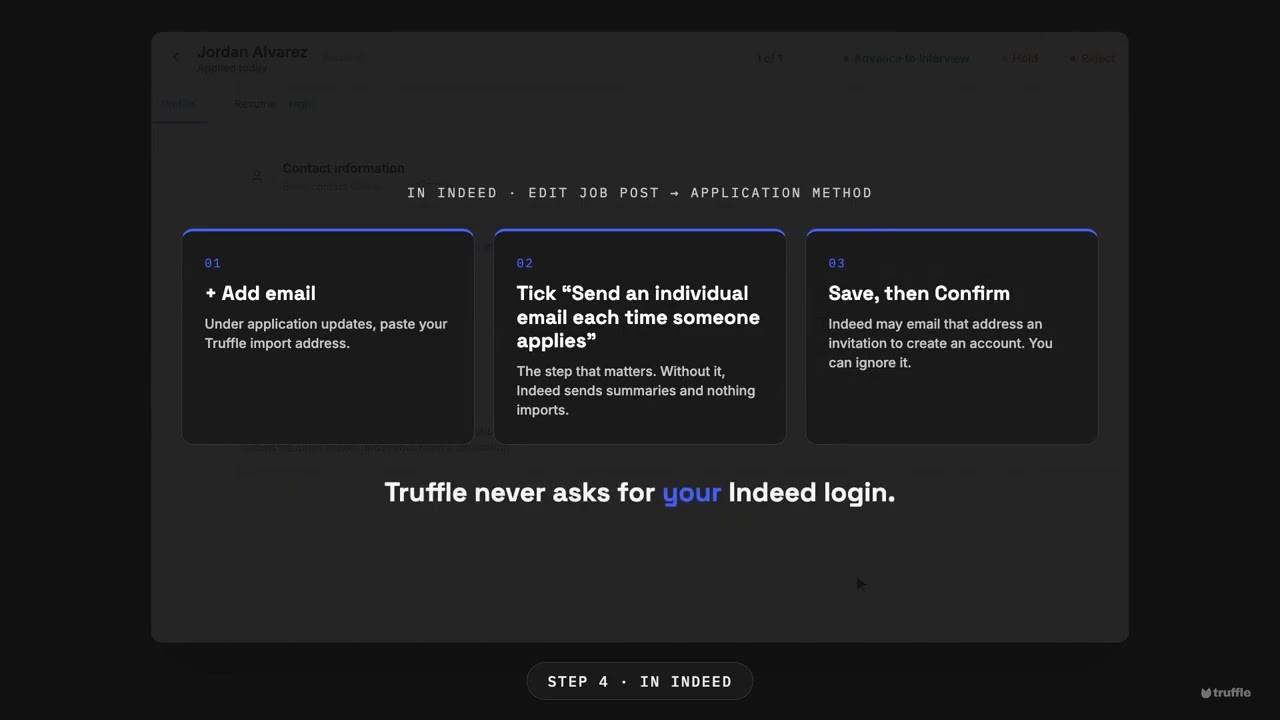
Here's how to bring your Indeed applicants into Truffle, automatically. Nothing to install, and no Indeed login. Open the position, and choose Get candidates. On auto-import applicants, choose set up. Confirm once that you're allowed to process these applications, and turn it on. The position now has its own import address. Copy it. Then, in Indeed, add that address to the job's application method, and tick send an individual email each time someone applies. Without it, nothing imports. From then on, each application email is read for the candidate's name, contact address, and attached resume. Import activity lists what arrives. Anything that couldn't be imported shows there too, with the reason. Every imported resume is scored against your criteria, with the reasons shown. You decide who moves forward. Start free at hiretruffle.com.
Before you start
- A Truffle account. The 7-day free trial works: 30 credits, no credit card.
- An active Truffle position. With Resume turned on, each imported resume is scored against your criteria.
- An Indeed employer account where you can edit the job post. Truffle never asks for your Indeed login.
1Open Auto-import applicants
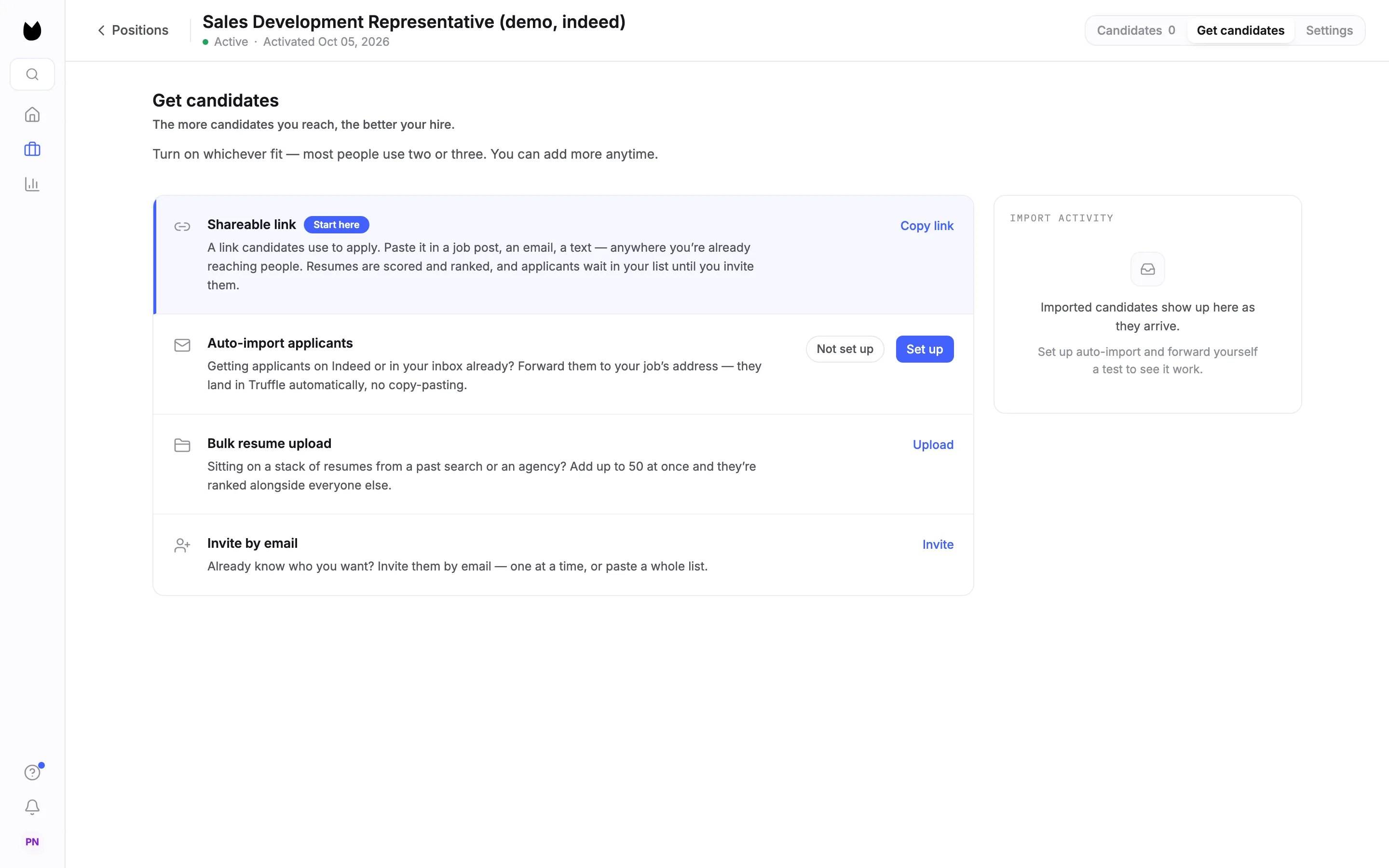
Open the position and choose Get candidates in the tabs at the top right. Find the Auto-import applicants row. Until you turn it on, it shows Not set up and a Set up button. Choose Set up.
2Confirm once for this position
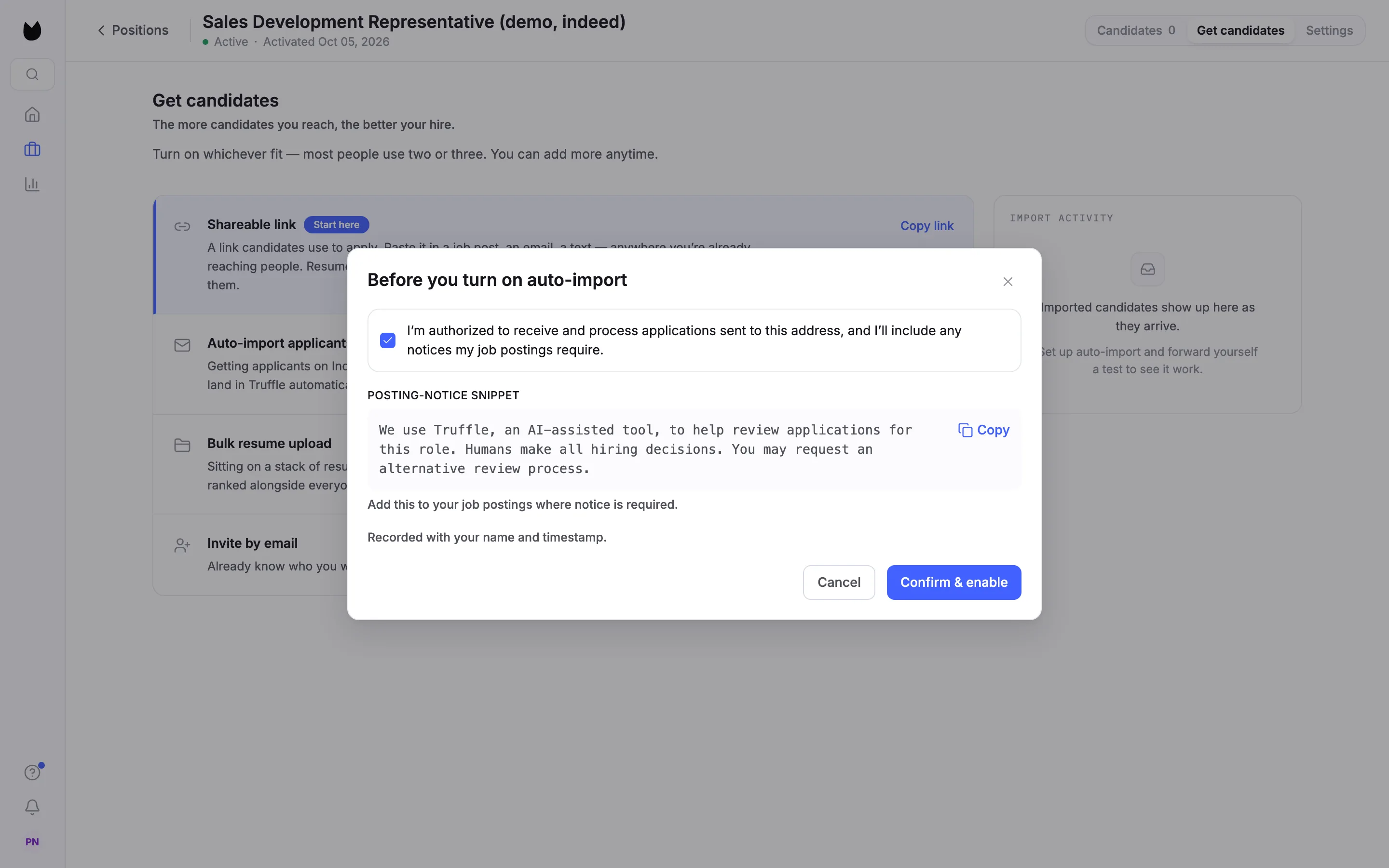
Before you turn on auto-import asks you to confirm that you are allowed to receive and process the applications sent to this address, and that you will add any notices your job postings require. Tick the box. The Posting-notice snippet below it is a short notice you can paste into your Indeed job post, with a Copy button. Choose Confirm & enable.
Note. You confirm once per position, and Truffle records it with your name and the time. View details on the row shows what you confirmed.
3Copy the import address
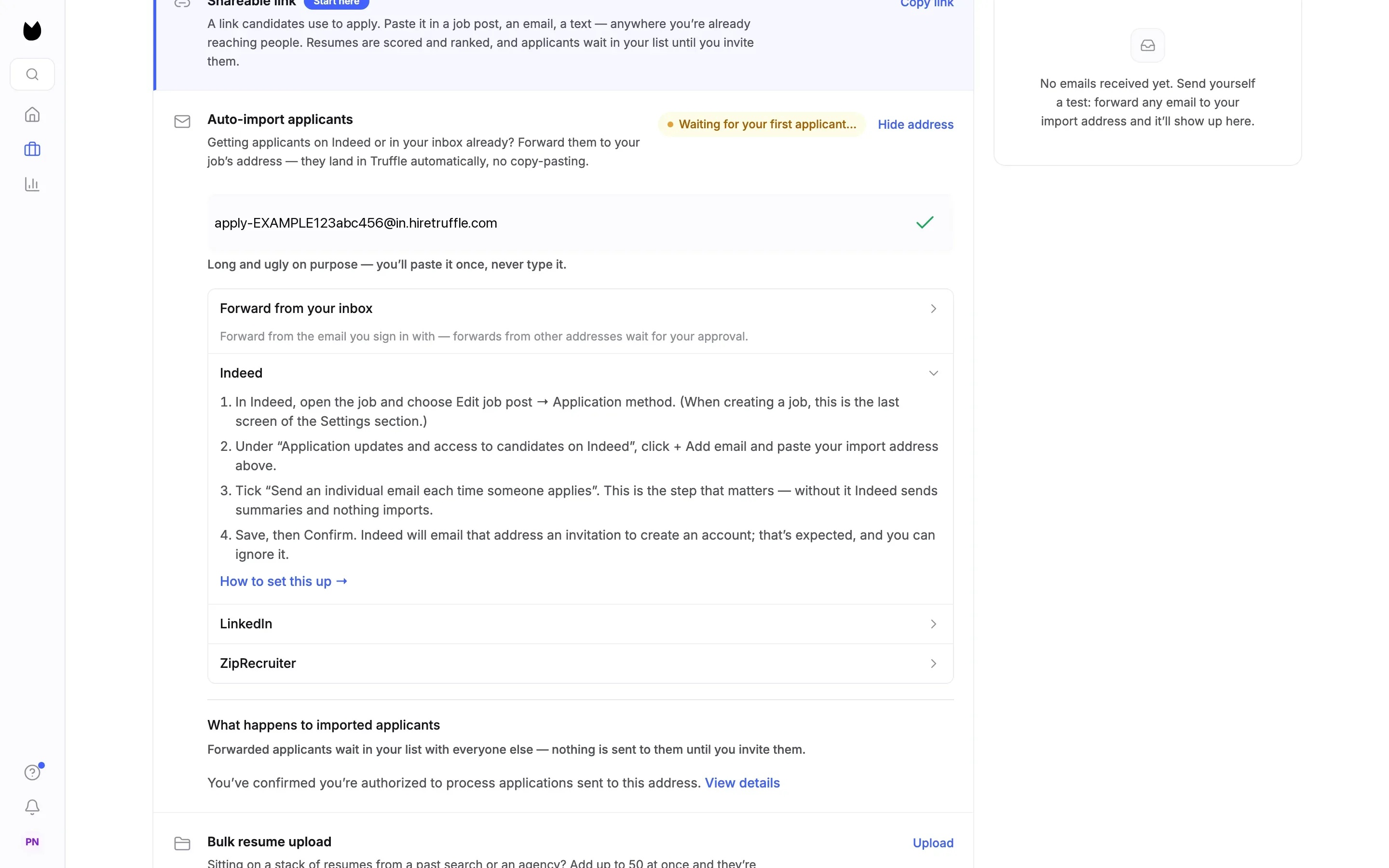
The row now shows the position's own import address, such as apply-…@in.hiretruffle.com. Every position has a different one. Choose the copy button at the right of the address. It turns into a check mark once the address is on your clipboard. Until the first email arrives, the row reads Waiting for your first applicant….
Note. Hide address folds the address away. The address is long on purpose. You paste it into Indeed once and never type it.
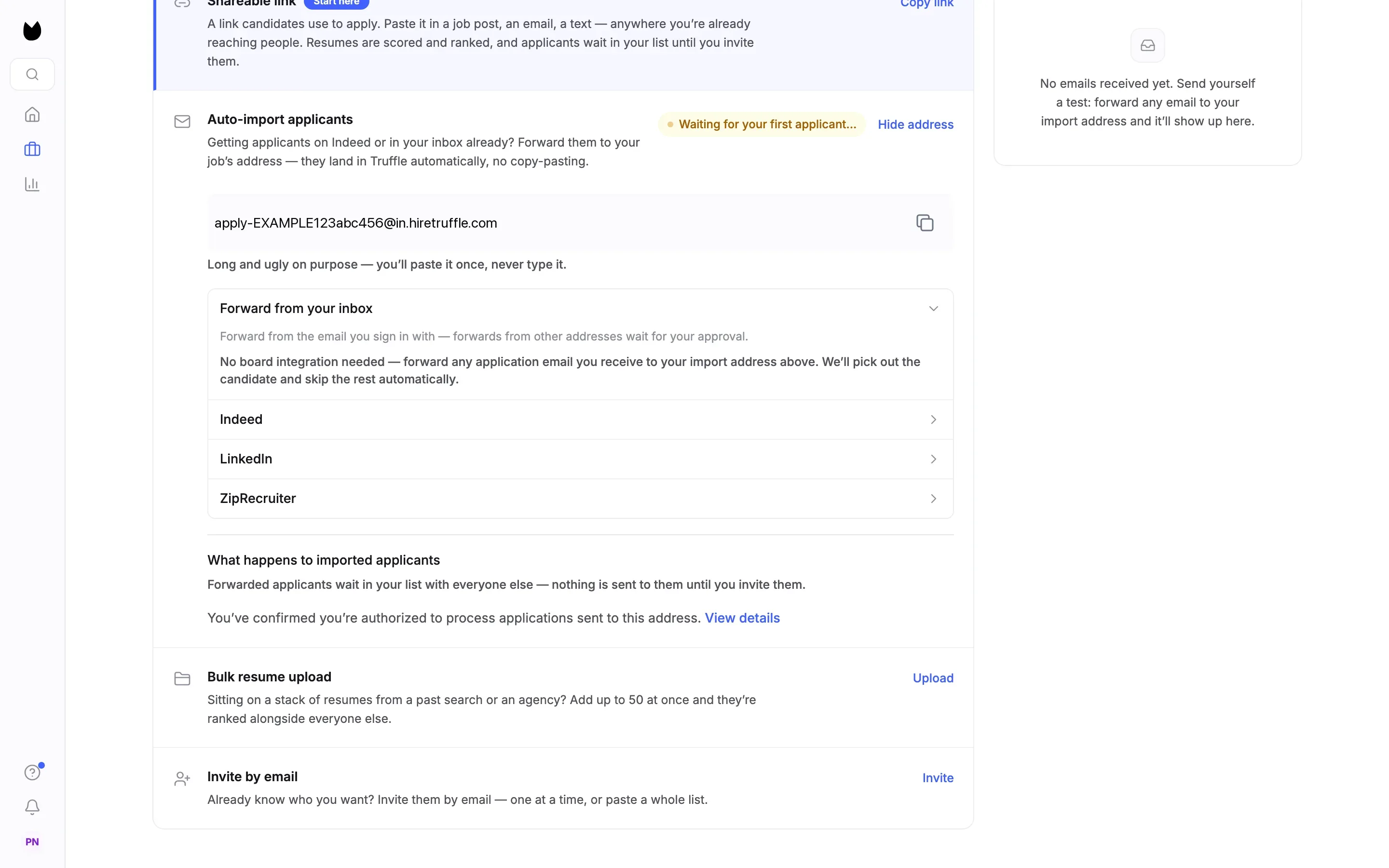
4Check what happens to imported candidates
Under the address are setup guides for Forward from your inbox, Indeed, LinkedIn and ZipRecruiter. Below them, What happens to imported applicants says what this position does with them. On a position where candidates apply first, as here, imported candidates wait in your list with everyone else, and nothing is sent to them until you invite them.
Note. On a position that runs in one sitting, or one with no resume step, imported candidates are invited to their interview automatically, unless the only address Truffle has is Indeed's relay address (at indeedemail.com). Truffle never emails that address, so the profile asks you to message them in Indeed or add their own email. If the resume carries an email, Truffle uses that one.
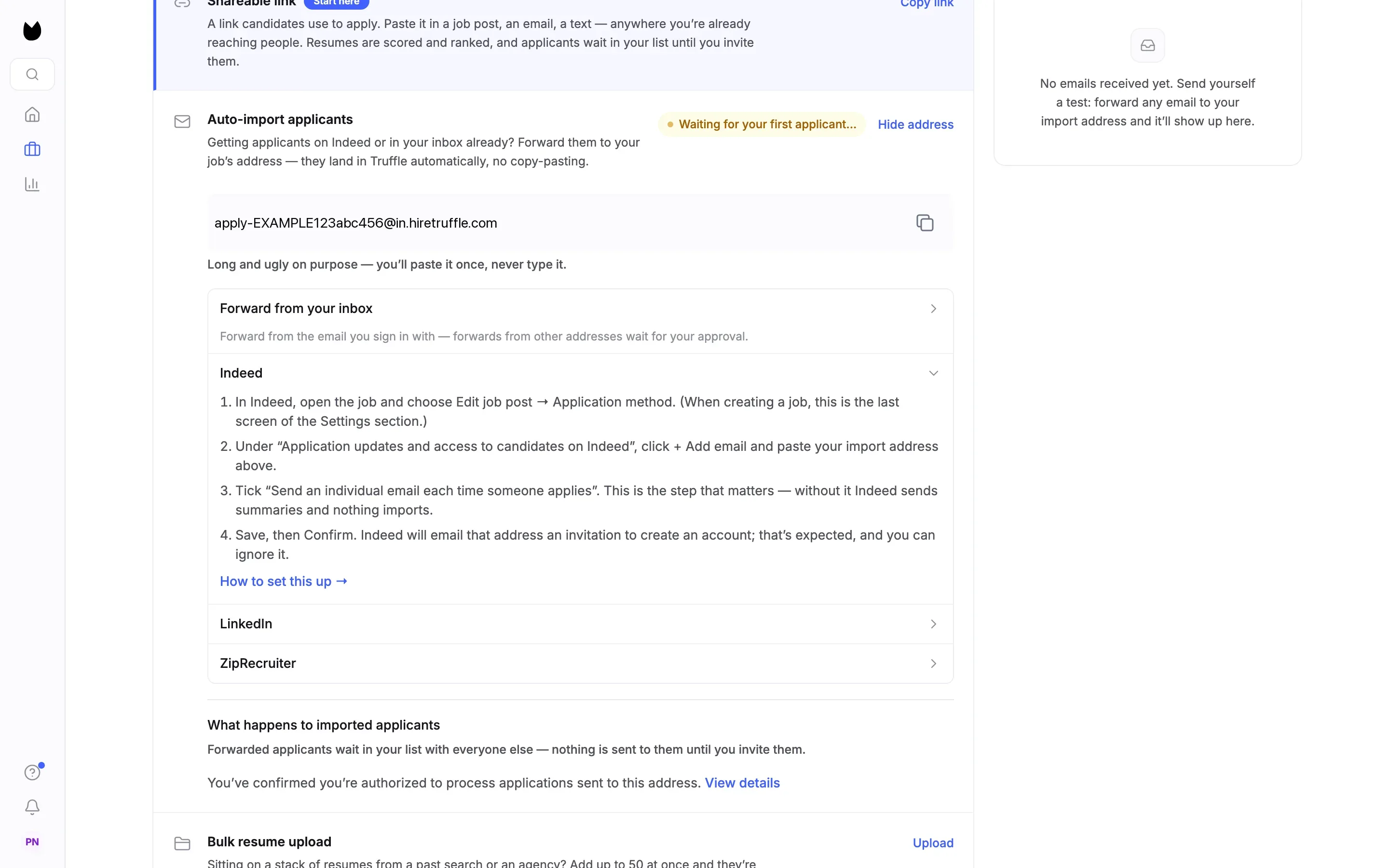
5Open the Indeed steps
Choose Indeed to see the four steps Truffle gives for it, and How to set this up → for a longer walkthrough. The next three steps of this guide happen in Indeed, not in Truffle.
6In Indeed: add your import address
Sign in to Indeed, open the job and choose Edit job post, then Application method. When you create a new job, this is the last screen of the Settings section. Under Application updates and access to candidates on Indeed, choose + Add email and paste your Truffle import address.
7In Indeed: send an individual email for each application
On the same screen, tick Send an individual email each time someone applies. This is the step that matters. Without it, Indeed sends summaries instead of one email per application, and nothing imports. Save the job, then choose Confirm.
Note. Indeed then emails your import address an invitation to create an Indeed account. That is expected. It has no effect on whether applications reach Truffle, and you can ignore it.
8In Indeed: make sure the resume comes too
Indeed only attaches a resume when the candidate gave one. In the job's application settings, choose the option that requires a resume. In the application update email settings, turn on the option to attach it. Truffle scores the attached resume, so an email without one brings in less.
9Watch the first application arrive
When Indeed emails an application, Truffle reads the candidate's name, contact address and attached resume (PDF or DOCX) out of the message and adds them to the position. Back on Get candidates, the row reads ✓ Receiving · 1 imported, with 1 applied · 0 completed. IMPORT ACTIVITY on the right lists each email as Imported, with the candidate's name.
Note. Indeed does not pass on a candidate's own email address. It uses a relay address per candidate, and Truffle accepts that relay as the candidate's address.
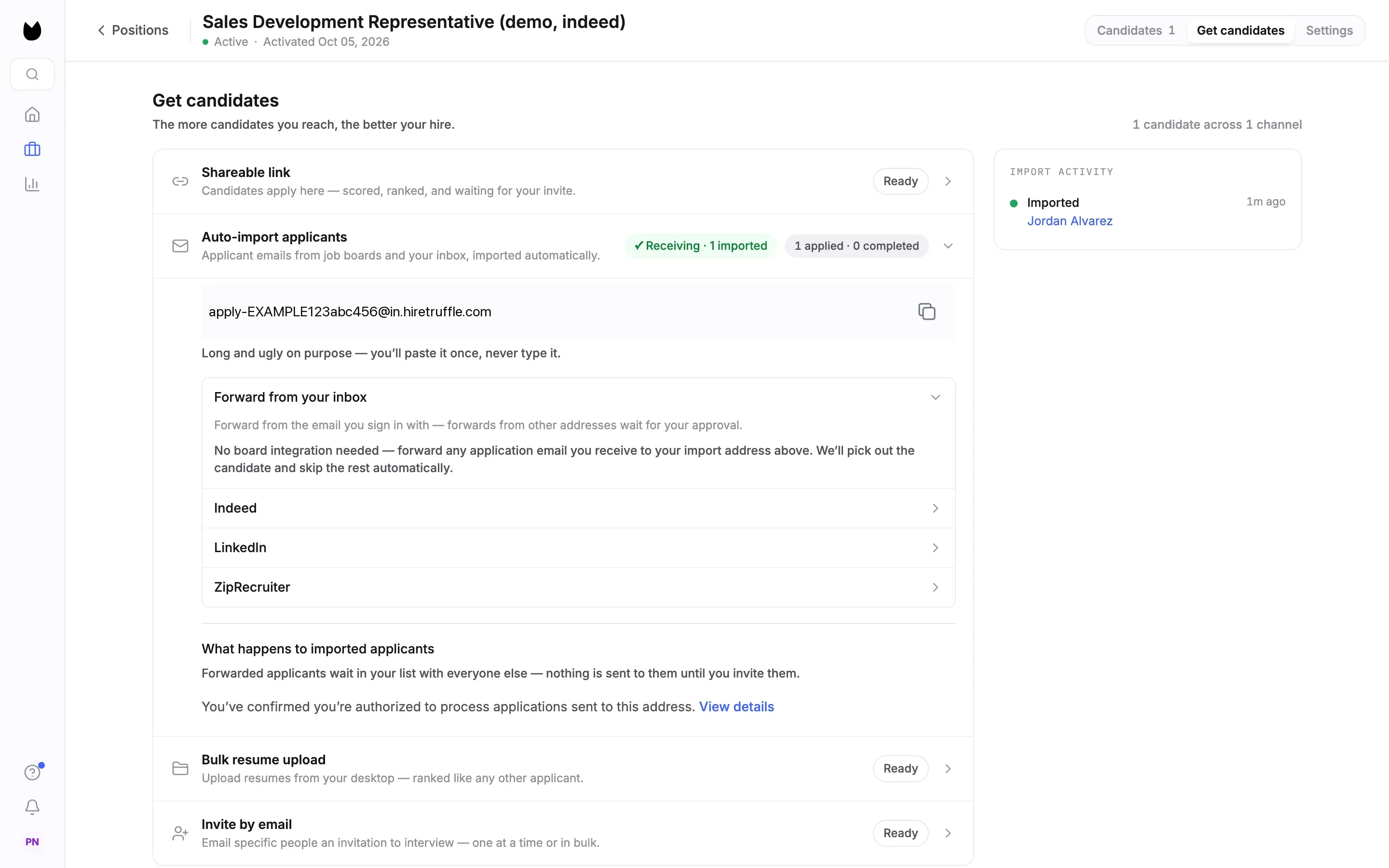
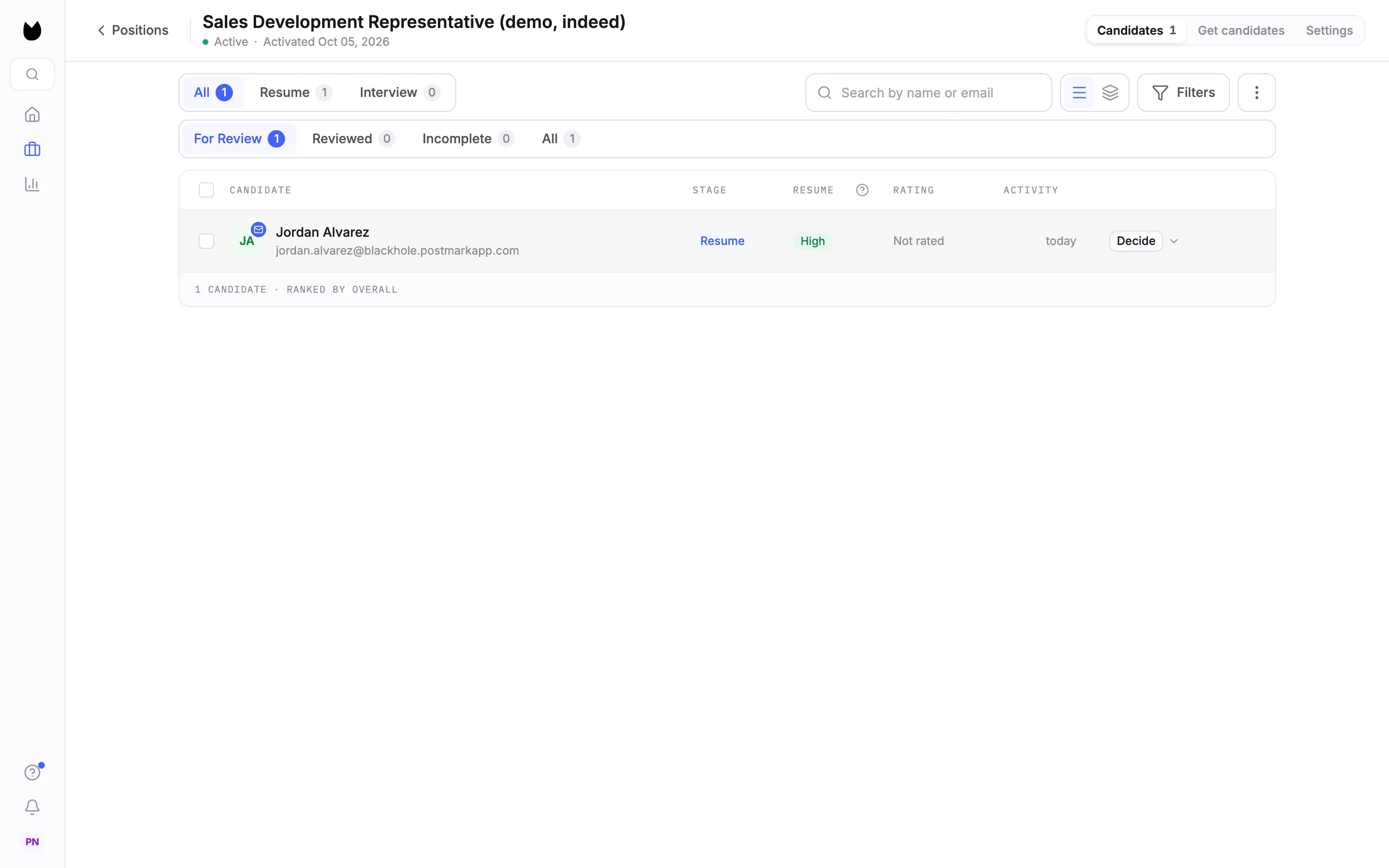
10Find imported candidates in your list
Choose Candidates. An imported candidate lands in For Review like anyone who applied through your Position Link, here at the Resume stage with their resume score. The envelope on their avatar marks them as Imported from email.
11Review the resume score
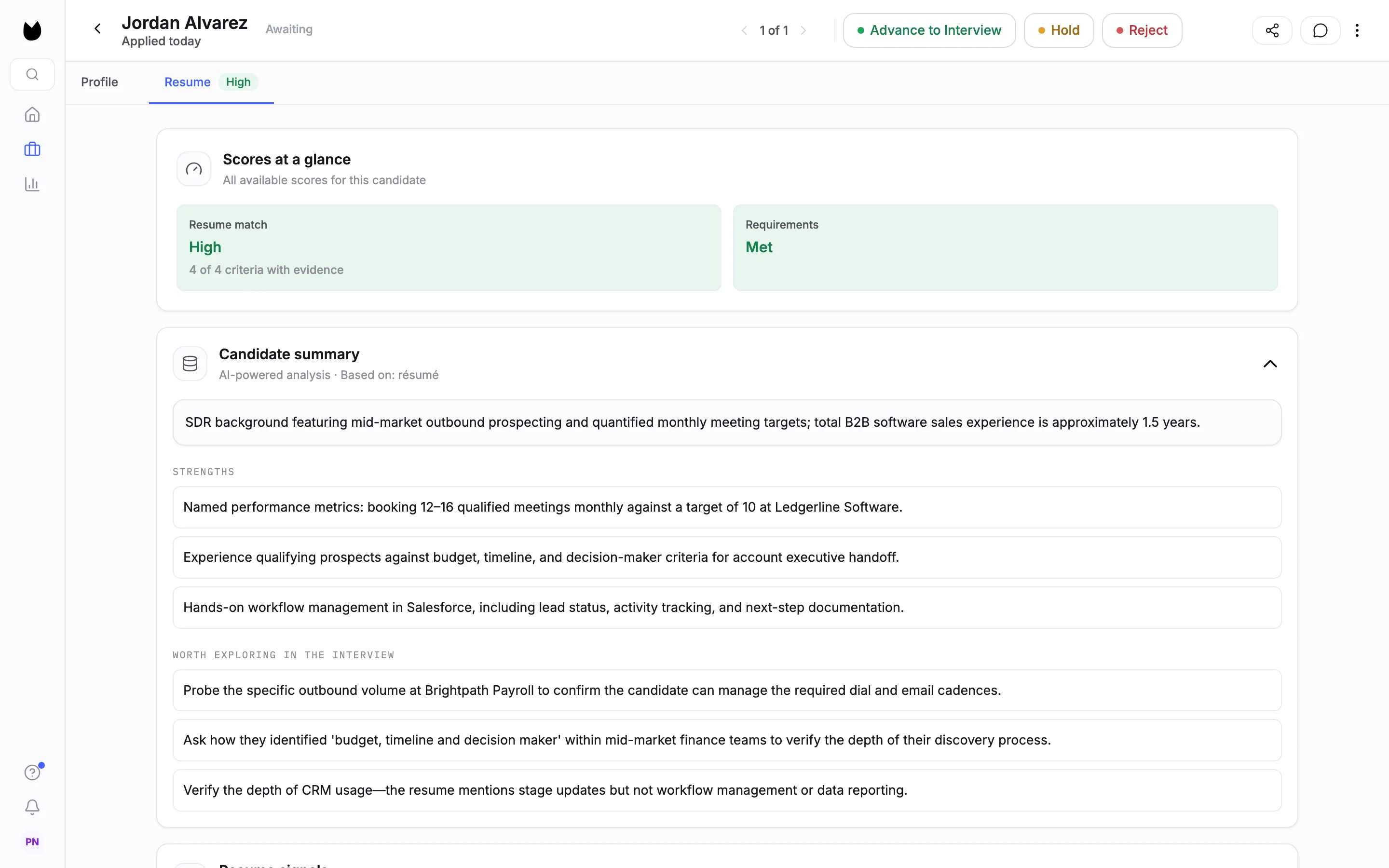
Open the candidate. The Resume tab shows Resume match against your criteria, here High with 4 of 4 criteria with evidence, and a Candidate summary. Nothing is advanced or rejected for you. You decide with Advance to Interview, Hold or Reject.
12See where the candidate came from
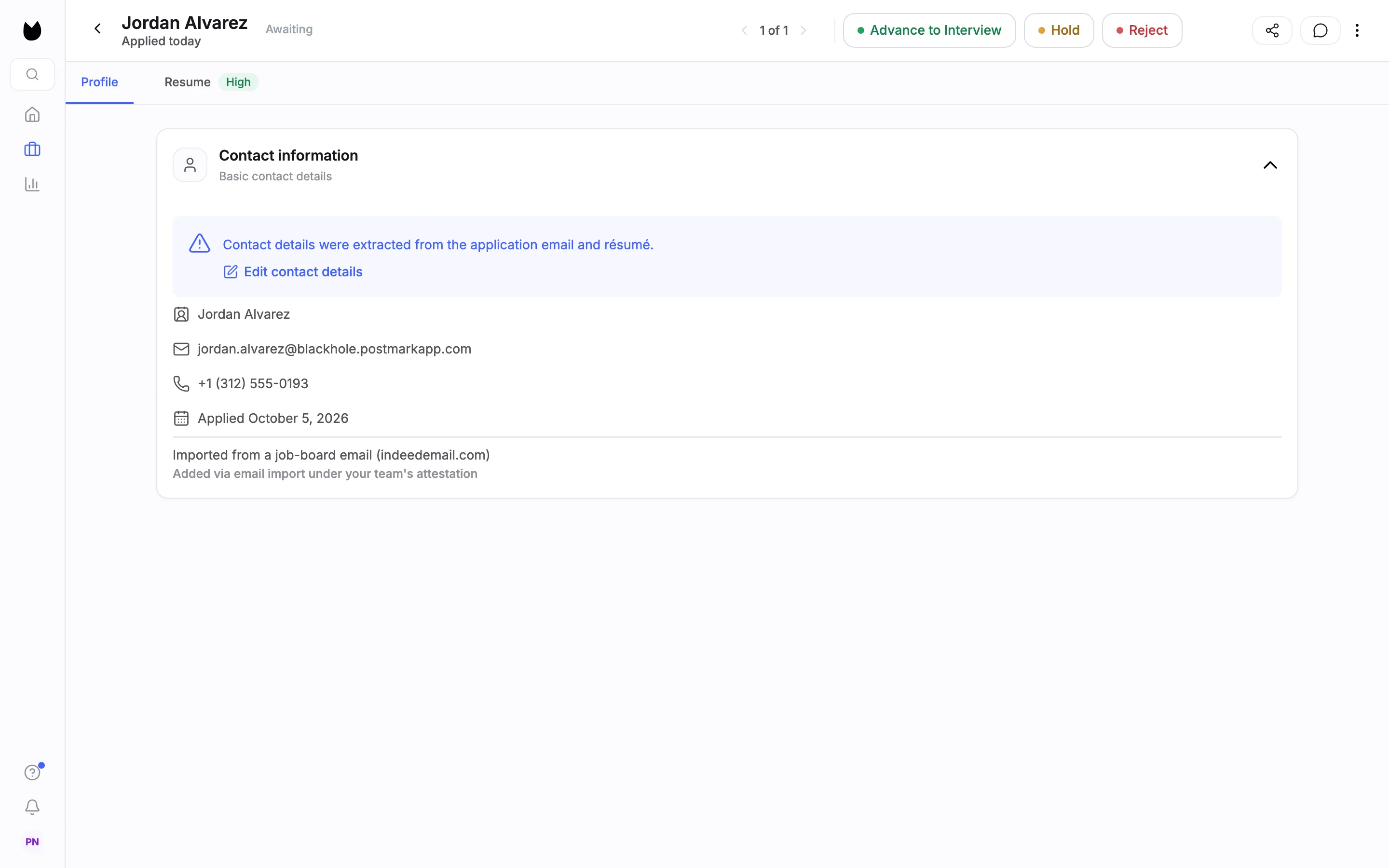
Choose Profile. Contact information notes that Contact details were extracted from the application email and résumé., with Edit contact details to correct them. Below the contact details, the profile reads Imported from a job-board email (indeedemail.com) and Added via email import under your team's attestation.
Questions
Do I need to give Truffle my Indeed login?
No. Truffle never asks for your Indeed login and never signs in to Indeed for you. You give Indeed your position's import address, and Indeed emails each application to it.
Nothing is importing. What is usually wrong?
Almost always, Send an individual email each time someone applies is unticked in Indeed. Adding the address only tells Indeed who to notify. That setting is what sends each application. If a position has had nothing import for a few days, Truffle flags it.
What does Truffle read from each email?
The candidate's name, a contact address and the attached resume, as a PDF or DOCX. Indeed gives a relay address instead of the candidate's own email, and Truffle accepts that relay as the candidate's address.
Does this work with Indeed Apply and Easy Apply?
Yes, as long as Indeed sends an individual email for each application. The import reads the email Indeed sends, not the way the candidate applied.
What does an imported candidate cost?
Importing is free. Scoring a resume costs 1 credit, the same as for any candidate whose resume is scored.
Can the same address take applications from other places?
Yes. Notifications from LinkedIn and ZipRecruiter are accepted directly, and so are forwards from the email address a teammate signs in with. Email from any other sender waits for a manager or owner to choose Import once, Always allow or Ignore, and expires after 14 days if no one acts.
What if an email cannot be imported?
It appears on the Auto-import applicants row with the reason and what to do about it, instead of disappearing, and your account gets an email when imports start failing.
Related
See something here that doesn't match what you see in Truffle? Tell us and we'll fix the page.