This page collects the numbers you may need while setting up and running Truffle. “Default” is what a new position or account starts with. “Limit” is the most, or the least, the product allows. Where a cell reads n/a, the setting has no default or no stated limit. For what each term means, see the Glossary.
Positions and setup
Item
Default
Limit
Note
Positions per account
n/a
Unlimited
On every plan.
Position description
n/a
At least 200 characters to go live
Truffle reads it back as Thin, Workable or Strong.
Wizard steps
4
n/a
Define the role, Build position, Configure screening, Review and activate.
Role brief
Empty
3 questions, all optional
Even one answer sharpens what Truffle drafts.
Drafting criteria, checks, scenarios or Environment fit questions
n/a
n/a
Usually about 15 seconds, in the background.
Building your position on Review
n/a
n/a
Usually about 20 seconds while scoring criteria are set for each question.
Budget bar
n/a
Turns amber past 20 minutes of candidate time
It never blocks Next.
Time to get a role live
n/a
n/a
About 10 minutes.
Duplicating a position
n/a
n/a
Under 2 minutes.
Position deadline
None
n/a
Optional. When it passes, the position switches to Expired. Extend it before it passes; reopening clears it.
Closing a position
n/a
n/a
The link and careers page stop accepting candidates the same day.
Interview response settings
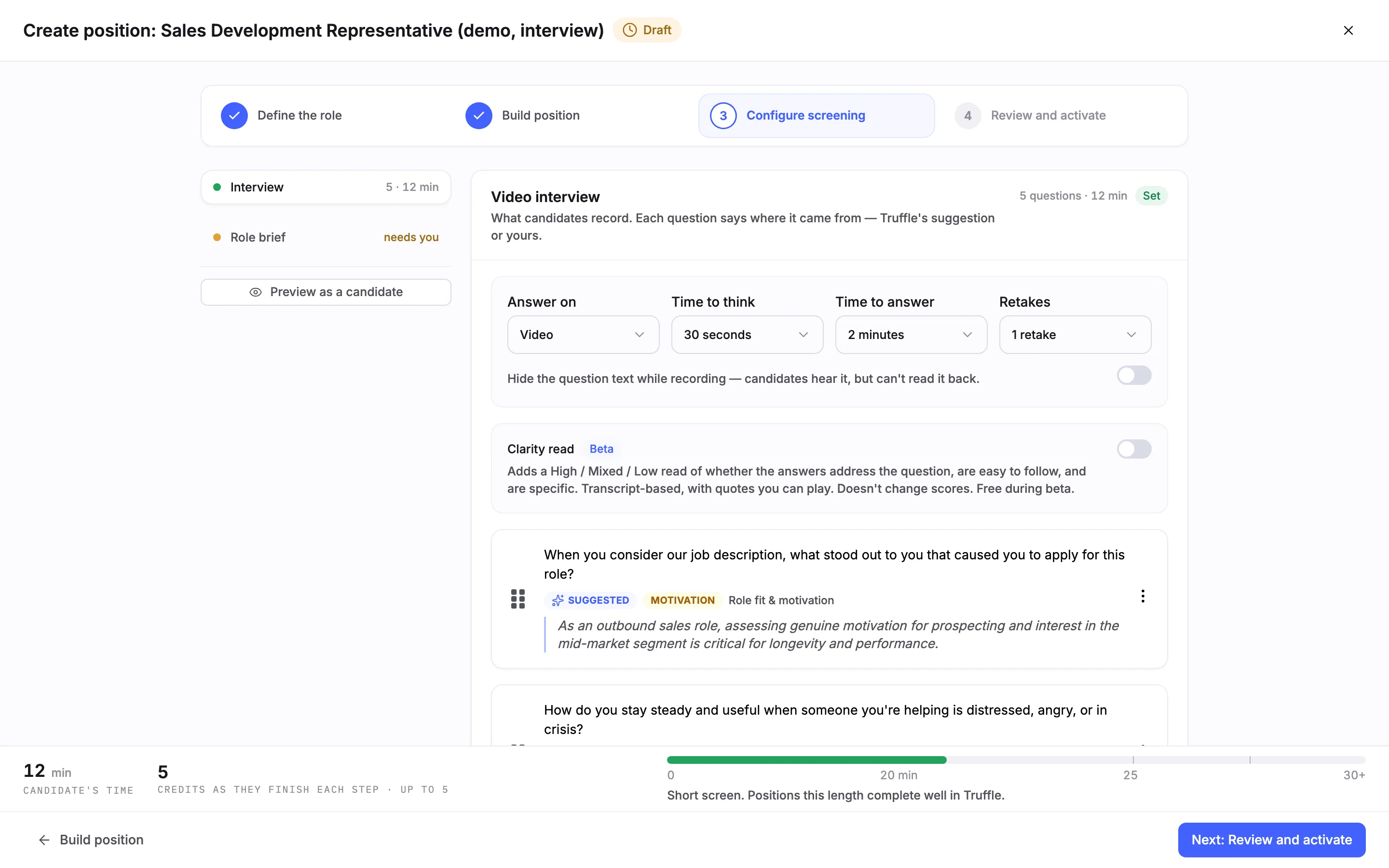
These sit in the Video interview section of Configure screening and apply to every question in the interview.
Setting
Default
Options
Note
Answer on
Video
Video or Audio
Audio means audio-only answers.
Time to think
30 seconds
None up to 5 minutes, or Unlimited
A countdown before recording starts.
Time to answer
2 minutes
1, 2 or 3 minutes
The recording time for each answer.
Retakes
1 retake
No retakes up to 3 retakes
Re-recordings allowed per question.
Hide the question text while recording
Off
On or off
Candidates hear the question but cannot read it back.
Clarity read (beta)
Off
On or off
English only, and free during the beta. Applies to interviews completed after you turn it on.
Welcome and completion videos
n/a
Up to 120 seconds when recorded
You can also upload an MP4 or use text.
A new position's interview settings: Video, 30 seconds to think, 2 minutes to answer and 1 retake, with Clarity read off.
With those defaults, a five-question interview came to about 12 minutes of candidate time in the wizard. A typical one-way interview takes a candidate 10 to 15 minutes.
Questions per position
Item
Default
Limit
Note
Interview questions
Suggested set, sized by role type
10
Our sales development capture suggested 5.
A question you write
n/a
150 words
Checked for bias risk as you type. Saved for reuse.
Question bank areas
n/a
7
Browse by area, or search.
Work scenarios
Drafted set for the role
10
Our capture drafted 6.
Response options per scenario
4
4
You pick one, candidates rank all four.
Environment fit questions
Drafted set for the role
10
Our capture drafted 6.
Preferences per Environment fit question
2
2
You pick the one true of the job.
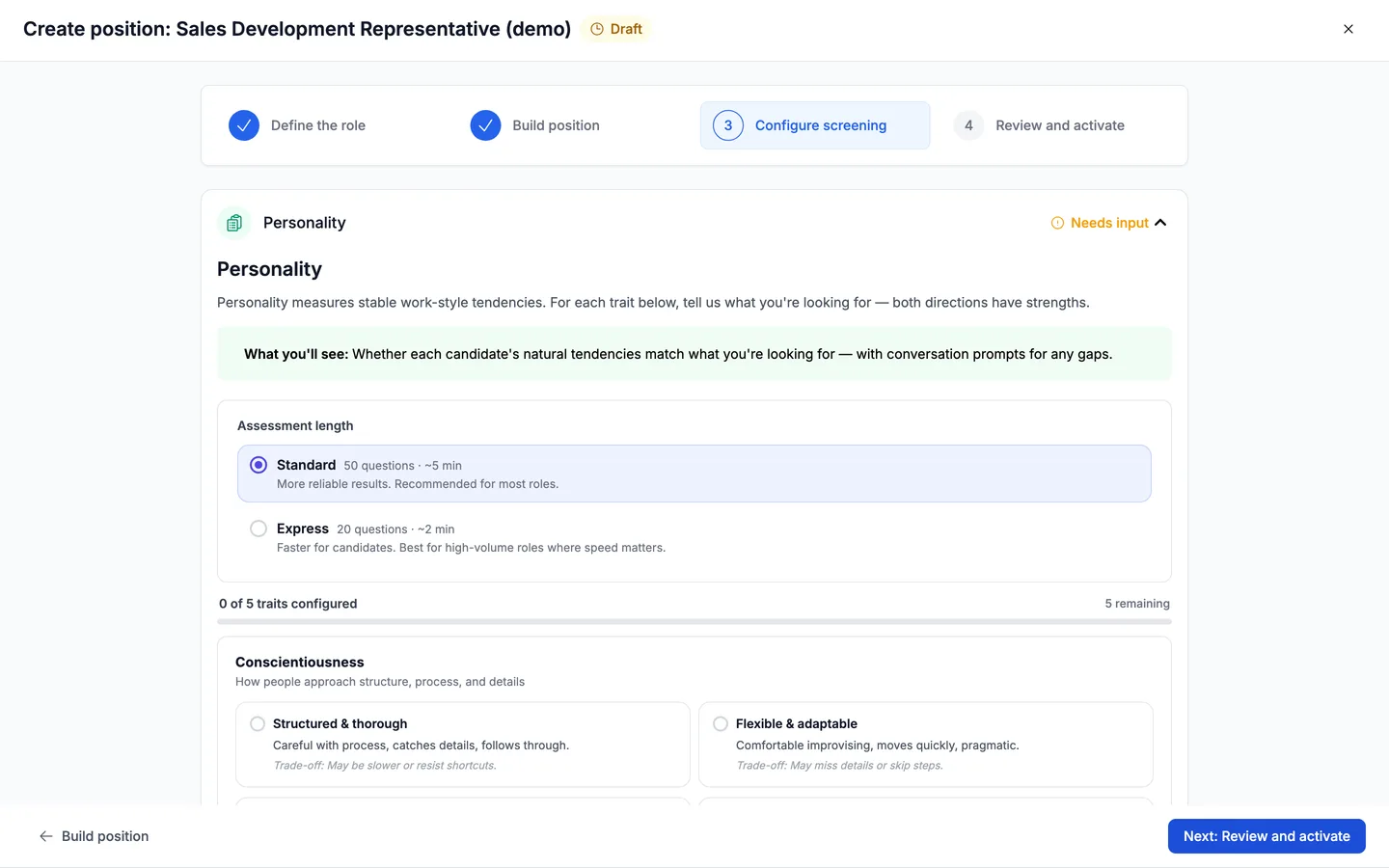
Personality traits
5, none chosen
At least 1 must be scored
Every trait needs a choice. Truffle never suggests trait directions.
Drafting again for the same role can return a different set of scenarios or questions.
Assessments
Assessment
Time on Build position
Length
Note
Personality, Standard
5 min
50 statements
10 statements a page on a 5-point scale. Truffle suggests the length for the role.
Personality, Express
3 min
20 statements
For roles where speed matters.
Work scenarios
6 min
Set by you, up to 10
With 6 scenarios, candidates were told about 7 minutes.
Environment fit
2 min
Set by you, up to 10
With 6 questions, candidates were told about 2 minutes.
Assessment length for Personality: Standard at 50 questions and 5 minutes, or Express at 20 questions and 3 minutes.
All three assessments together take a candidate about 12 to 13 minutes.
An assessed candidate costs 2 credits, with all three assessments included.
In Work scenarios, a candidate who ranks your pick last of four scores 0 of 3 on that scenario.
Environment fit shows a count, such as 4 of 6 aligned, and no percentage.
Qualification checks
Each check has a question type, a pass rule, an outcome, and a Must be answered switch.
Question type
What passes
Yes/No
The answer you require, such as Yes.
Numeric
A minimum, a maximum or both, with an optional unit.
Select
A choice from a list you write.
Multiple select
Any, all, none or exactly one of the options you mark.
Date
A fixed date, or one relative to today, such as within the last 2 years.
Free-form
No pass rule. The answer is collected for your review and never evaluated.
Item
Default
Limit
Note
Outcomes
Drafted checks arrive with a proposed outcome
3
Reject automatically, Flag for review or Just collect it.
Must be answered
Set per check
n/a
Locked on for Reject automatically.
Running checks on their own
n/a
Not allowed
A position needs Resume, Video Interview or Assessments on as well.
Credit cost
n/a
n/a
Checks show no credit cost.
Invitations and reminders
Item
Default
Limit
Note
Invitation deadline
7 days
n/a
Each invitation carries a unique link.
Per-invite completion deadline
Off
n/a
Set a date and time zone. You can extend it after sending, for one candidate or in bulk.
Deadline warning
n/a
n/a
Shown when a candidate tries to leave with less than 24 hours remaining.
Paste from spreadsheet
n/a
200 rows per paste, 50 invitations per send
A send over 50 is refused with “Maximum 50 candidates can be invited at once”. See Invite candidates by email.
Automatic reminders
On
3
At 24 hours, 72 hours and 7 days. Each can be switched off per position.