Guide
Connect Ashby
By the end Truffle is connected to Ashby, Truffle is an activity on a job's interview plan, and screening results land on the candidate in Ashby.
10 min · 7 steps · Captured from the live product 5 Oct 2026 Changelog Copy as Markdown
Before you start
- A paid Truffle plan. Integrations are available on paid plans, so a free trial cannot connect Ashby.
- The Owner or Admin role in Truffle. Integrations & API sits under WORKSPACE in Settings, which only owners and admins see.
- Admin access in Ashby, to create an API key and add the Truffle integration. Ashby's API sits on Ashby's paid plans, so check your Ashby plan.
- At least one open Truffle position for the role you screen in Ashby.
1Create an API key in Ashby
This step happens in Ashby. Go to Admin, then Integrations, then API Keys, and create a new key. Name it, choose Truffle as the integration partner, and continue. Ashby fills in the permissions Truffle needs. Copy the key on the last screen, because Ashby shows it only once.
2Open Integrations in Truffle
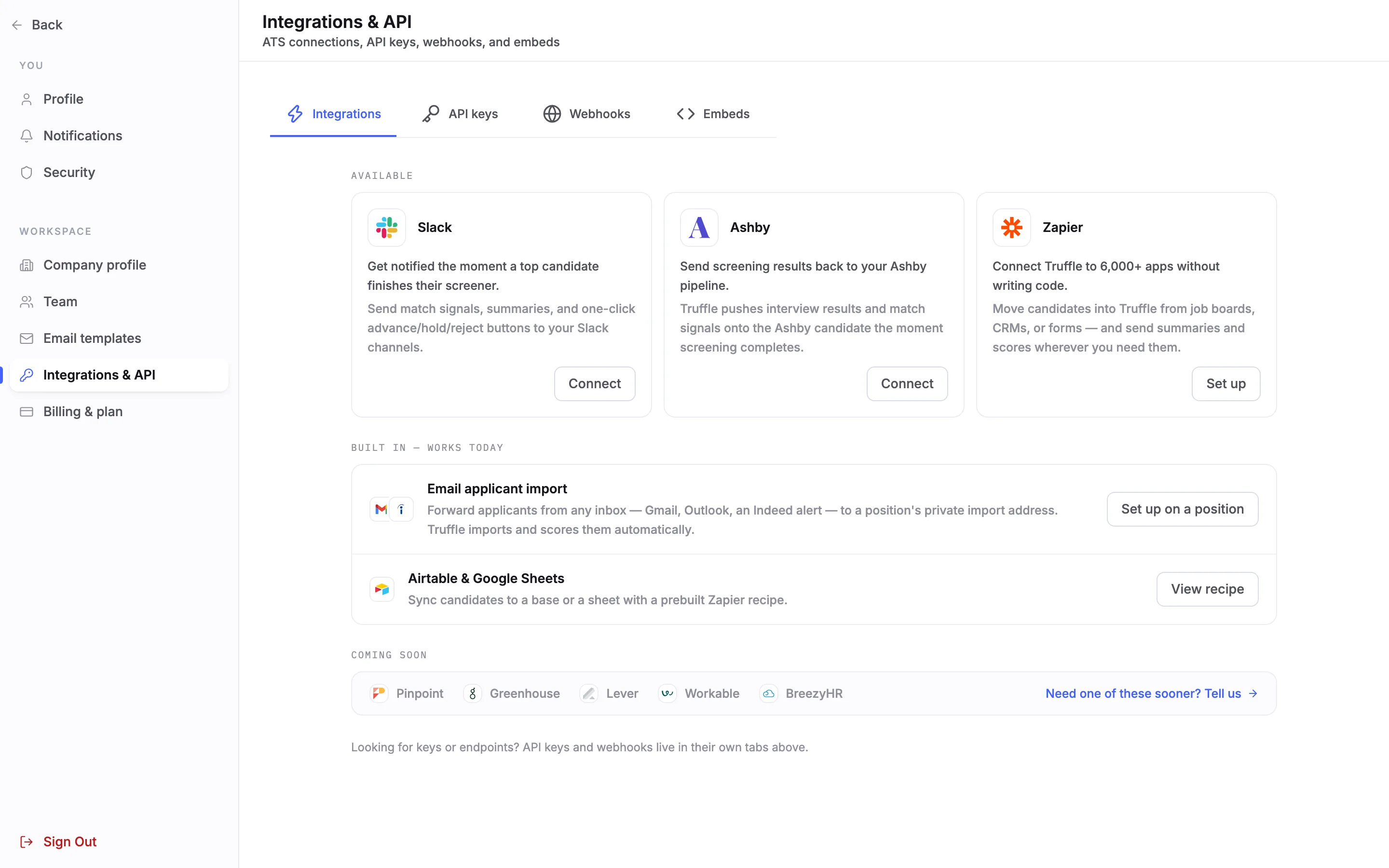
In Truffle, open Settings and choose Integrations & API under WORKSPACE. The Integrations tab opens first. Find the Ashby card under Available, which reads Send screening results back to your Ashby pipeline., and choose Connect.
3Paste the Ashby key and connect
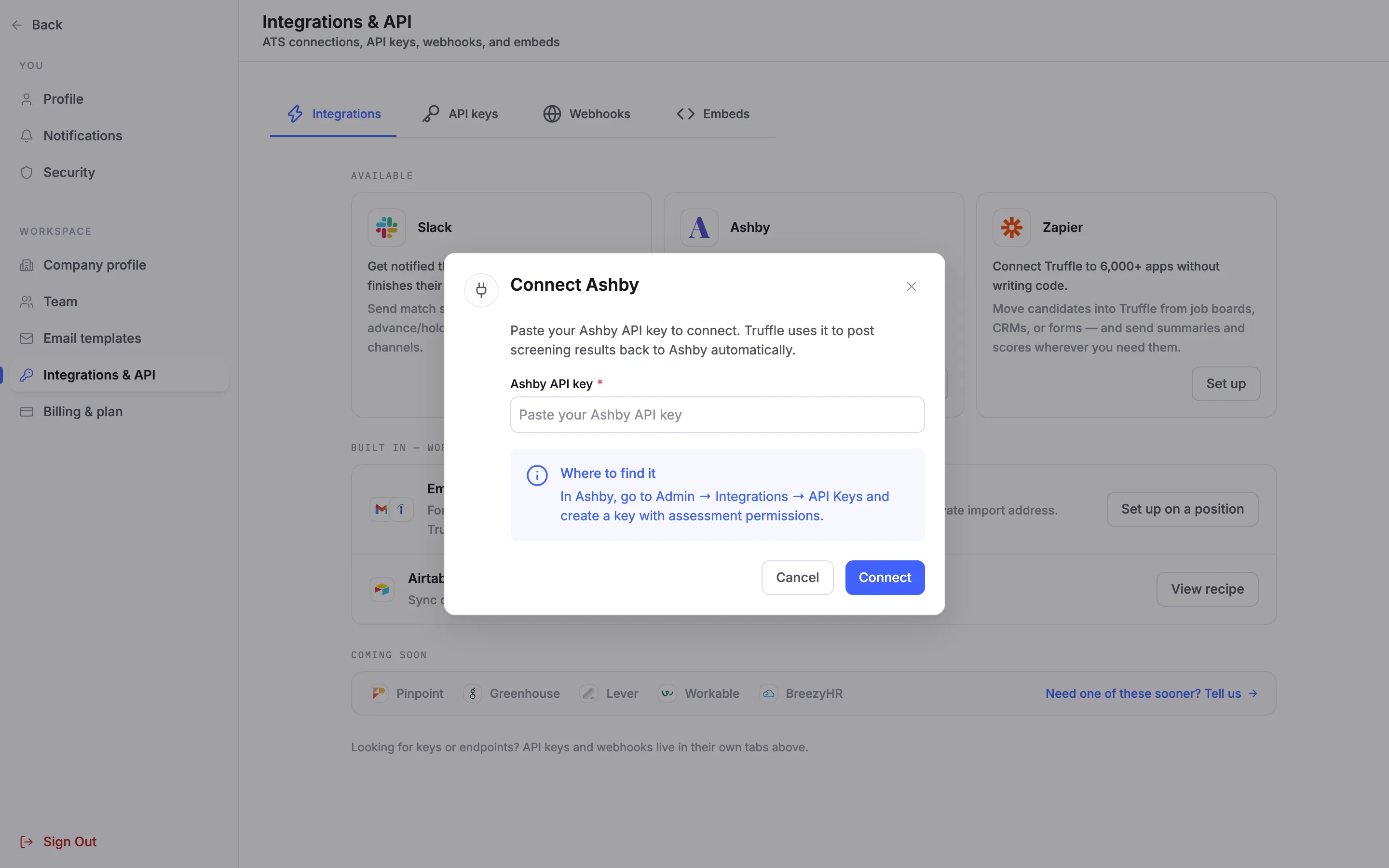
Connect Ashby asks for one thing: paste the key from Ashby into Ashby API key. Truffle uses it to post screening results back to Ashby. Where to find it repeats the path in Ashby. Choose Connect. If the field is empty, Truffle asks you to paste the key first.
Note. Truffle stores the Ashby key to send results back. You never see it again in Truffle.
4Copy the Truffle key
When you connect, Truffle creates a key of its own and shows it once, with a copy button and the steps to finish in Ashby. Copy it before you choose Done. Truffle does not show it again. If you lose it, choose Reconnect on the Ashby card to get a new one. Ashby now sits under Connected, with its health and its last activity.
Note. The Pinpoint guide shows the same one-time key panel step by step.
5Paste the Truffle key into Ashby
This step happens in Ashby. Go to Admin, then Integrations, then Integrations, and search for Truffle. Paste the Truffle key into the Truffle API Key field and save.
6Add Truffle to a job's interview plan
This step happens in Ashby, once for each job that should screen with Truffle. Open the job's interview plan, add Truffle as an activity on the stage that should screen, and choose the Truffle position under Assessment Type. Your open Truffle positions are the choices.
7Send the screening from the candidate's profile
This step happens in Ashby. When a candidate reaches that stage, send the Truffle screening from their Ashby profile. Truffle emails the candidate their link and posts the status back as In progress once they start. When a one-way video interview finishes, the match score, the match level, the questions asked and answered, a written summary and a link to Truffle land on the candidate's Ashby profile. Assessments come back as one score of High, Mid or Low.
Note. Resume screening results do not post as a score in Ashby. Ashby gets the completed status and a View in Truffle link to the full breakdown. Scores never reject anyone: you decide who moves forward in Ashby.
Questions
Do resume screening results appear in Ashby?
Not as a score. Ashby gets the completed status and a View in Truffle link to the criteria breakdown. One-way video interview match scores and the High, Mid or Low assessment score do post onto the Ashby profile.
What happens if I cancel a Truffle screening in Ashby?
Cancelling the screening in Ashby disqualifies the candidate's Truffle application, so the two stay in step.
Results stopped reaching Ashby. What do I do?
Check the Ashby card under Connected. It shows Connected, Degraded or Action needed, and the date of its last activity. Reconnect creates a new Truffle key. Paste it into the Truffle integration in Ashby.
Can a Member connect Ashby?
No. Only owners and admins see Integrations & API and can connect or disconnect an integration.
Can I connect Ashby on the free trial?
No. Integrations need a paid Truffle plan. The trial is 7 days with 30 credits and no credit card, and it covers screening without integrations.
Does Truffle decide who moves forward in Ashby?
No. Truffle's scores rank candidates against your criteria and show why. You move or disqualify candidates in Ashby.
Related
See something here that doesn't match what you see in Truffle? Tell us and we'll fix the page.