Reference
Glossary
The words Truffle uses on screen, in alphabetical order, each with a plain definition and a link to the page that covers it.
Checked against the live product 5 Oct 2026 Changelog Copy as Markdown
These are the terms you see in Truffle, from setting up a position to recording a decision. Labels in code font are quoted exactly as the product shows them. For the numbers behind these terms, see Limits and defaults.
A
Accommodation contact email
The address that receives candidates’ requests for an alternative selection process, set in Settings under Candidate email. When it is empty, requests go to the account owner. See Alternative requests.
Activate position
The button on the last step of the position wizard that puts a position live. It stays off while anything still blocks go-live, such as drafted resume criteria nobody has reviewed. Activating does not post the role publicly. See Setting up a position.
Advance
One of the four decisions you can record on a candidate, alongside Hold, Reject and Hire. In Magic Review the A key advances the candidate. See Reviewing candidates.
AI Match
The name for Truffle’s scoring of a candidate against your criteria. A resume scored by AI Match costs 1 credit, and AI Match scores and summaries are on every plan. See How scoring works.
AI suggested
A tag on the approach or preference Truffle picked for a work scenario or an Environment fit question. The tag stays on Truffle’s pick even after you choose a different one. See Assessments.
Aligned
A result label on the Assessments tab. In Work scenarios, the candidate ranked your pick first. In Environment fit, the candidate chose the same preference as you. See Assessments.
All
The candidate list tab that shows every candidate on a position, whatever their status. The other tabs are For Review, Reviewed and Incomplete. See Reviewing candidates.
Alternative selection request
A candidate’s request to be screened another way instead of the AI-scored interview, made from the welcome page of a video or audio interview. You see it on Home and in the candidate list and mark it handled. See Alternative requests.
Answer on
The interview setting that decides whether candidates answer on Video or Audio. It applies to every question in the interview. See Setting up a position.
API key
A key your own code uses to call Truffle’s REST API. Each key is Read, Write or Admin, and Truffle shows it once when you create it. The API keys tab opens after Truffle approves your request for API access. See Create API keys and webhooks.
Apply first
An intake route on Build position. Candidates send a resume, it is scored against your criteria and ranked, and they wait in your list until you invite them to the next step. See Getting candidates in.
Archived
The state of a closed position you have moved out of the default Positions list. Nothing is deleted, and owners and admins find it on the Archived tab. An archived position must be unarchived before it can be reopened. See Setting up a position.
Assessment signal
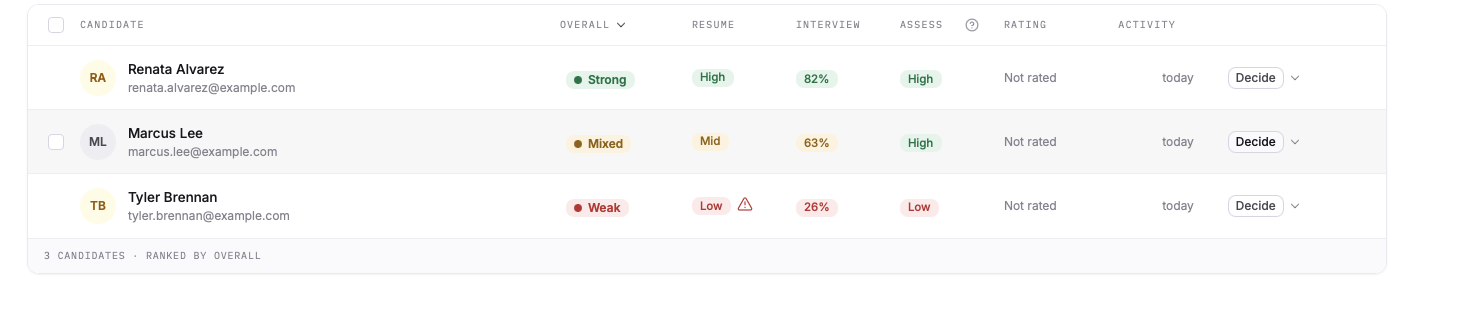
The High, Mid or Low result of a candidate’s assessments, shown in the ASSESS column of the candidate list and on the Assessments tab. See Assessments.
Assessments
The screening method that runs Personality, Work scenarios and Environment fit. Each one is switched on per position and scored on its own, and an assessed candidate costs 2 credits with all three included. See Assessments.
Auto-import applicants
The setting on Get candidates that turns on a position’s private email address. Application emails forwarded or sent there are read and added to the position as candidates. See Getting candidates in.
Auto-rejected
The result line for a candidate who missed a qualification check set to Reject automatically, shown with how many requirements were not met. It comes from a rule you wrote, not from an AI score. See Add qualification checks.
B
Balanced
A Personality trait setting that scores the trait without preferring a direction and flags extremes either way. See Add a personality assessment.
Budget bar
The bar on Build position and Configure screening that shows the candidate’s estimated time and the credits charged as candidates finish each step. It turns amber past 20 minutes of candidate time and never blocks Next. See Setting up a position.
Build position
The second step of the position wizard, titled Build the screen. Truffle suggests which components to run from your description, each with a reason, and you switch any of them on or off. See Setting up a position.
C
Candidate
A person screened for one of your positions, from the moment they apply, are invited or are imported. See Getting candidates in.
Candidate experience
The section on Review and activate that sets what candidates see: logo, primary color, a welcome message and a completion message with an optional redirect. Logo and color come from your company settings unless you change them for the position. See Company profile. See Setting up a position. See Brand the screening.
Candidate Shorts
Highlight clips from a candidate’s video interview. Each clip is tagged with a competency, timestamped, transcribed and given a “Why this matters” note. See How scoring works.
Candidate summary
A short written read of a candidate’s strengths and role alignment, with a Gaps section on where their answers fell short of what the position calls for. See How scoring works.
Careers page
A hosted page at one shareable link that lists every open, published position at your company. Copy its link from Settings, under Company profile. See Getting candidates in.
Clarity read
An optional read (beta) of whether a candidate’s interview answers address the question, are easy to follow and are specific, shown as High, Mixed or Low with quotes you can play. It is off by default and does not change any score. See How scoring works. See Turn on Clarity read.
Clear decision
The option in the Decide menu that removes the decision recorded on a candidate. See Reviewing candidates.
Close
A result label in Work scenarios and Personality. In Work scenarios, the candidate ranked your pick second. In Personality, it marks a trait between Aligned and Gap, and comes with an interview prompt. See Assessments.
Closed
The state of a position you have closed. Its link and careers page entry stop accepting candidates the same day, and all candidate data stays available. You can reopen it. See Setting up a position.
Completed
The invitation stage after a candidate submits everything. The analysis runs automatically at this point. See Getting candidates in.
Configure screening
The third step of the position wizard. A list of the sections you switched on, each with its state, where Truffle drafts content for you to review. See Setting up a position.
Credit
The unit every plan is measured in. A resume screened by AI Match costs 1, an assessed candidate costs 2, and a completed one-way interview costs 5. A credit is charged only when a screening gives you a result to act on. See Plans and credits.
Criteria match
The part of a candidate’s Resume tab that shows how the resume scores against each resume criterion. Each criterion is rated Strong, Some or None, with the line from the resume it rests on. See Screen resumes with AI criteria.
D
Decide
The menu on every candidate row where you record a decision: Advance, Hold, Reject or Hire. See Reviewing candidates.
Decline
One of the three recommendations a reviewer can give in Your Evaluation, alongside Move forward and Unsure. It is a teammate’s view, not a decision on the candidate. See Working as a team.
Define the role
The first step of the position wizard, where you add the title, the position description and the optional role brief. See Setting up a position.
Different
A Work scenarios result label. The candidate ranked your pick third of four. See Add work scenario questions.
Drafting
The state of a section in Configure screening while Truffle writes its content in the background. See Setting up a position.
Duplicate
The row action that creates a new position from an existing one, copying its questions, settings, checks, role brief and branding. It does not copy candidates, the link, the status or integrations. Check the copy’s qualification checks before activating. See Duplicate a position.
E
Environment fit
The assessment that compares a candidate’s working preferences with how the role runs. Each question shows two preferences, you pick the one true of the job, and candidates pick the one that sounds more like them. See Add environment fit questions.
Expired
The state of a position whose deadline has passed. It stops accepting submissions and candidates who open its link see an expired page. You can reopen it, which clears the deadline. See Setting up a position.
Express
The shorter Personality length: 20 questions in about 3 minutes. See Add a personality assessment.
F
Finish later
The candidate option that saves their progress so they can come back with the same link and email address. See What candidates see.
Flag for review
A qualification check outcome. An answer that misses the rule is flagged for you, and no one is rejected. See Add qualification checks.
Flagged for review
The candidate list filter that finds answers to checks set to Flag for review. See Add qualification checks.
For Review
The candidate list tab for candidates who have finished and are waiting for a decision. See Reviewing candidates.
G
Gap
A result label. In Environment fit, the candidate picked the other preference from the one true of the job. In Personality, the candidate’s tendency sits away from the direction you chose. Gaps come with an interview prompt. See Assessments.
Get candidates
The page on a live position that holds its Shareable link, its import address and its invite options. See Getting candidates in.
H
High, Mid, Low
The three tiers of the Resume and Assessment signals. Assessment results also read as an alignment, such as Mid alignment. See How scoring works.
Hire
One of the four decisions you can record on a candidate. Hired candidates can be listed when you close the position. See Reviewing candidates.
Hold
One of the four decisions you can record on a candidate, shown as On Hold. In Magic Review the H key puts a candidate on hold. See Reviewing candidates.
Hosted job page
The public page every published position gets, with the description and an Apply for this role button. Candidates upload a resume and apply without an account. See Create a job application.
I
Incomplete
The candidate list tab for candidates who started but have not finished. See Reviewing candidates.
Interview prompt
A suggested question shown on a Personality or Environment fit gap, to talk the difference through with the candidate. See Assessments.
Interview signal
The candidate’s interview match score, shown as a percentage in the Interview column. See How scoring works.
Invited
The first invitation stage. The invitation email has been delivered with the candidate’s unique link. See Getting candidates in.
J
Just collect it
A qualification check outcome that records the answer for your review and never evaluates it. Free-form checks always work this way. See Add qualification checks.
K
Key Insights
The part of a candidate summary that breaks down fit on specific criteria, each with a brief explanation. See How scoring works.
L
Login code
The 6-digit code Truffle emails you when you choose Email me a code instead on the sign-in page. You type it in to sign in without your password. See Notifications and sign-in security.
Looks right
The button that marks a drafted section as reviewed when you agree with it as written. Drafted resume criteria and qualification checks must be marked Looks right or edited before a position can go live. See Setting up a position.
M
Magic Review
The review screen that opens a candidate on the right while the full list stays on the left. Keyboard shortcuts advance, hold or reject, and the arrow keys move between candidates. See Reviewing candidates.
Match score
A candidate’s interview score from 0 to 100, built from per-question scores against each question’s rubric. See How scoring works.
Move forward
One of the three recommendations a reviewer can give in Your Evaluation, alongside Unsure and Decline. See Working as a team.
Must be answered
A qualification check switch that stops a candidate submitting without answering. It is separate from what the answer does, and it is locked on for Reject automatically. See Add qualification checks.
N
Needs you
The state of a Configure screening section that waits for your input, such as Personality before you set the traits. See Setting up a position.
Nice to have
The label on a resume criterion that is not marked Required, shown on the candidate’s criteria match. See Screen resumes with AI criteria.
Not important
A Personality trait setting that leaves the trait out of the result. That trait reads Not scored on the candidate. See Add a personality assessment.
Not qualified
The mark on a candidate who missed a qualification check set to Reject automatically. See Add qualification checks.
Not scored
The label on a signal a candidate was not scored on, or on a Personality trait set to Not important. See How scoring works.
O
One sitting
The intake route shown as Apply and finish in one sitting. Candidates give their resume and complete the next step in the same session, and you review everything together. See Getting candidates in.
Opposite
A Work scenarios result label. The candidate ranked your pick last of four. See Add work scenario questions.
Overage
Credits used beyond your monthly pool. On Core, Team and Scale each extra credit is billed at $0.25. Starter is a hard cap with no overage. See Plans and credits. See Change or cancel your plan.
Overall signal
The rollup of a candidate’s signals into Strong, Mixed or Weak, when a position uses two or more score types. It leads the signal set on the candidate list, in Magic Review and on the profile. See How scoring works.
P
Personality
The assessment built on the Big Five personality model. You set a direction for each of five traits, and the result shows where a candidate’s tendencies line up with your choices. See Add a personality assessment.
Pool
The credits your plan gives you each month, shared across resume screening, assessments and one-way interviews. See Plans and credits. See Change or cancel your plan.
Position
One role you are screening for. It holds the description, the screening components, the interview settings, your branding and its own link. See Setting up a position.
Position description
The description of the role that Truffle drafts the screen from and candidates read on the job page. A position needs at least 200 characters of it to go live. See Setting up a position.
Position Link
The one shareable link for a live position, shown as Shareable link on Get candidates and copied with Copy shareable link on the Positions list. See Getting candidates in.
Preview as a candidate
The button in Configure screening that opens the candidate’s page in a new tab with a private link, so it works on a draft. See Setting up a position.
Q
Qualification checks
Must-have questions candidates answer at the start of the screening, such as work authorization. Each check has a pass rule and an outcome: Reject automatically, Flag for review or Just collect it. Checks cannot run on their own. See Add qualification checks.
R
Ready for review
The queue on Home that groups finished candidates by position. Clicking a row opens the candidate in Magic Review. See Reviewing candidates.
Reject
One of the four decisions you can record on a candidate. In Magic Review the R key rejects. A score never rejects anyone. See Reviewing candidates.
Reject automatically
The qualification check outcome that rejects a candidate whose answer misses the rule. It is a fixed rule you write and the only automatic rejection in Truffle. See Add qualification checks.
Required
A resume criterion you have marked as a must-have. It is labelled Required on the candidate’s results, and it does not reject anyone. See Screen resumes with AI criteria.
Requirements met
The qualification result line for a candidate whose answers meet every check, or meet them with some flagged for review. See Add qualification checks.
Resume criteria
The criteria a position scores resumes against. Truffle drafts them from your description, and you edit, add, remove or mark them Required. See Screen resumes with AI criteria.
Resume match
A candidate’s resume result, High, Mid or Low, shown under Scores at a glance with how many criteria have evidence. The same tier is the Resume signal on the candidate list. See Screen resumes with AI criteria.
Resume signals
Factual counts from a resume, such as average tenure, shown on the Resume tab for context. They are not scored. See Screen resumes with AI criteria.
Retakes
The interview setting for how many times a candidate can re-record an answer. See Limits and defaults for the range.
Reviewed
The state of a Configure screening section you have checked, by choosing Looks right or by editing it. It is also a candidate list tab. See Setting up a position.
Role brief
Three optional questions about what good looks like in the role. Truffle reads your answers alongside the description when it drafts and scores. See Setting up a position.
Roll-over
Unused monthly credits carried forward on Core, Team and Scale, for 12 months while you stay subscribed, up to 3x the monthly pool. Starter does not roll over. See Plans and credits. See Change or cancel your plan.
S
Scorecard
A set of criteria for a position that every reviewer rates candidates against. Up to 10 criteria, each rated on 1 to 5 stars. It locks once criterion ratings have been submitted. See Use scorecards and structured reviews.
Set
The state of a Configure screening section that is complete and needs no review, such as checks you wrote yourself or Personality with all five traits chosen. See Setting up a position.
Share & export
The panel for sending a read-only link to a candidate’s profile, or downloading it as a PDF. Each link has an audience, an expiry and an optional password. See Reviewing candidates.
Standard
The default Personality length: 50 questions in about 5 minutes. See Add a personality assessment.
Started
The invitation stage after a candidate begins recording responses. See Getting candidates in.
Suggested
A badge on a component, question or criterion Truffle proposed for this role, with a line on why. Questions you add instead read Yours. See Setting up a position.
Suggested, not reviewed
The state of content Truffle drafted that nobody has checked yet. Drafted resume criteria and qualification checks in this state keep a position from going live. See Setting up a position.
T
Thin, Workable, Strong
How Truffle reads back your position description on Define the role. See Setting up a position.
Time to answer
The interview setting for how long a candidate can record each answer. See Limits and defaults.
Time to think
The interview setting for the countdown before recording starts on each question. See Limits and defaults.
Trial
The free trial: 7 days and 30 credits, with no credit card. See Plans and credits. See Change or cancel your plan.
Truffle key
The key Truffle creates when you connect Ashby or Pinpoint, shown once, that you paste into the other tool so it can call Truffle. See Connect Ashby and Connect Pinpoint.
U
Unpublished
A chip on a live position that has saved edits waiting. Candidates keep seeing the current version until you publish. See Edit a live position.
Unsure
One of the three recommendations a reviewer can give in Your Evaluation, alongside Move forward and Decline. See Working as a team.
W
Webhook
A URL of yours that Truffle notifies when an event happens. Two events are available: Screening completed and Résumé scored. See Create API keys and webhooks.
Website widget
A snippet that lists your open positions on your own website and stays in sync with them. Set it up under Careers page in Settings. See Getting candidates in.
Work scenarios
The product’s name for Truffle’s situational judgment test. Candidates rank four responses to each work situation, and the result shows where they placed the approach you picked. See Add work scenario questions.
Y
Your Evaluation
Your own section of a candidate’s evaluation panel: your star rating, your recommendation and any scorecard ratings. The Team roll-up stays locked until you submit it. See Working as a team.
Related
See something here that doesn't match what you see in Truffle? Tell us and we'll fix the page.