Concepts
How scoring works
Truffle scores resumes, interview answers and assessments against the criteria for each position, and shows the reasoning next to every score.
Checked against the live product 5 Oct 2026 Changelog Copy as Markdown
Every score in Truffle is measured against criteria built for one position: your position description and, if you write one, your role brief. AI analyzes resumes and interview answers, scores them against those criteria, and shows you why. You decide what happens to every candidate.
What gets scored
A position can screen with a resume, a one-way interview, assessments, or any mix of them. Each produces its own result.
| What the candidate submits | Scored against | What you see |
|---|---|---|
| Resume | The resume criteria for the position, which you set and edit | A criteria-match breakdown with the reasoning for each score |
| One-way interview | A rubric for each question, built from your position description and role brief | A score from 0 to 100, per-question scores, a summary and Candidate Shorts |
| Assessments | Each assessment’s own scoring, set up per position | A High, Mid or Low signal per assessment |
Each assessment is covered on the Assessments page.
How a score is made
- You describe the role. You add the position description (a position needs at least 200 characters of it to go live) and, optionally, a role brief of three questions: what winning looks like in the first 90 days, who would nail this position, and who would struggle even if their resume looks great.
- Truffle builds the criteria. Every active interview question on a live position gets a scoring rubric, drafted from the full position description and your role brief answers. Resume criteria are drafted from the description for you to review.
- The candidate answers. They complete whatever the position includes: resume, recorded interview answers, assessments.
- Answers are transcribed and scored. Recorded answers are transcribed, and AI scores each answer against its question’s rubric.
- Scores roll up into signals. Per-question scores roll up into the candidate’s match score. Each score type becomes a signal on the candidate’s row, and when the position uses two or more score types, Truffle adds an Overall signal.
Interview scores
Each candidate who completes the one-way interview gets a match score from 0 to 100, shown as a percentage. It shows how closely their answers align with the role criteria. The colour tells you the band at a glance: green from 70, amber from 50 to 69, red below 50.
The match score appears in the Interview column of the candidate list, in the signal rail in Magic Review, on the Screening tab of the candidate profile, and on a shared candidate link.
Per-question scoring
Each question is scored against its own rubric. For questions you write yourself, the rubric is generated from the full position description and your role brief, so it reflects the actual role. Questions from Truffle’s question bank count toward the overall score the same way.
On the candidate profile’s Screening tab, Interview at a glance lists every question with its band and score. Under each answer you see:
- An AI summary of the answer against what the question looks for.
- A band and percentage for each competency the question scores, with the reasoning behind it.
Worth flagging, which points out anything to follow up, such as an outcome the candidate did not quantify.
When a question carries scoring guidance, About this question in its header opens it, in three parts: Why we ask this, What we look for and Evaluation criteria. Questions without guidance do not show it.
Resume scores
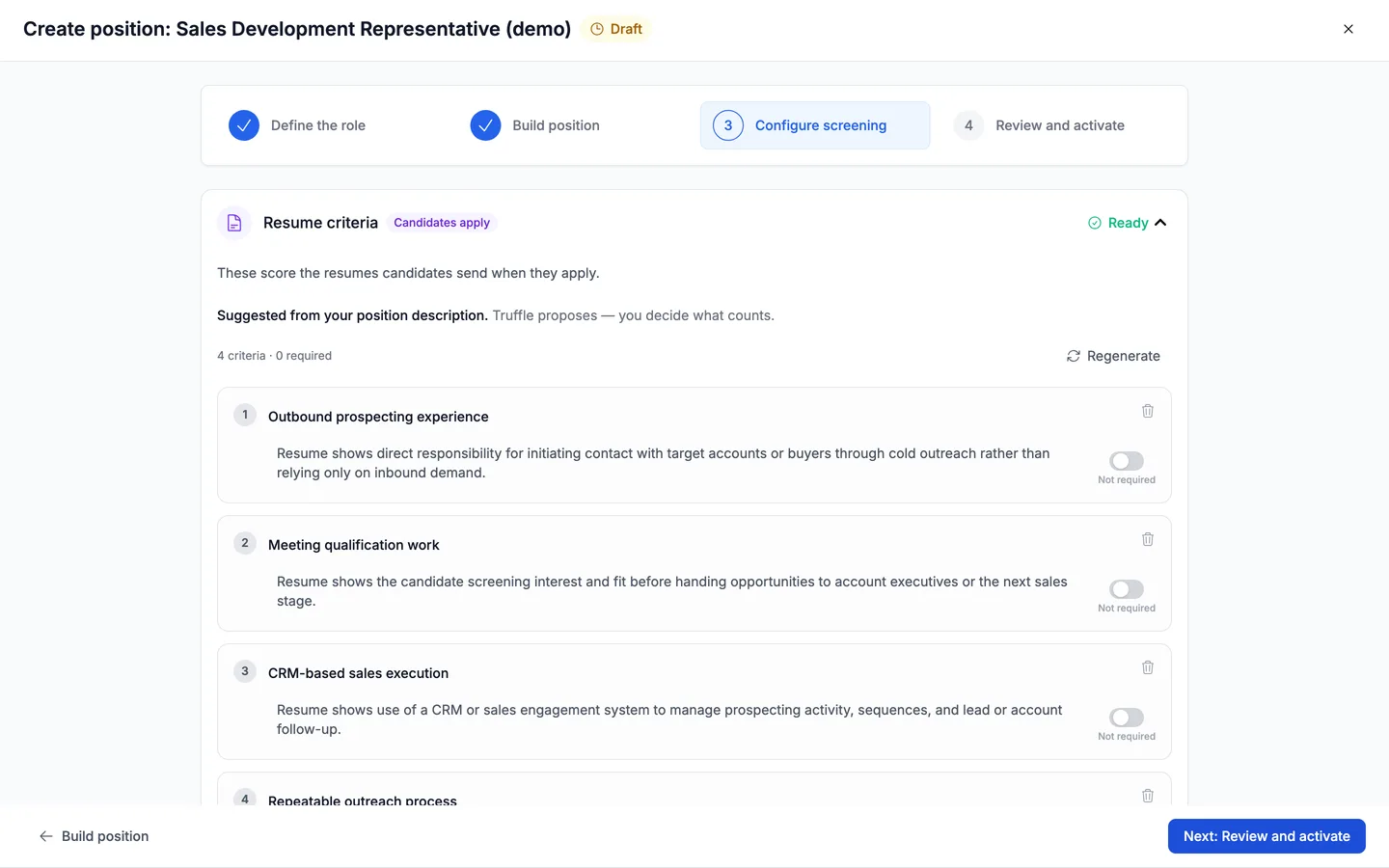
When resume scoring is on, Truffle parses each resume into a structured, readable CV and scores it against the resume criteria for the position. Truffle drafts those criteria from your position description, and you set and edit them. Drafted criteria land as Suggested, not reviewed, and the position cannot go live until someone marks them Looks right or edits them.
The candidate’s Resume tab opens on Scores at a glance: the Resume match band and how many criteria have evidence, such as 4 of 4 criteria with evidence. Below it, a resume-based summary lists strengths, questions worth exploring in the interview, and any gaps against the criteria. Resume signals give tenure and skills alignment, labelled for context, not scored. Criteria match shows each criterion’s result, the reasoning, and the resume line it is based on. The resume itself is shown in Structured and PDF views. The resume summary is held until after the video interview, so you read it alongside the interview.
Summaries and Shorts
For each completed interview, Truffle writes a Candidate summary on the candidate’s Overview tab. It opens collapsed on a one-sentence read of the candidate’s strengths and role alignment. Expanded, key insights break down fit on specific competencies, such as adaptability and credibility building, with a brief explanation for each. Gaps against the position’s criteria are listed on the resume-based summary, on the Resume tab.
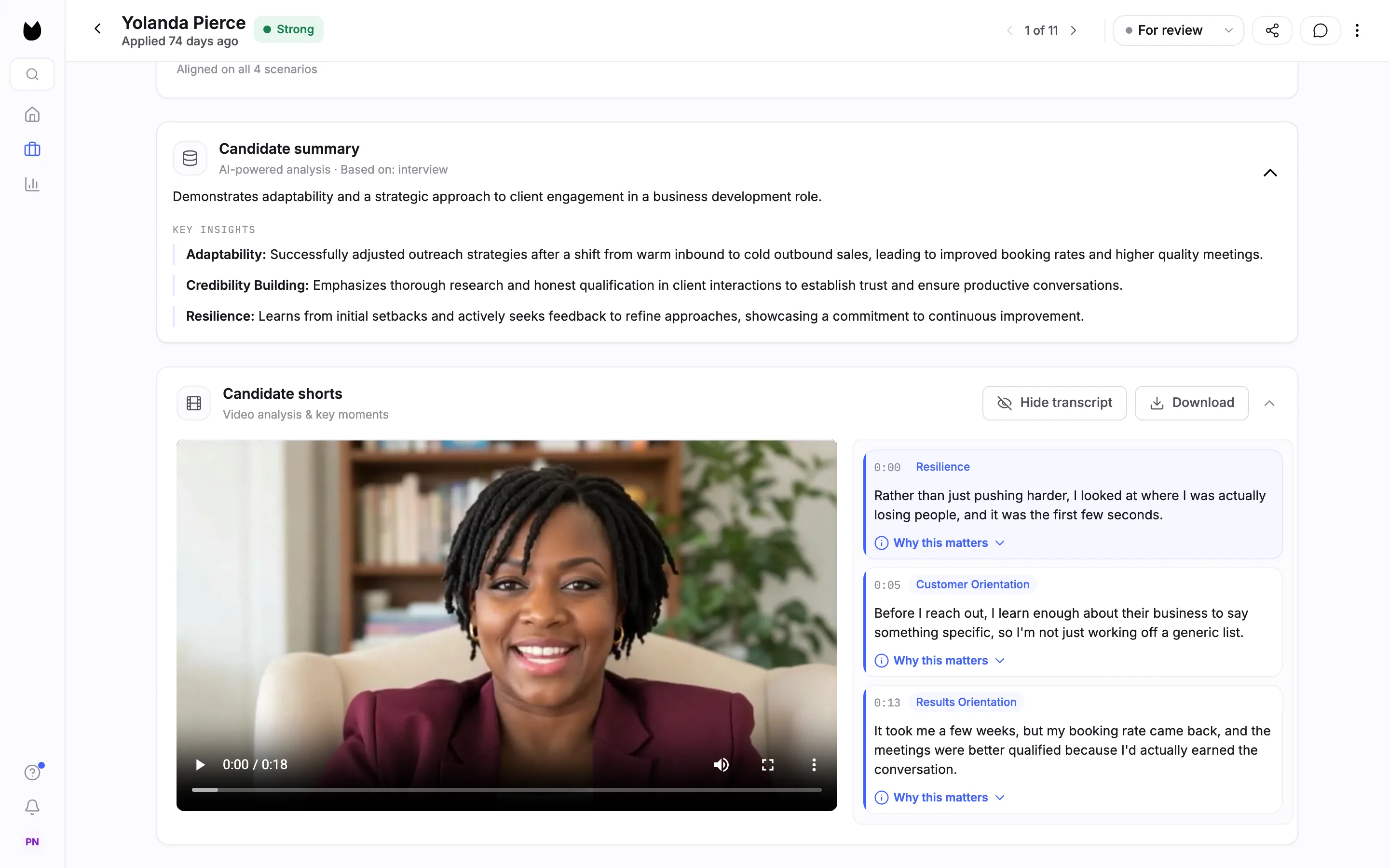
Candidate Shorts are highlight clips from each video interview. Each clip is tagged with a competency from 33 dimensions (for example Career Alignment, Problem Solving, Communication Skills), timestamped, transcribed, and given a “Why this matters” note explaining why it was surfaced. They sit on the candidate’s Overview tab, in Magic Review and on a shared candidate link.
 0:31
0:31 “I checked our inventory, found the same tent at a store near him, and had it held under his name that same afternoon.”
Why this matters: she solved it without escalating, which is what the role asks for. 0:28 “I told him exactly what I could do today and what would have to wait until Monday, and why.”
0:25 “Support is where I want to get good, not where I'm waiting for something else.”
Signals and the overall read
The candidate list, Magic Review and the candidate profile all show the same set of signals, one for each method the position uses. Resume and Assessment read High, Mid or Low. High is 75% and up (70% and up for the interview), Mid is 50 to 74%, and Low is below 50%. Interview shows the match score as a percentage, such as High · 82%. Resume match also shows how many criteria have evidence, such as High · 4/4. Pending and not-scored states are labelled as such. In Magic Review, How to read these signals explains each one, and Read a candidate profile shows where each sits on the profile.
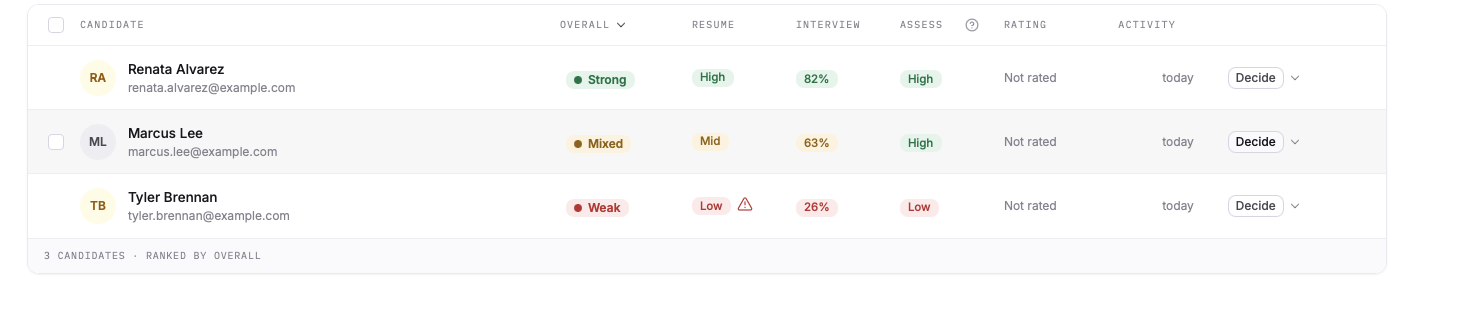
When a position has two or more score types switched on, Truffle rolls them up into one Overall signal: Strong, Mixed or Weak. It leads the signal set everywhere it appears. The reasoning behind each underlying score stays available, and the candidate list can be filtered by each signal.
Clarity read (beta)
Clarity read is an optional read of how a candidate’s interview answers come across as a set. It is off by default. You turn it on per position with the Clarity read toggle on the video interview in Configure screening. Results show as a CLARITY column on the candidate list, which you can sort and filter, and as a card on the Screening tab and in Magic Review. Turn on Clarity read shows each step.
When it is on, AI reads the interview transcripts and gives a High, Mixed or Low read on three things: Answers the question, Easy to follow and Specific, plus a row for the job’s language. Each row cites quotes you can play back in the answer. It reads transcripts only. It does not consider accent, tone, emotion or appearance, and it does not change any score.
During the beta, Clarity read is English only and costs no credits. It applies only to interviews completed after you turn it on.
Rules you write
Two parts of a position are checks on your own setup.
Question compliance check
When you write your own interview question, AI reads it as you type for potential bias risk, such as wording that touches protected characteristics. A question that passes is added as usual. A warned question shows Potential bias risk with a suggested rewrite. You can still add it after acknowledging the flag, with an optional business reason, and the flag stays on the question. A failed question shows This question can't be added as written with the change it needs. The check is guidance, not legal advice.
Qualification questions
These collect must-have information before the rest of the screening, such as work authorization or certifications. For each one you choose what the answer does: Reject automatically, Flag for review or Just collect it. Auto-reject is a deterministic rule you write. No AI judgement is involved. When Truffle drafts qualification checks for you, it proposes an outcome for each, sometimes Reject automatically for a hard requirement. Nothing goes live until you review every drafted check, so an automatic rejection is always a rule you have accepted.
What it does not do
- Scores do not advance, hold or reject candidates. You decide what happens to every candidate. The only automatic rejection is a qualification rule you write yourself.
- A score is measured only against the criteria for that position. It is not a rating of the candidate as a person.
- A position cannot go live with drafted resume criteria or qualification checks that nobody has marked
Looks rightor edited. - The resume summary is not shown before the video interview is done.
- Resume signals such as tenure are shown for context and are not scored.
- Clarity read (beta) does not change any score, does not consider accent, tone, emotion or appearance, works in English only, and does not apply to interviews completed before it was turned on.
- The question compliance check is not legal advice.
Related
See something here that doesn't match what you see in Truffle? Tell us and we'll fix the page.