Product guide
How to set up a one-way video interview in Truffle
By the end you'll have a live position with a one-way video interview that candidates can complete on any device, with every answer scored against the criteria you set.
Copy as markdown
Before you start
- A Truffle account. The free trial works. 7 days, 30 credits, no card required.
- A rough idea of the role. Truffle drafts scoring criteria from your job description, so a few honest sentences beat a polished spec.
- 1
Open the wizard and define the role
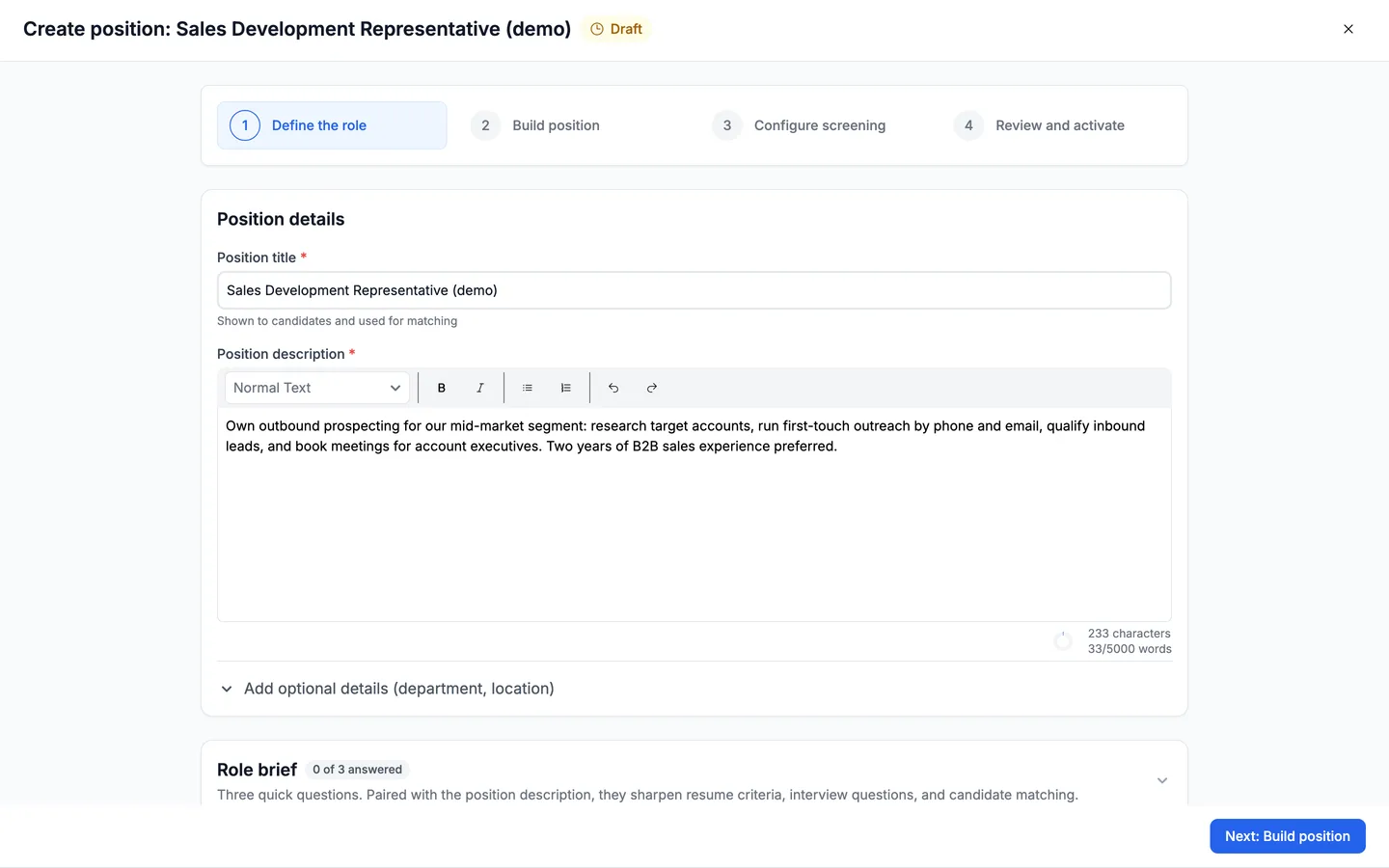
From your positions list, choose to create a new position. The wizard opens on Define the role, the first of four steps: Define the role, Build position, Configure screening, and Review and activate. Enter a position title under Position details, then paste or write a job description. This is also where the Role brief lives. Truffle reads the description to draft the criteria it scores against, so write it the way you'd brief a person, not a keyword list. When it's filled in, choose Next: Build position.
- 2
Turn on the Video Interview component
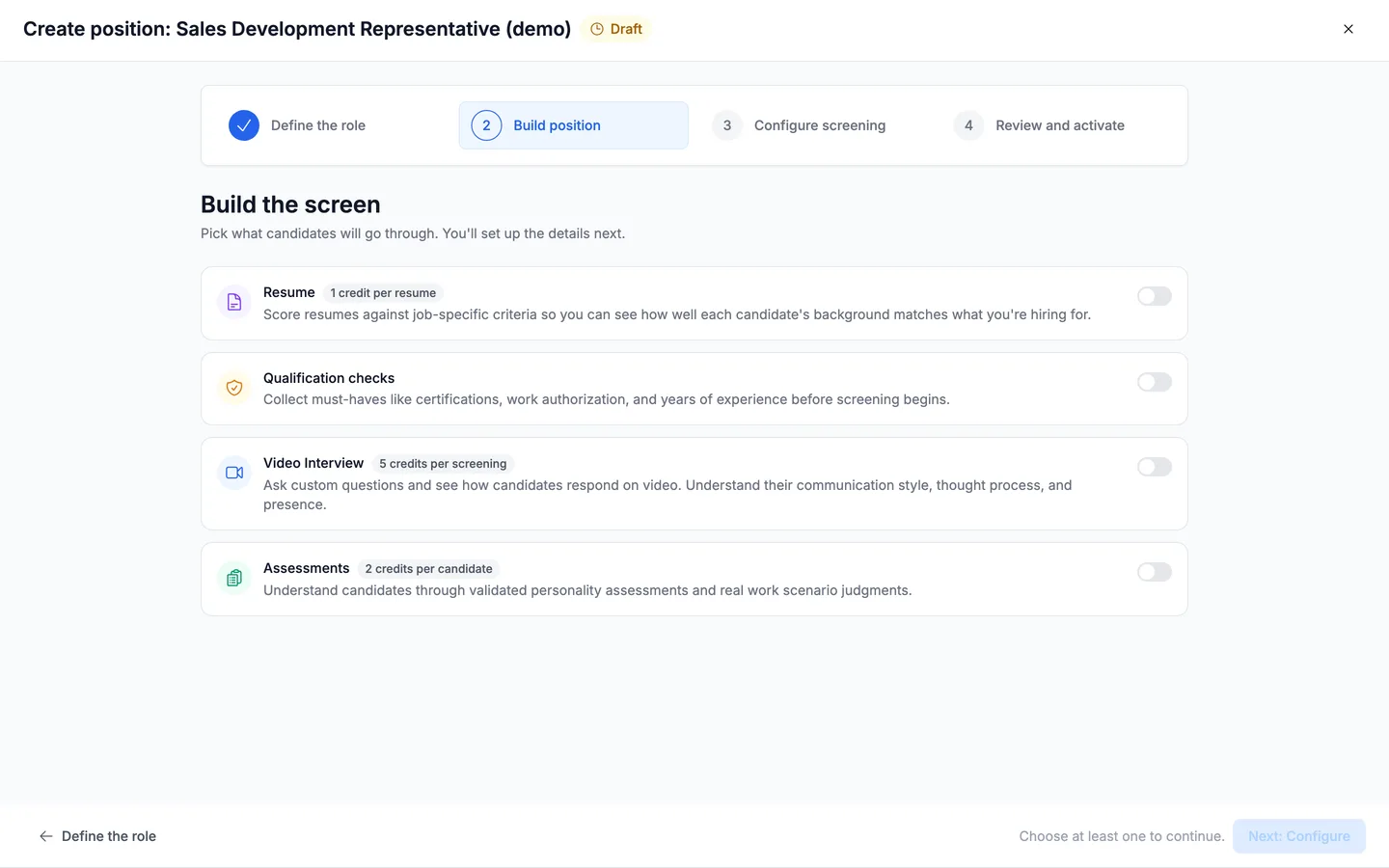
The Build position step ("Build the screen") is where you pick what candidates go through. Truffle offers four components, each with its own credit cost: Resume (1 credit per resume), Qualification checks, Video Interview (5 credits per screening), and Assessments (2 credits per candidate). For a one-way video interview, switch on Video Interview. You can combine it with the others later, but it can also stand on its own. Choose Next: Configure to continue.
- 3
Let Truffle draft the questions
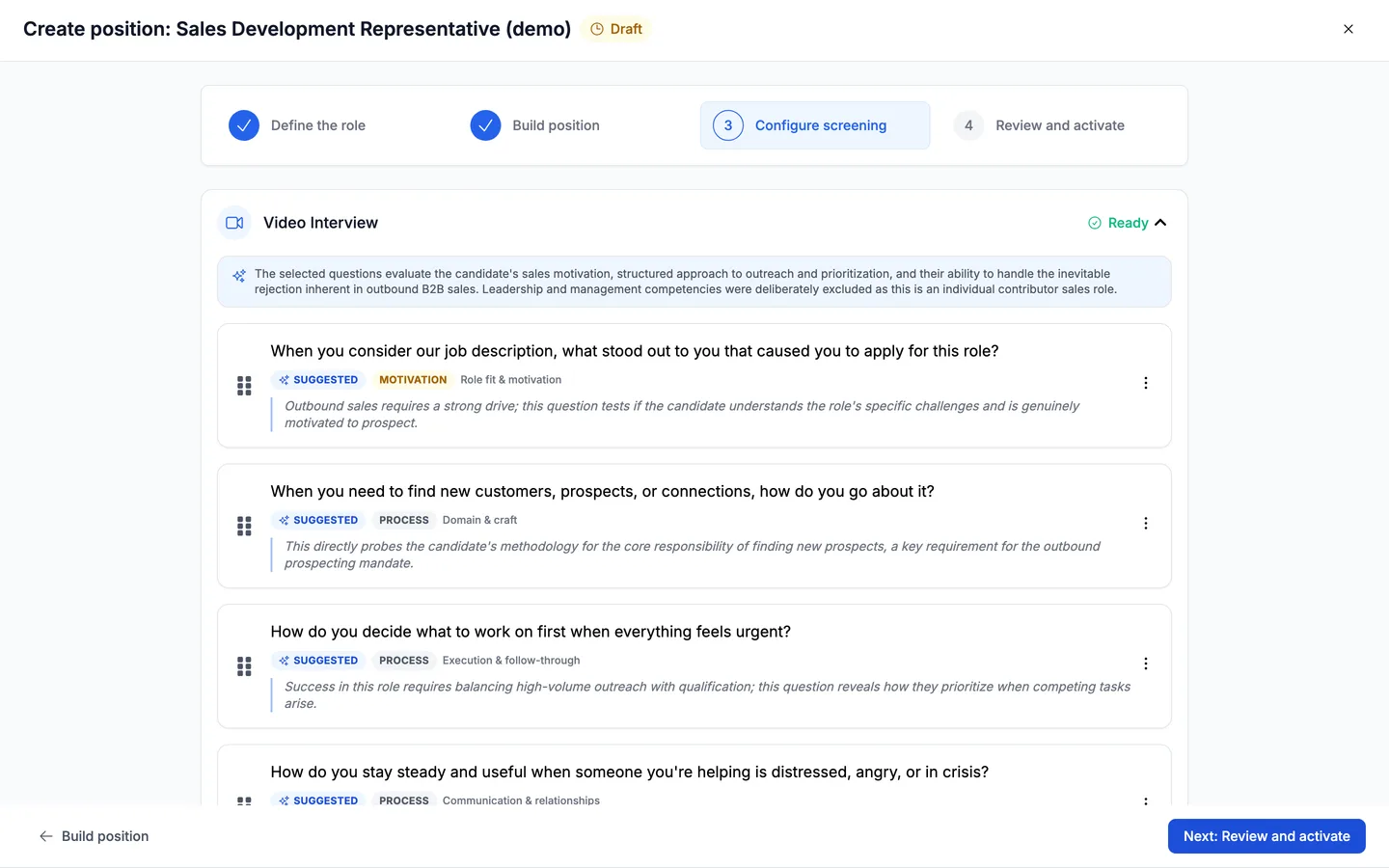
You don't start from a blank interview. The moment you move to Configure screening, Truffle reads the role and drafts a set of questions for it — briefly showing Analyzing the role… — then presents five, each badged Suggested. Every one carries the competency it's testing (motivation, process, behavioral) and a line explaining why it was chosen for this role. A note at the top summarizes what the set covers, and what it deliberately left out — for an individual contributor role, for instance, it skips the leadership questions.
- 4
Keep them, swap one, or add your own
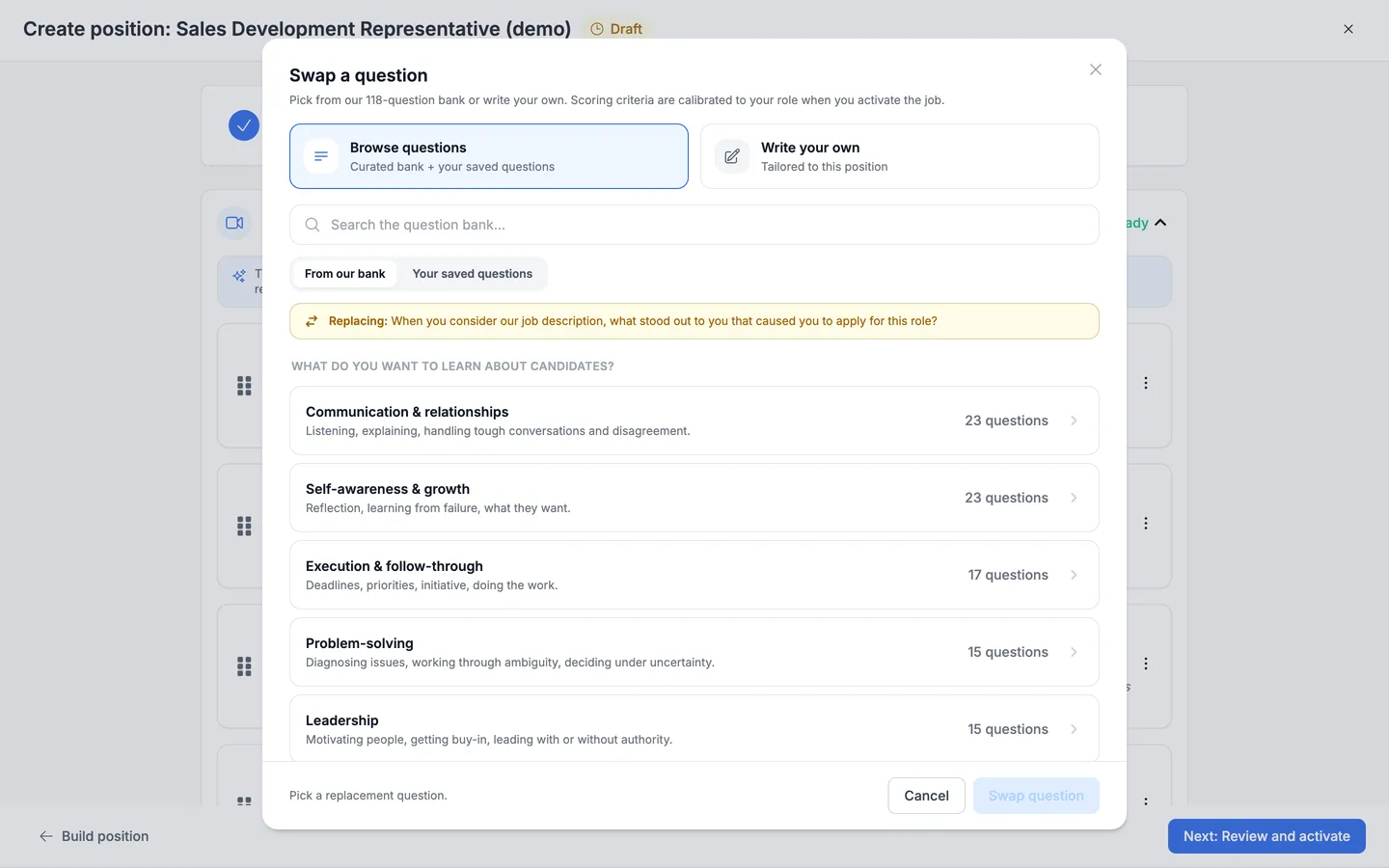
The draft is a starting point, not a decision. Each question has its own menu — Add video, Replace question, Remove question — and you can drag them into the order you want. Replace question opens the bank, organized by what you want to learn about candidates — categories like Communication & relationships, Self-awareness & growth, Execution & follow-through, Problem-solving, and Leadership, each showing how many questions it holds. Search it, or switch to Write your own for something specific to this role. Add a question below the list appends one the same way. A handful of focused questions beats a long list — every answer is scored, so more questions is more to review, not automatically more signal.
- 5
Review, brand it, and activate
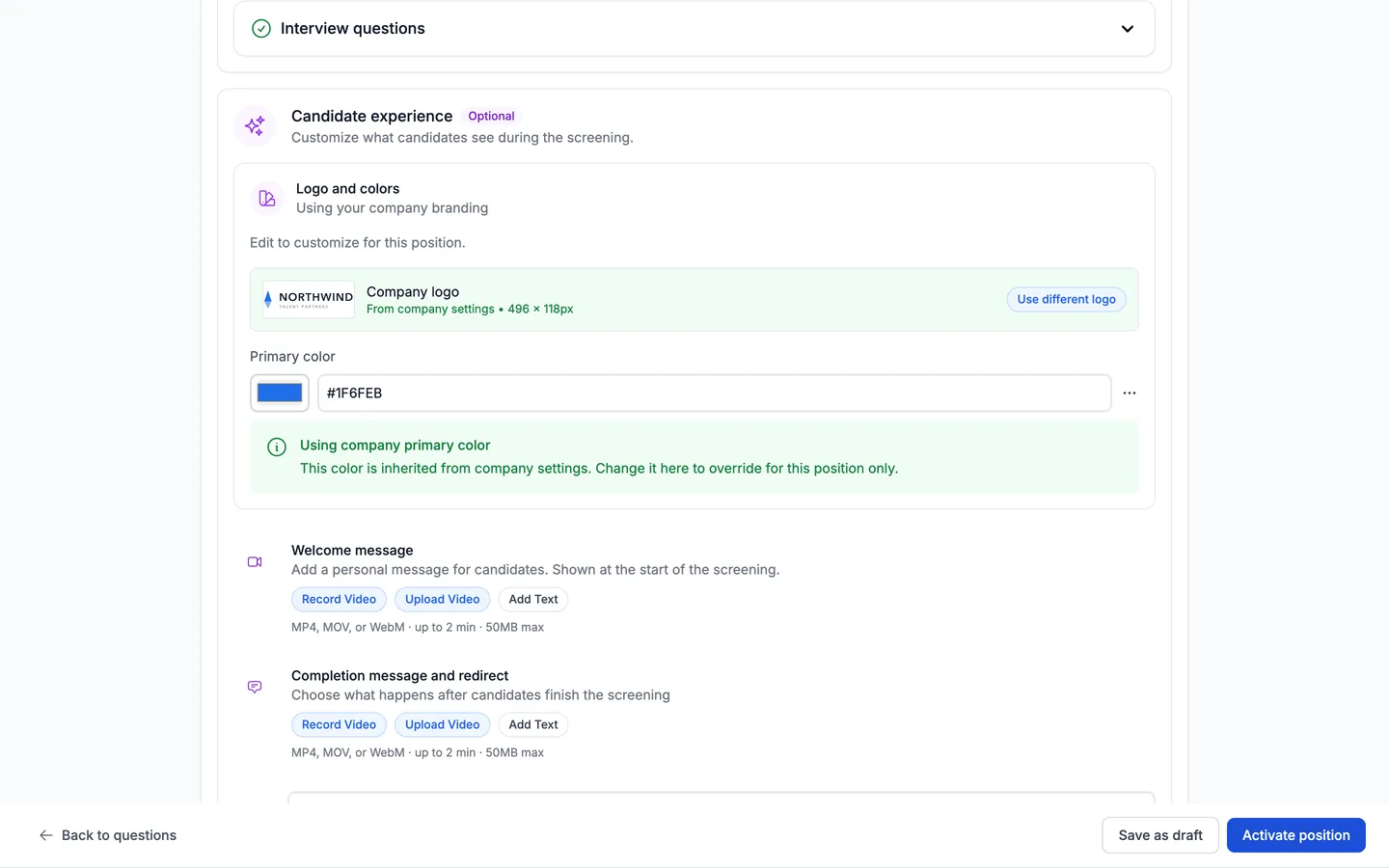
Moving to Review and activate kicks off the last piece of setup: Truffle calibrates scoring criteria for each of your questions, which takes a few seconds and gates activation until it finishes. Then you get the full summary — position setup, role brief, interview questions — plus Candidate experience, where your logo and brand color are already applied from your company settings, and you can add a Welcome message and a completion message by video or text. When everything looks right, choose Activate position. You can also Save as draft and come back.
Questions
Do candidates need to install anything or book a time?
No. A one-way video interview is asynchronous. Candidates open a link and record their answers on any device, on their own time. There's nothing to schedule and nothing to install.
How many credits does a video interview cost?
The Video Interview component costs 5 credits per screening. You can see the cost next to each component on the Build position step before you turn anything on. The free trial includes 30 credits.
Can I use a video interview without resume screening or assessments?
Yes. Each screening component stands on its own. Turn on Video Interview by itself, or combine it with resume screening and assessments when you want more signal. You need at least one component switched on to continue.
Does Truffle decide who passes the interview?
No. Truffle transcribes and scores each answer against the criteria you set, and shows the reasoning behind every score, but it never auto-rejects. You review the evidence and make the call.
Does Truffle write the interview questions for me?
It drafts them. When you reach the Configure screening step, Truffle reads your job description and suggests five questions, each tagged with the competency it tests and a line on why it fits the role. You decide what to keep — replace any question from the bank, write your own, or remove it. The draft is a starting point, not a decision.
Can I edit the questions after the position is live?
You build your questions on the Configure screening step, keeping or replacing what Truffle drafts and adding your own. You set them before activating; plan the interview before you go live so the experience is consistent for every candidate.
Try it on your own role
Every plan includes resume screening, one-way interviews, and talent assessments.
Start free trial7 days · 30 credits · no card required