The five best AI screening tools for high-volume hiring in 2026
I signed up for five free trials of AI screening tools, two ATS with screening built in and three standalone tools, and tested each one against the same seven criteria. Here are the results, screenshots included.


AI summary
- I tested Truffle, TestGorilla, Mokka, Workable and Manatal on free trials, against seven criteria: what it screens, how it scores, who makes the call, where candidates come from, where results go, time to first screen, and cost at your volume.
- Most of the AI in this category is gated. TestGorilla's scoring is a paid tier, Manatal's AI interviewer is paid, Workable's AI review never switched on, and Mokka wouldn't activate a role without a 500 euro sourcing checkout.
- The two ATS are ATS first. Both do the pipeline well and the screening badly. If you're set on one, pair it with a dedicated screening tool rather than paying for their add-ons.
- Truffle is our product and I've said so. It's the only one of the five where all three screening methods ran on the trial and nothing was auto-rejected. It doesn't post jobs, so you bring the applicants.
I recently wrote about what AI screening actually is. In that article I lightly touched on AI screening tools (AI candidate screening software, if you prefer the longer label) and how to evaluate them. Today I’d like to do a deeper dive into some of the most popular options on the market in 2026, because there is a lot of confusion out there.
As someone with the misfortune of working in marketing, I’m no stranger to how bastardised these “best of” roundups have become. So it’s no surprise that when I Google “best AI screening tools” I see a ton of inaccuracies.
For example, the folks at Mokka have a best AI screening tools listicle that states Willo starts at $49. Willo’s pricing page says it’s $59, and it’s per open role. Sapia has a best AI screening software roundup that, no surprise, argues Sapia is the best tool on the market because “it audits its own AI”. And so on it goes.
That’s why I have an ambitious goal today. To lay out the best AI screening options for hiring teams without:
- Inventing facts
- Having my own Truffle bias muddy the water
To do this I signed up for a trial of each tool and I’m sharing my experience, so you know I actually tried these tools out and didn’t just ask ChatGPT to give me a roundup.
Buckle up buttercup, it’s about to get real.
How we evaluate and test recruiting software
Our reviews are written by recruiters and TA professionals who have spent years using, testing, and buying hiring tools. We evaluate every product against the same criteria: what it actually does, what it costs, how fast you can get value from it, and whether it solves the screening problems small teams face every day. Truffle is our product, and we are upfront about that. But we do not inflate competitor weaknesses or hide our own limitations. If a tool does something better, we say so. We think owners deserve honest comparisons, not marketing disguised as editorial.
The AI screening tools I tested (and why)
A lot of AI screening tools on the market target large enterprises, so there’s no way to trial them. It’s really hard to write about HireVue if all I use is G2 and Reddit threads, and also pointless for two reasons:
- Your LLM of choice can summarize that information better than I can
- First-hand experience is the only way to truly evaluate a platform. A review based on what other people say isn’t interesting to write or to read.
With that in mind, I selected tools that offer free trials I could actually sign up for. This meant enterprise brands like Paradox (now part of Workday) and Eightfold weren’t included.
If you’re a large enterprise, you’ll have to go do the demos and make up your own mind. This roundup focuses on tools that offer free trials or free accounts.
Broadly speaking there are two categories of AI screening software, so I broke the roundup into two:
- ATS that offer AI screening, like Workable and Manatal
- Standalone AI screening tools, like Truffle, TestGorilla and Mokka
The five tools, in the order they appear below:
- Truffle, AI screening for small teams doing high-volume hiring, from $49 a month
- TestGorilla, skills tests first, from $135 a month billed annually
- Mokka, AI phone screen with resume screening, $0.49 per applicant
- Workable, all-in-one ATS with AI screening built in, from $299 a month
- Manatal, cheapest ATS with AI candidate matching, $15 per user a month
| Tool | Best for | Free trial | Credit card | Starting price |
|---|---|---|---|---|
| Truffle | AI screening for small teams that lets you pick and choose resume screening, one-way video and assessments | 7 days, 30 credits | No | $49/mo |
| TestGorilla | Skills tests first | Free plan, 10 credits a month, no expiry | No | $135/mo, billed annually |
| Mokka | AI phone screen with resume screening | 30 days | Not stated | $0.49 per applicant, or flat unlimited |
| Workable | All-in-one ATS with AI screening built in | 15 days, full Standard plan | No | $299/mo |
| Manatal | Cheapest ATS with AI candidate matching | 14 days | No | $15/user/mo, billed annually |
The criteria I used to compare AI screening tools
To avoid turning this into a clearly biased article about how brilliant Truffle is, I evaluated each AI candidate screening tool against the same set of criteria. I did this by signing up for a free trial and seeing how quickly I could launch a role with AI screening.
| Criterion | What good looks like | The question to ask |
|---|---|---|
| What it screens | Resume, video and assessments. | Does it offer one screening method or multiple methods? |
| How it scores | Do you see the criteria? Do you see the reasoning? | Can I set the criteria per role and see the evidence behind every score? |
| Who makes the call | You get helpful analysis but calls aren’t made for you. Nothing is rejected on its own. | Does it auto-reject, or does it rank and leave the decision to me? |
| Where candidates come from | Indeed and the boards you use. | Do applicants flow in from Indeed and my job boards automatically? |
| Where results go | Back into your ATS. Or it stands alone. | Does it write scores back to my ATS, and can it work without one? |
| Time to first screen | Can I get started in five minutes or fifty minutes? | Can I sign up and screen a real role today? |
| Cost at your volume | Does the math math? Is it clear how pricing works? | What does a month of my actual applicant volume cost? |
Standalone AI screening tools
There are a lot of standalone AI screening tools, ranging from one-way interview tools like Hireflix to enterprise tools like Paradox. These are the three with trials I could run.
1. Truffle
Best for: small recruiting and hiring teams with more applicants than time.
Free trial: 7 days, 30 credits, no card. That is 30 resumes, 15 assessed candidates or 6 interviews, and 5 direct invites.
Price: from $49 a month. Every feature on every plan; plans differ only by credit pool.
This is our product, so read the next paragraphs as the terms we’re asking to be judged on.
Truffle is an AI screening platform for small teams doing high-volume hiring. You decide what each role is screened on, any mix of resume criteria, one-way interview questions and assessments, and Truffle reads every applicant against it and ranks them with the evidence shown. It works with job boards like Indeed or the ATS you already have. Nothing is auto-rejected. You make every call.
| Criterion | Truffle |
|---|---|
| What it screens | All three on every plan, including the trial. AI Match on resumes, one-way video or audio interview, and three assessments: Big Five personality (IPIP), situational judgment, environment fit. |
| How it scores | You set the criteria per role. Each candidate gets a match percentage, a written summary with key insights, per-question scores with the evaluation criteria shown, and 30-second highlight clips with a “why this matters” note. Video is scored on the transcript only, not face or tone. |
| Who makes the call | Nothing is auto-rejected anywhere in the product. Qualification questions flag a green tick or red cross and everyone still proceeds. Every candidate row ends in Decide: Advance, Hold, Reject or Hire. |
| Where candidates come from | One Position Link per role that you put on Indeed, any board or your careers page. Direct email invites, CSV bulk invite, Zapier from an ATS, or Ashby natively. It doesn’t post jobs for you. |
| Where results go | Stands alone. Ashby gets scores written back natively. Greenhouse, Lever, Workable, BambooHR, JazzHR, Breezy and Recruitee go through Zapier, plus an API and webhooks. Integrations are paid-plan only, so you can’t test writeback on the trial. |
| Time to first screen | About 10 minutes: paste the JD, accept or edit the AI-suggested criteria and questions, add a logo, copy the link. A built-in two-question demo interview lets you sit the candidate side in five. |
| Cost at your volume | One credit pool across all three methods. A resume is 1 credit, an assessed candidate 2, a completed interview 5. Starter is $49 for 200 credits with a hard cap. Core is $99 a month billed annually for 600 with roll-over and 25 cent overage. Per applicant that’s 12 to 25 cents for a resume, up to $1.25 for an interview. |
Setup is four steps and takes about 10 minutes
Paste the job description. Answer three role brief questions if you want sharper criteria, or skip them. Pick what candidates go through: resume scoring, qualification checks, a video interview, assessments. Each card shows what it costs in credits before you turn it on.
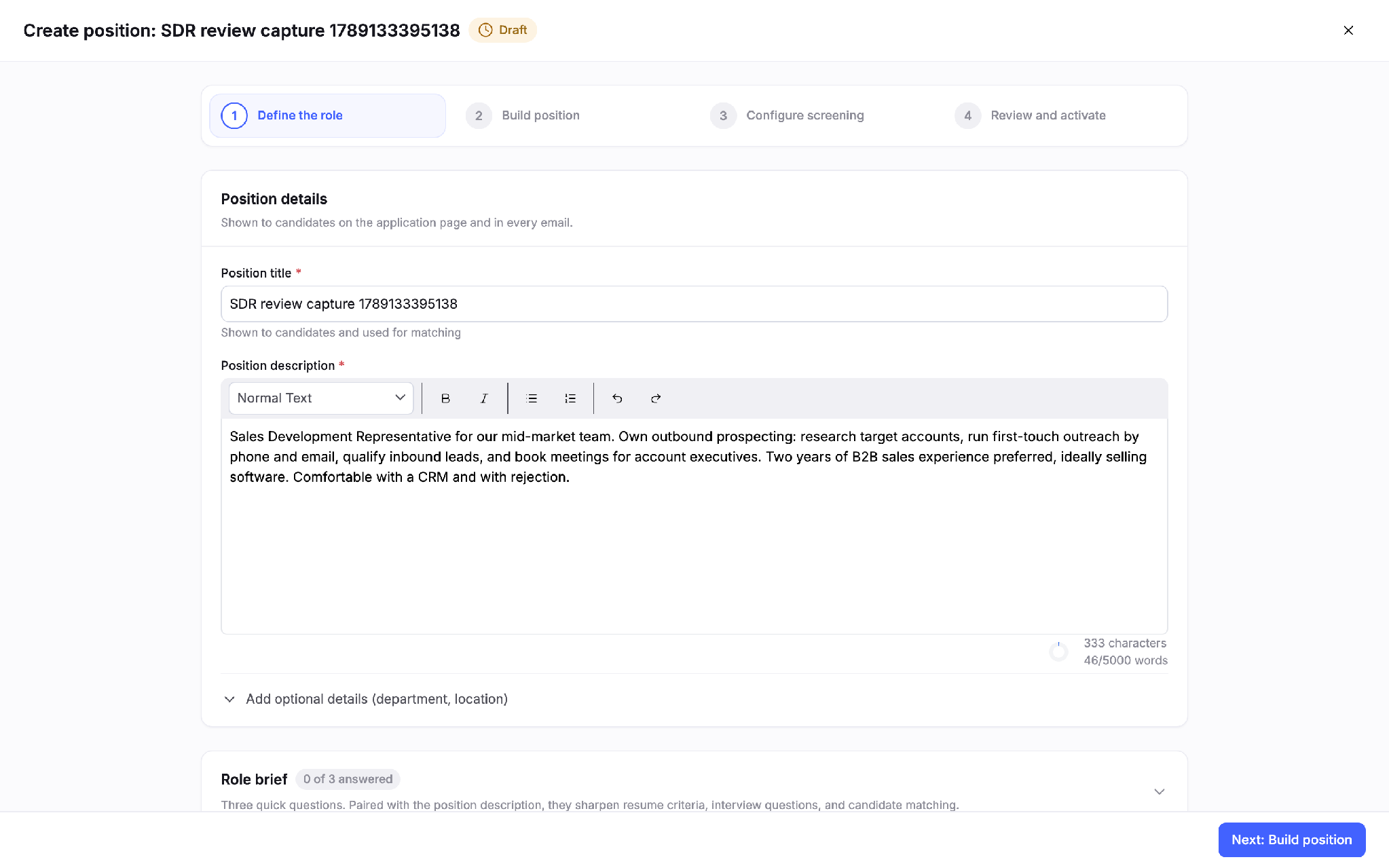
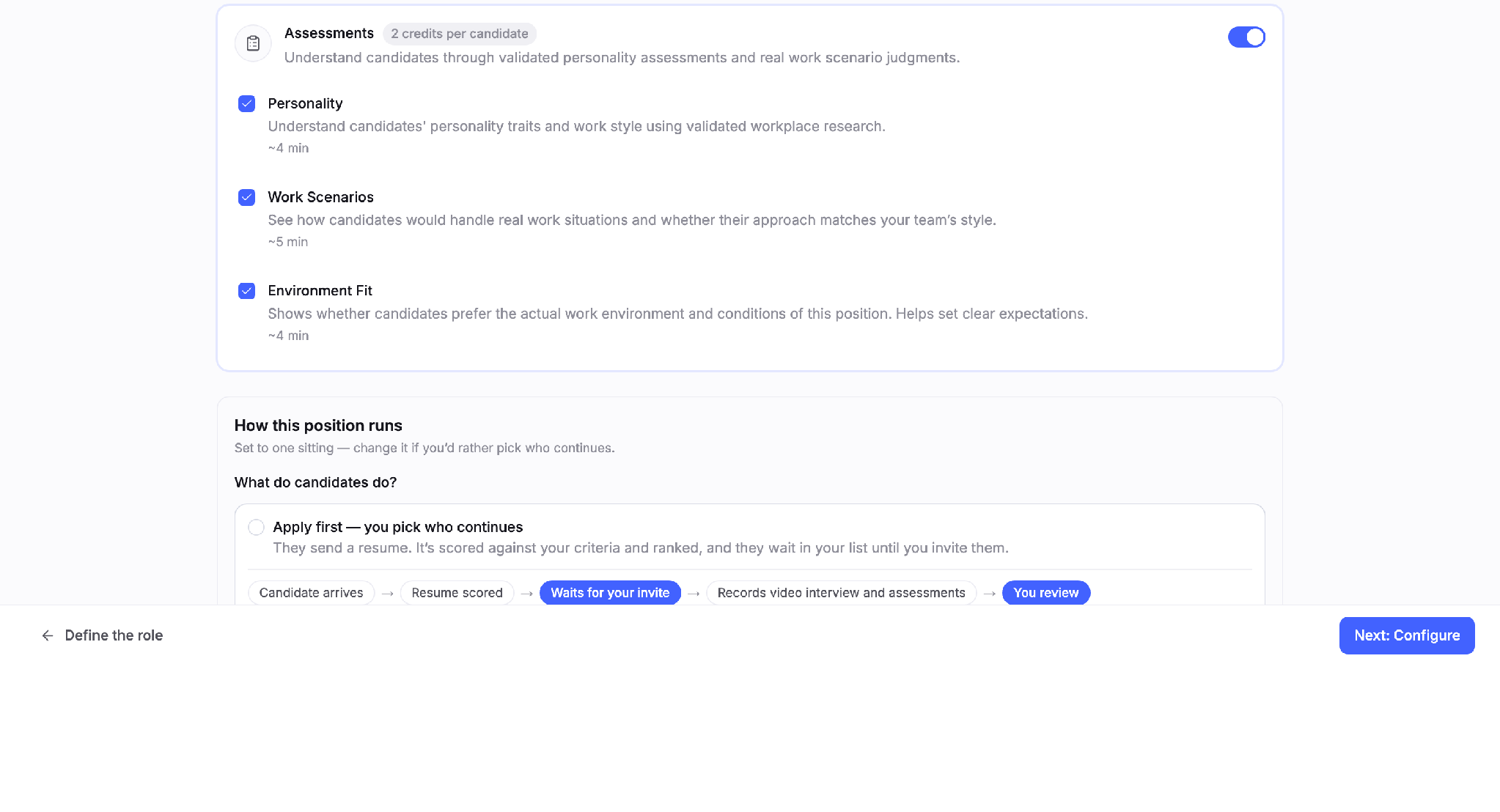
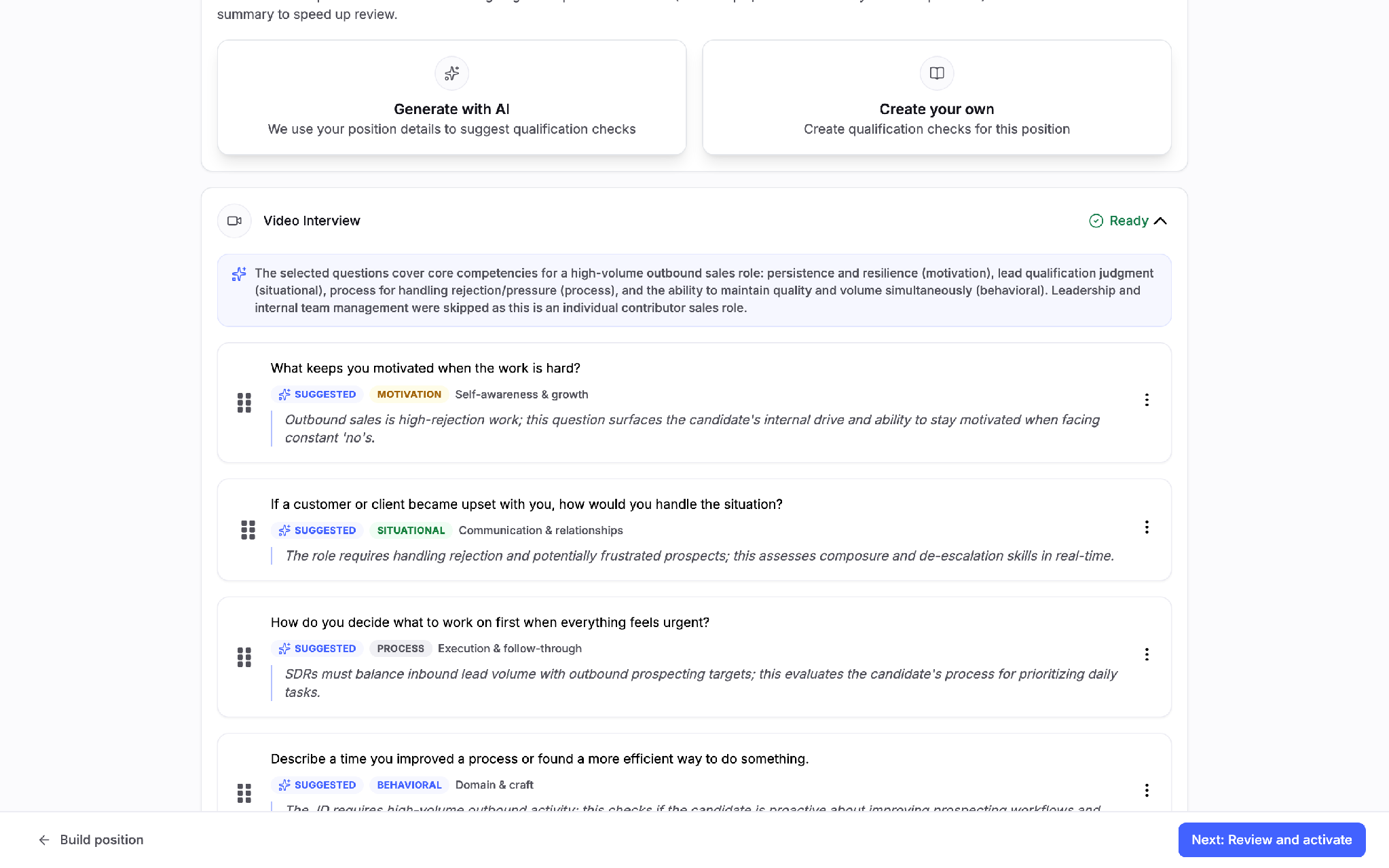
Truffle drafts the criteria and the questions from your job description
On step three the resume criteria are already written: five for my SDR description, each with a one-line definition and a “required” toggle. The interview questions come with a rationale for why each one is there, and the whole interview is timed at about 12 minutes. Personality traits are configured as a choice between two directions with the trade-off stated, or “not important”.
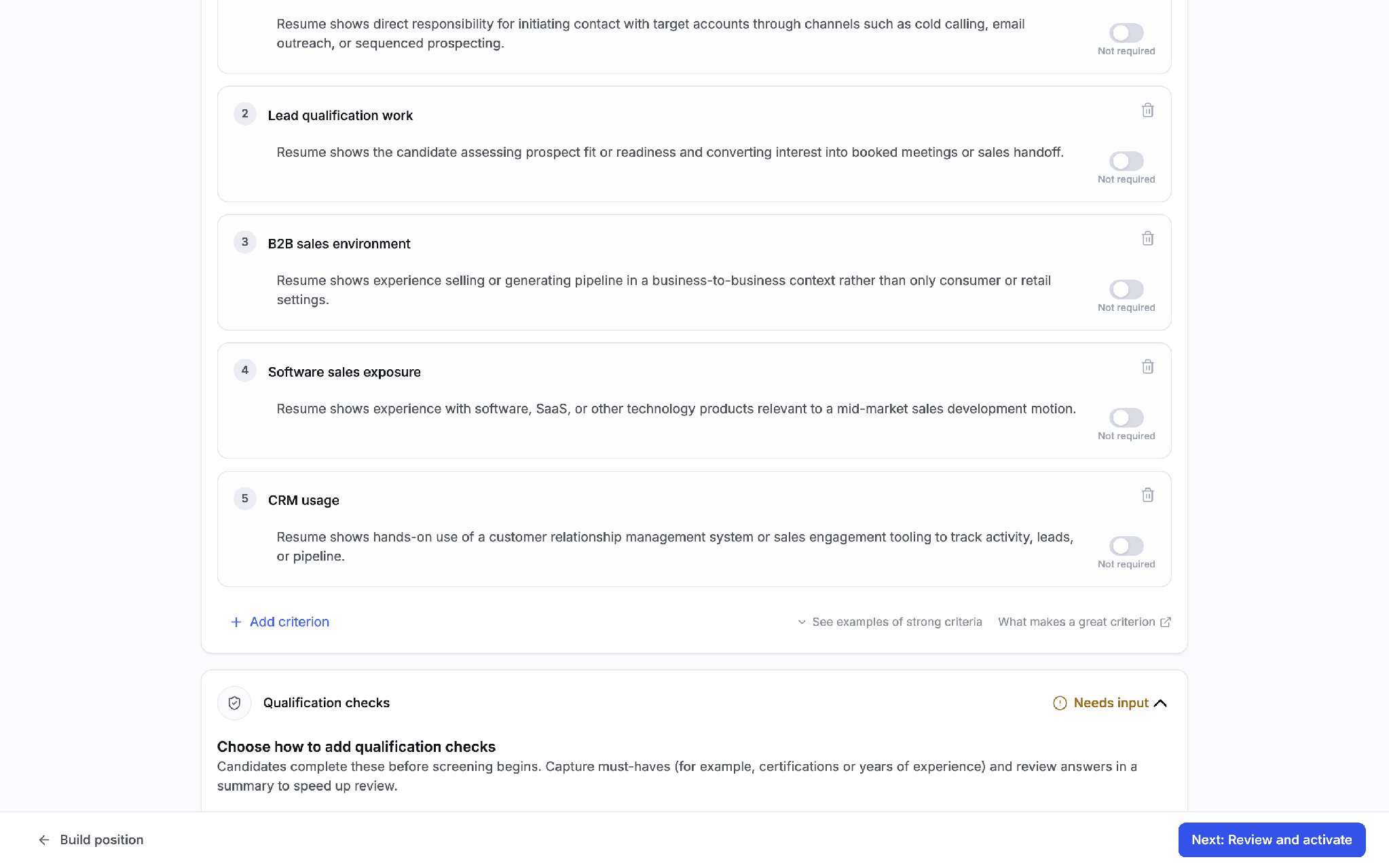
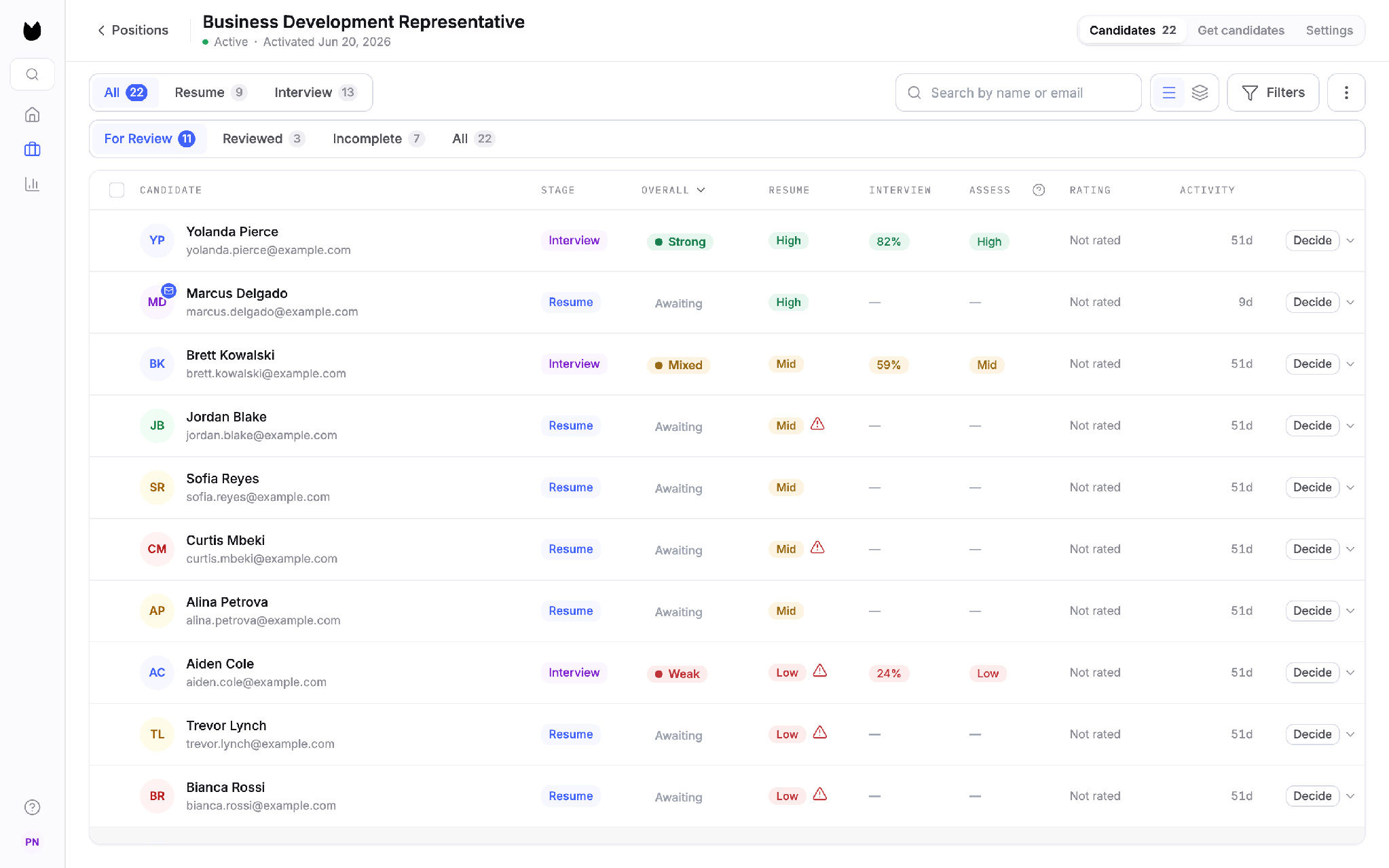
What comes back is a ranked list with the reasoning attached
The candidates table shows one overall call per person (Strong, Mixed, Weak) alongside the resume, interview and assessment signals, so you can see which method produced the read. Open a candidate and you get a summary, key insights, and Candidate Shorts: 30-second clips tagged by competency with a note on why the moment matters.
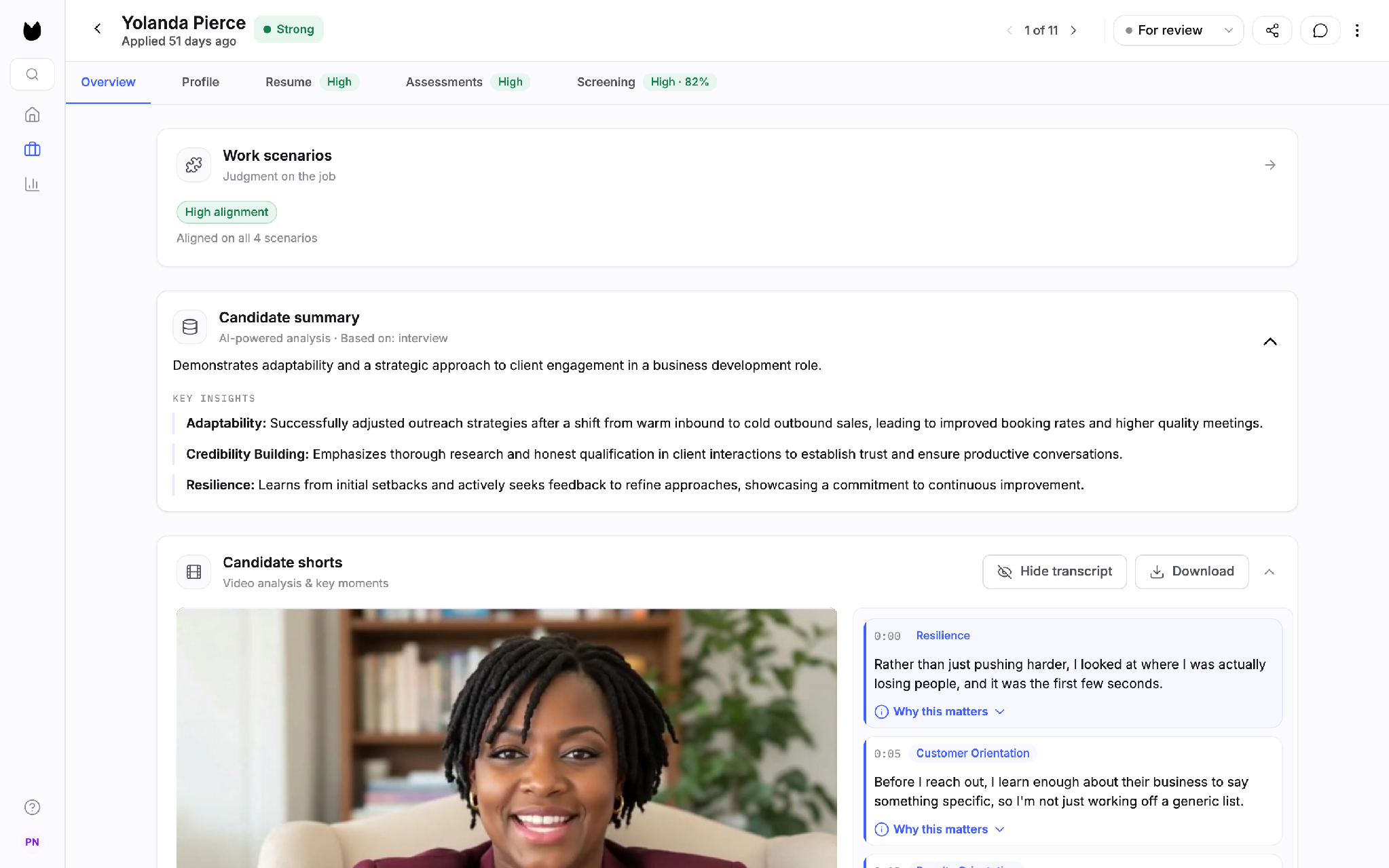
You make the call
Every candidate row ends in a Decide button: Advance, Hold, Reject, Hire. Nothing moves without you. The candidate sees the same promise on the application form: Truffle’s AI does not reject or advance any application automatically.
2. TestGorilla
Best for: teams that want to test skills before they talk to anyone, and can live without job posting.
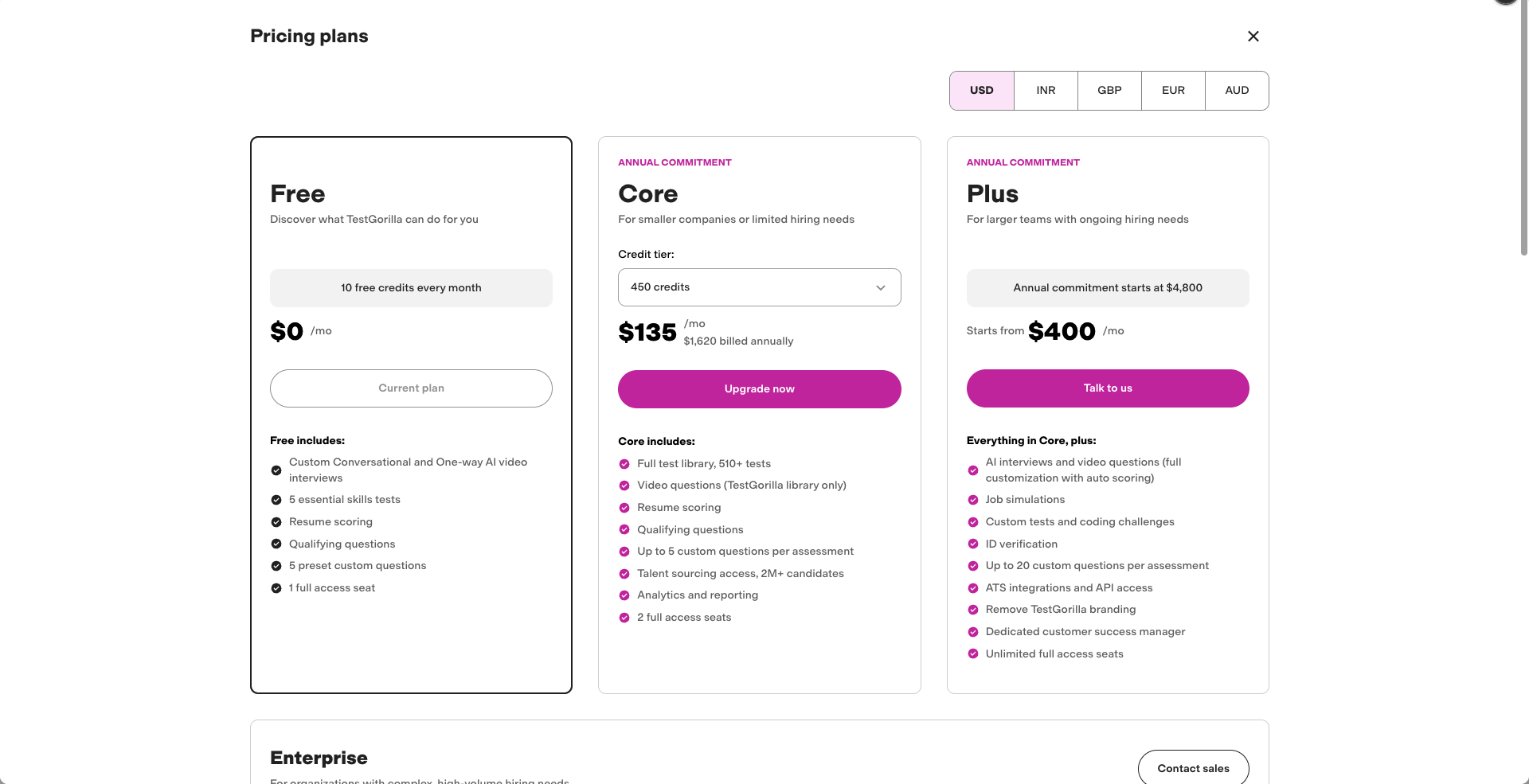
Free plan: 10 credits a month, no card, no expiry. Most of the AI is locked behind Plus.
Price: Core is $135 a month billed annually for 450 credits. Plus from $400 a month with AI interviews, auto scoring and ATS integrations.
| Criterion | TestGorilla |
|---|---|
| What it screens | All three exist: resume scoring, qualifying questions, skills tests, one-way video questions, AI interviews with an avatar, job simulations. On the free plan the AI interview and library video questions are locked, and the wizard blocks at Finalize until you remove them, so I wasn’t able to test them. |
| How it scores | Custom video questions get AI-generated scoring criteria you can edit, scored on transcript only, no tone or appearance. The sourcing view shows a per-criterion match with a line of evidence for each. But AI scoring of your own applicants is a Plus feature, so I never saw it applied to a real answer. |
| Who makes the call | Nothing is rejected. The qualifying question I built was multiple choice with no disqualify option, so it doesn’t even knock out. You read scores and decide. |
| Where candidates come from | It doesn’t post jobs. You invite candidates by email or link, or source from their 2M+ talent database. ATS integrations and API are Plus only, from $400 a month. |
| Where results go | Stands alone by default. Writes back to an ATS only on Plus. |
| Time to first screen | The four-step wizard is quick and takes a pasted JD. Then a fresh account told me “you’ve run out of credits”, the invite I sent myself never arrived, and “Try your assessment” did nothing. I built a screen and couldn’t run it. |
| Cost at your volume | Credits, and the math is visible. Free is 10 a month. Core is $135 a month billed annually, $1,620 for 450 credits, about $3.60 per candidate. Plus starts at $4,800 a year. One credit per candidate, so high volume gets expensive fast. |
The job wizard is four steps and the first one takes a pasted job description. Good start.
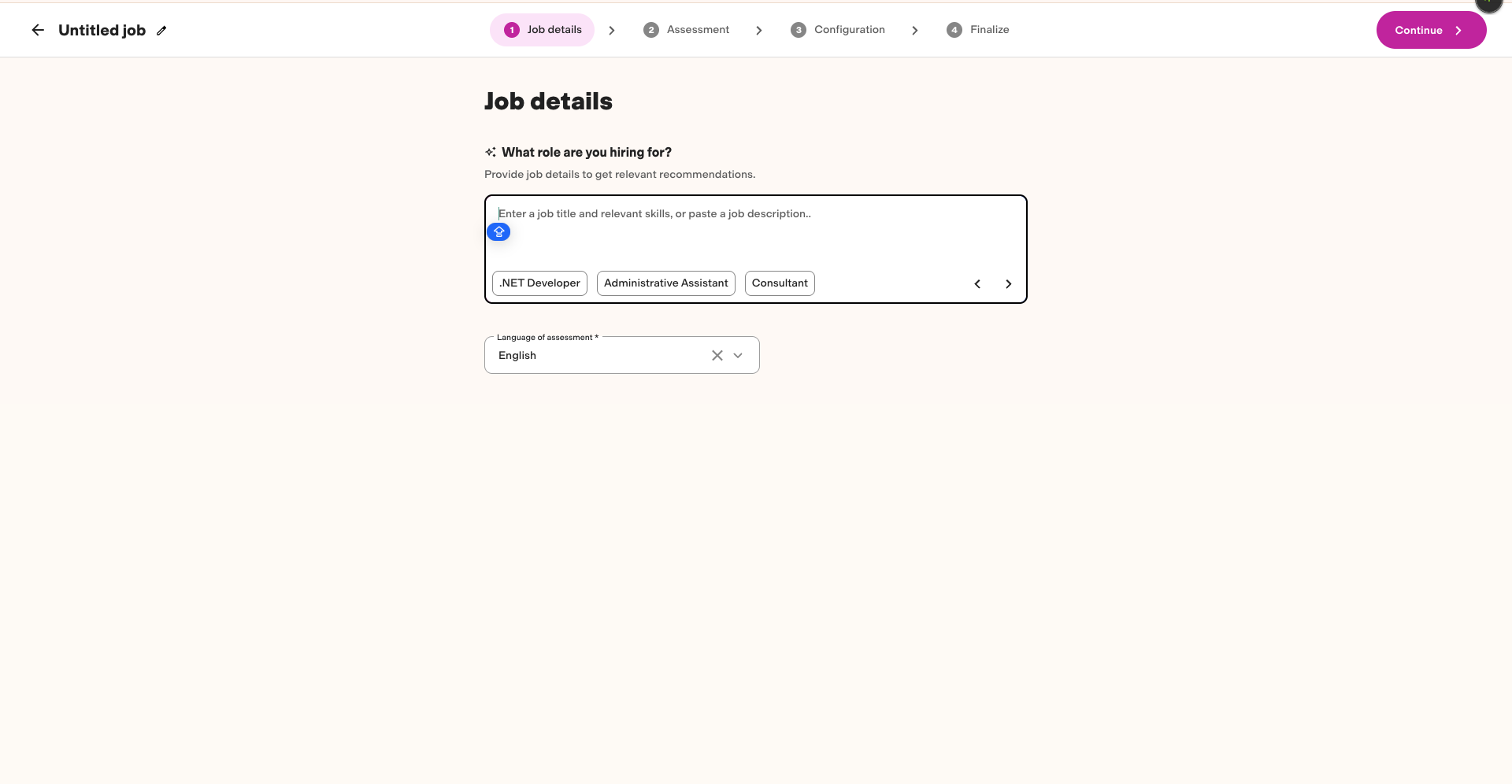
Step two is a menu of everything the category promises
Qualifying questions, skills tests, resume scoring, one-way video, AI interview with an avatar, job simulations. I picked a knockout question, the Big Five personality test and an AI interview. The knockout question turned out to be plain multiple choice with no way to disqualify on the answer. The AI interview turned out to be premium.
I swapped it for a one-way video question and the library questions were premium too, so I wrote my own: “Why do you want to work here?”
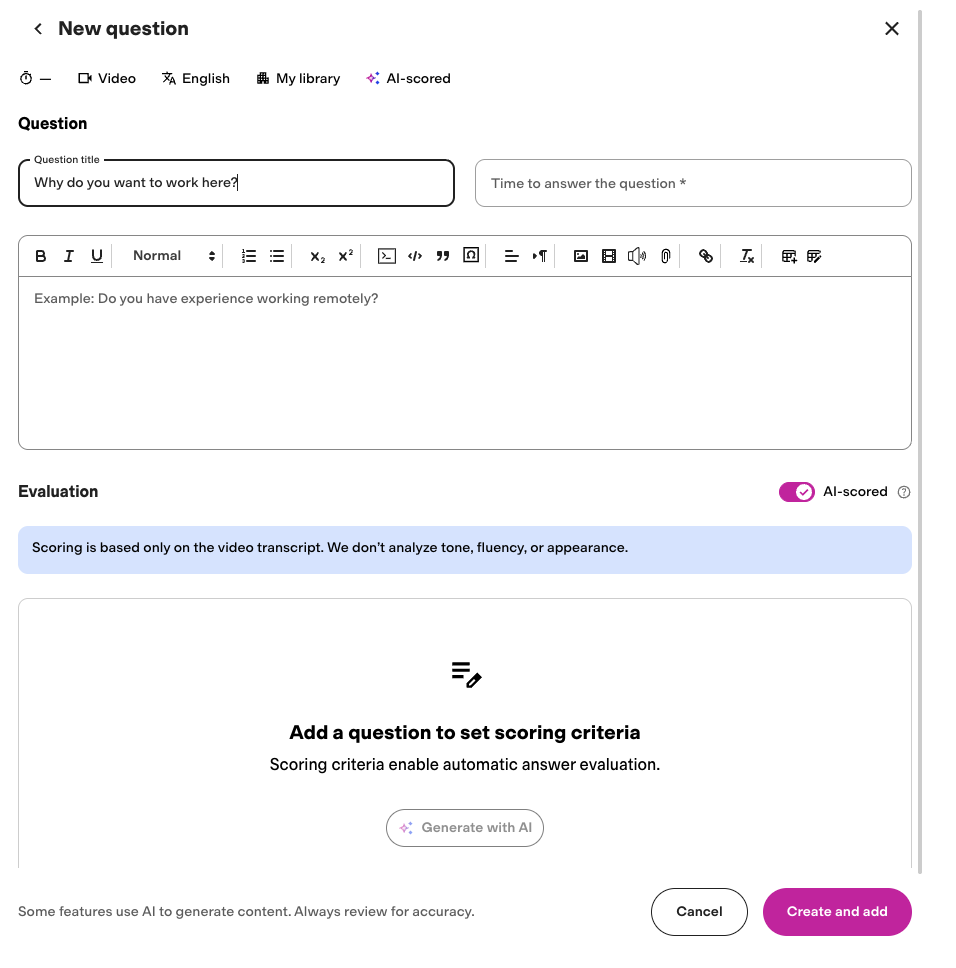
That question is where TestGorilla shows what it can do
Toggle AI-scored, click Generate with AI, and it writes scoring criteria for the answer, which you can edit. A banner says scoring uses the transcript only, not tone, fluency or appearance. That’s the right design. It’s also a Plus feature, so on the free plan I could build the criteria and never see them score anything.
Then it fell over
On an account I’d created that morning, Finalize produced “You’ve run out of credits. To keep inviting talent, you’ll need to upgrade your plan.” The free plan says 10 credits a month. I sent an invitation to myself anyway. The candidate moved to Invited. No email arrived. “Try your assessment” did nothing. I could not run the screen I’d just built, which was frustrating.
The sourcing tab is the most interesting thing in the product
Type a role, add ranking criteria, and it searches TestGorilla’s own talent pool and shows each candidate against each criterion with a line of evidence: “SDR Manager role, 2 years leading outbound team”, “No Clay.com experience mentioned”. Criteria you set, reasoning you can read.
Verdict
TestGorilla has the worst trial of the five. Everything that makes it AI screening is on Plus, from $4,800 a year, and the free plan couldn’t run a single assessment for me.
3. Mokka
Best for: teams that want an AI phone screen and are prepared to fight the checkout.
Free trial: 30 days on Starter and Business, no card mentioned.
Price: $0.49 per direct applicant or flat unlimited, seats free. Sourcing is 500 euros per role on top.
| Criterion | Mokka |
|---|---|
| What it screens | Resume screening is always on. The pre-screen is an AI phone interview, 10 to 15 minutes, voice not video. Assessments are “interactive forms” (career progression, SMART outcomes) rather than tests, and the intro interview is labelled “No AI assessment”. |
| How it scores | Criteria are yours and visible. It pulled requirements from the JD in a chat, then let me add my own, including nonsense like fluency in Gaelic and enthusiasm for IPAs, which it accepted without comment. I couldn’t see scoring on a real candidate because the role wouldn’t activate. |
| Who makes the call | Application questions carry reject rules, rejected candidates land in an “Auto-rejected” tab, and the copy says they “can be notified later via your ATS”. You’d have to switch it off. |
| Where candidates come from | A direct apply link, no ATS needed. Posting to 250+ boards is “Source talent”, a 500 euro per-role fee with a 14-day refund if no strong candidates arrive. |
| Where results go | Stands alone. ATS integration is an add-on on higher plans. |
| Time to first screen | Setup is fast and the chat-based role briefing is nice onboarding. Then Activate opened a 500 euro sourcing checkout with a Stripe card form, even though I’d turned sourcing off. I retried four times, stripped the interview plan, and got “Could not open payment, please retry” and a JavaScript error. |
| Cost at your volume | Usage-based: $0.49 per direct applicant or a flat unlimited plan, unlimited free seats, 30-day trial. Clear on paper. In the product the first thing it tried to charge me was 500 euros, shown as $500 on one screen and 500 euros on the next. |
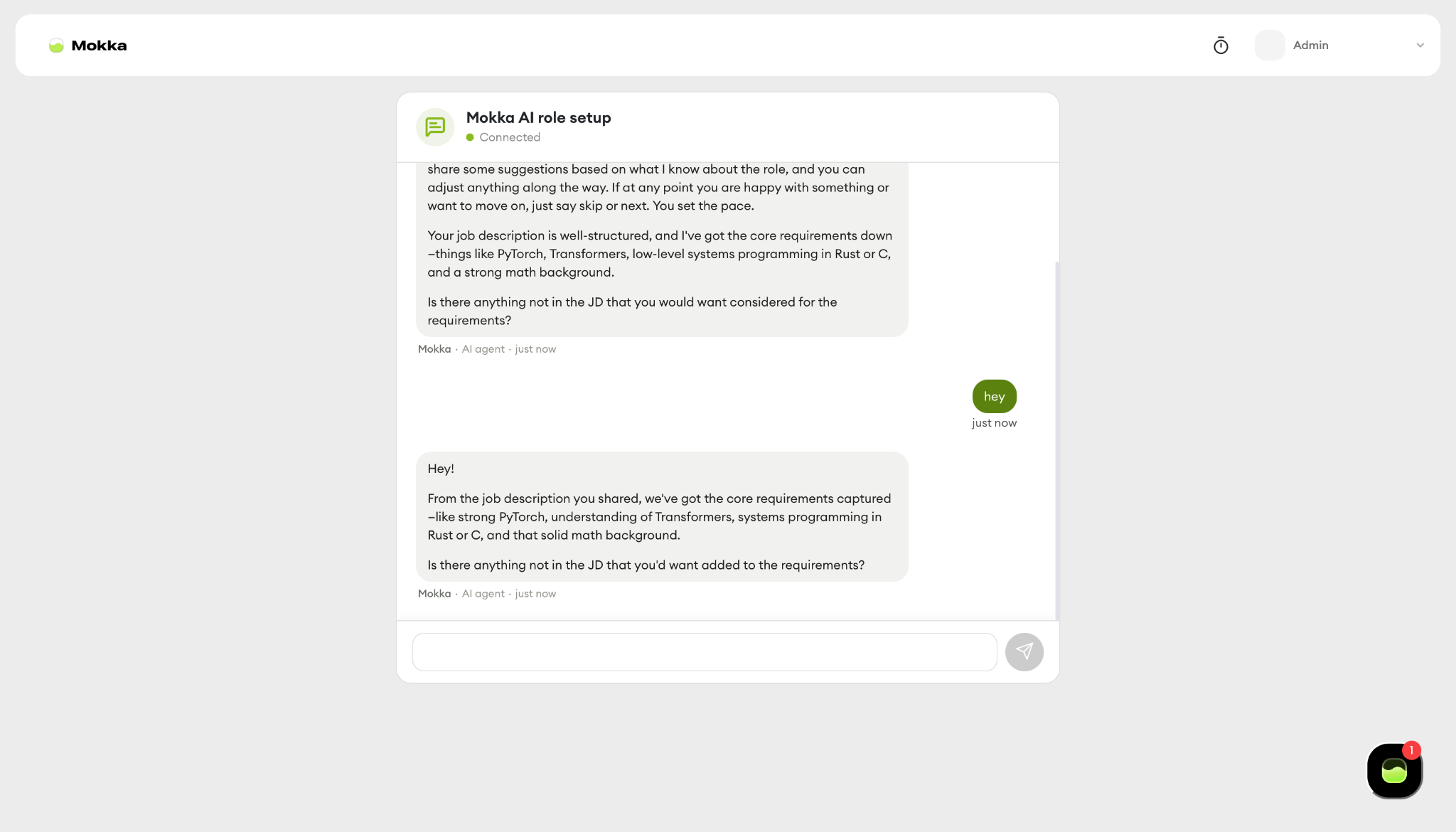
The role briefing is the best idea in the test
Instead of a form, Mokka opens a chat, or a phone call if you prefer, and interviews you about the role. It read my job description, listed the core requirements back correctly, and asked what wasn’t in the JD that I’d want considered.
When I typed “hey” it repeated its previous message almost word for word, so there’s a script underneath, but it produced a role brief I could edit.
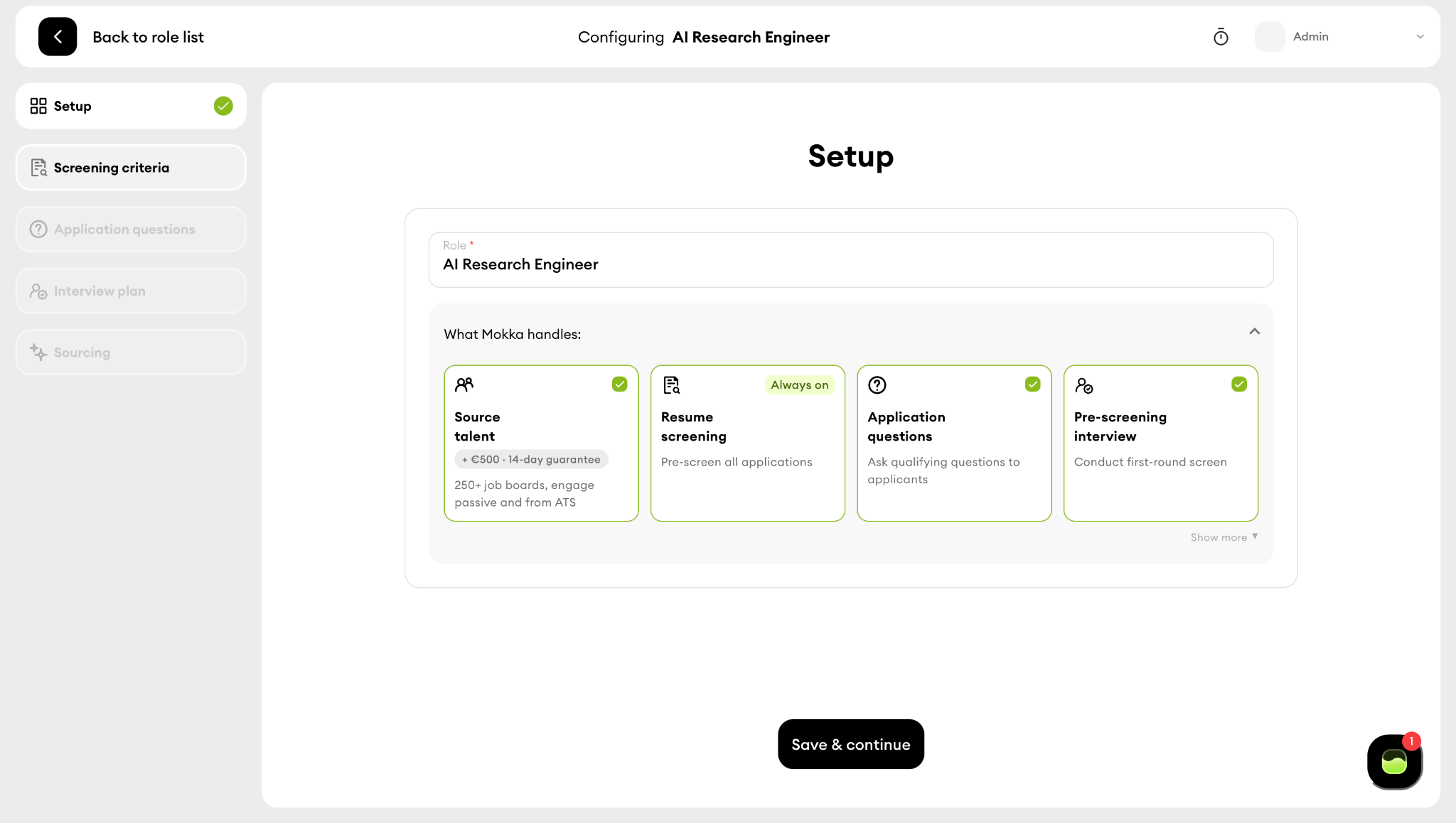
Setup shows you the four things Mokka does
Source talent, at 500 euros per role with a 14-day guarantee. Resume screening, always on. Application questions. Pre-screening interview. I turned sourcing off.
Screening criteria are free text and it took whatever I typed, including “must have enthusiasm for IPAs”, without pushing back. Application questions are the usual work authorization, salary, location and notice period, each with an optional reject rule. Auto-reject is on by default for work authorization.
The interview is a phone call, not a video
The introduction interview is an AI voice call of 10 to 15 minutes marked “No AI assessment”. The optional add-ons are interactive forms, one ranked relatively across candidates and one AI-assessed. There’s a “Generate new” button for a custom interview. Nothing here records video.
Then I couldn’t activate the role
Clicking Activate opened “Only pay if we deliver”, billed now $500, refunded if no strong candidates in 14 days. I’d turned sourcing off. Cancel, back to Setup, sourcing still off, Activate again, same 500 euro checkout with a Stripe card form.
I removed the interview plan, tried again, and got “Could not open payment, please retry” alongside a raw JavaScript error in the corner. Four attempts, same result.
Verdict
Mokka has a clearer idea of what AI screening should be than most tools on this list: criteria you set, a screen it runs, a decision it hands back.
But the trial funnels every activation through a 500 euro sourcing purchase you didn’t ask for, the checkout is broken, and auto-reject is the default rather than the exception. If they fix the activation flow this is a serious tool. Today I couldn’t screen anyone with it.
ATS that offer AI screening
For the purpose of this roundup I included Workable and Manatal. There are a lot of ATS out there to choose from. In particular, I strongly considered Breezy HR and Zoho Recruit.
In the end, my initial research told me Workable and Manatal are leading the charge here, so I decided to focus on thoroughly reviewing them instead of spreading myself too thin.
4. Workable
Best for: teams that want a full ATS with (very) basic AI screening bolted on.
Free trial: 15 days, no card. The trial doesn’t include Workable Agent, which is the AI part.
Price: from $299 a month on Standard. Video interviews and assessments are add-ons at $109 and $59 a month, so screening on the entry plan is really $467 a month. Premier at $599 includes them. (I always find it odd how ATS price by employee count.)
| Criterion | Workable |
|---|---|
| What it screens | All three on paper, but the resume side is very basic. Out of the box it parses the PDF into work history and education and shows it back to you. Scoring and a match percentage exist on paid plans, but from what I could see they’re weaker than the dedicated screening tools. One-way video ($109/mo) and assessments ($59/mo) are add-ons on Standard, included on Premier. |
| How it scores | It doesn’t, in the trial. The AI resume review is a separate feature I couldn’t switch on, so the profile is a parsed resume and nothing more. Video answers come back as raw takes to watch and assessments as test scores. You do the comparing. |
| Who makes the call | Yes/no knockout questions auto-disqualify if you tick the box. Beyond that, you move candidates through stages by hand. |
| Where candidates come from | Strong. Publishing pushed the job to 8 of 17 free boards automatically. Applicants land in the pipeline, with a lag, and the trial only showed one of my two test applications. |
| Where results go | It is the ATS. There’s nothing to write back to. If you already run a different ATS, Workable wants to replace it, not sit beside it. |
| Time to first screen | About 6 minutes to build and publish the job and turn on the interview and assessments, based on screenshot timestamps. Then it stalled: the AI review toggle wasn’t there and candidate email was locked pending account verification. |
| Cost at your volume | Pricing is published and per month, not per applicant, so volume doesn’t change the bill. But the entry price is $299 and screening on that plan is really $467 with video and assessments added. Workable Agent credits are the one usage-based piece, and the trial doesn’t include it. |
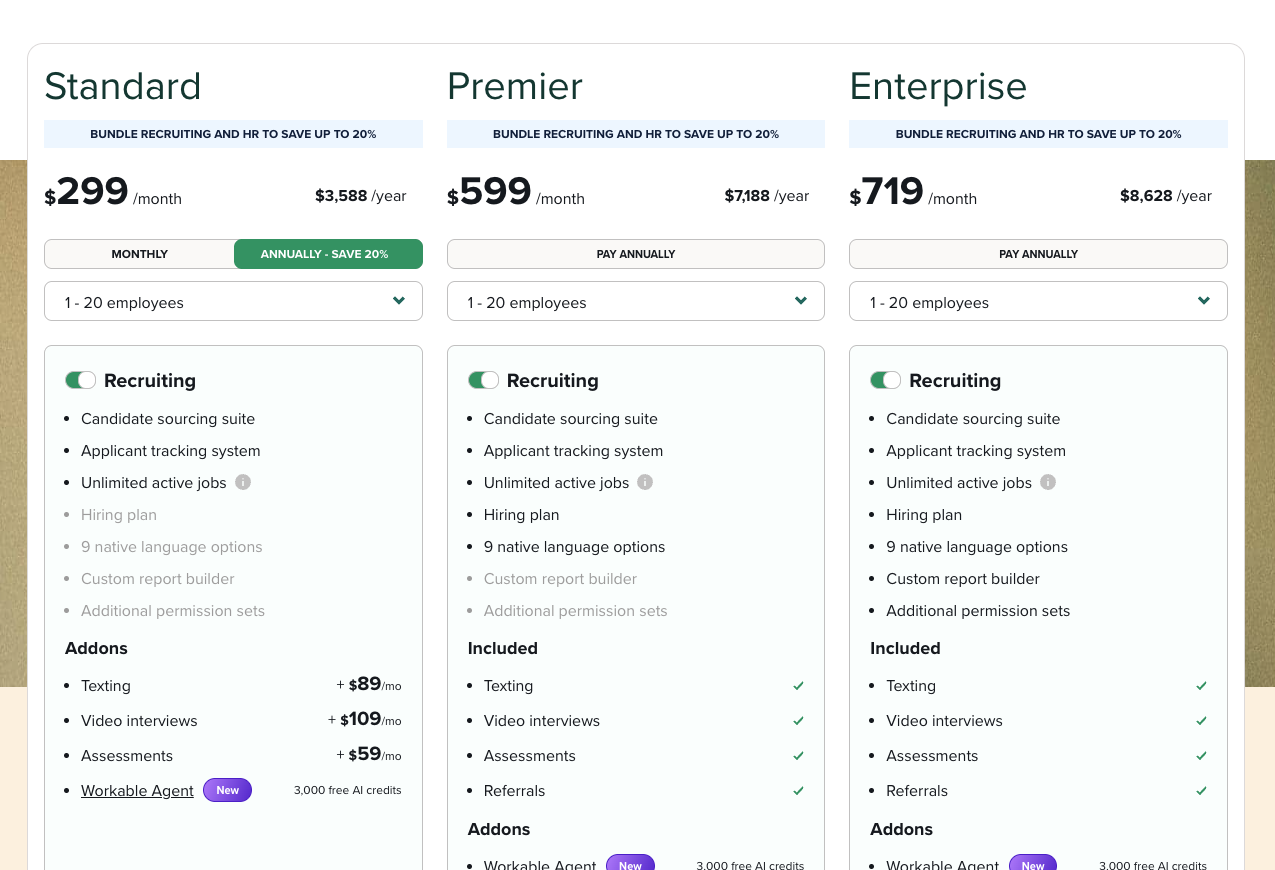
I signed up and went straight to creating a job, because how fast you can get to a first screen is the criterion that decides whether you’ll use a tool at all.
Getting a job live took a long time
The job form is split into description, requirements, benefits, industry, function, employment type, education, salary and location, each a separate field.
I had a finished job description and still had to cut it up and paste it in section by section. Nothing reads the JD and fills the form for you. The title field caps you at 60 characters with no special characters, which I only learned by hitting it.
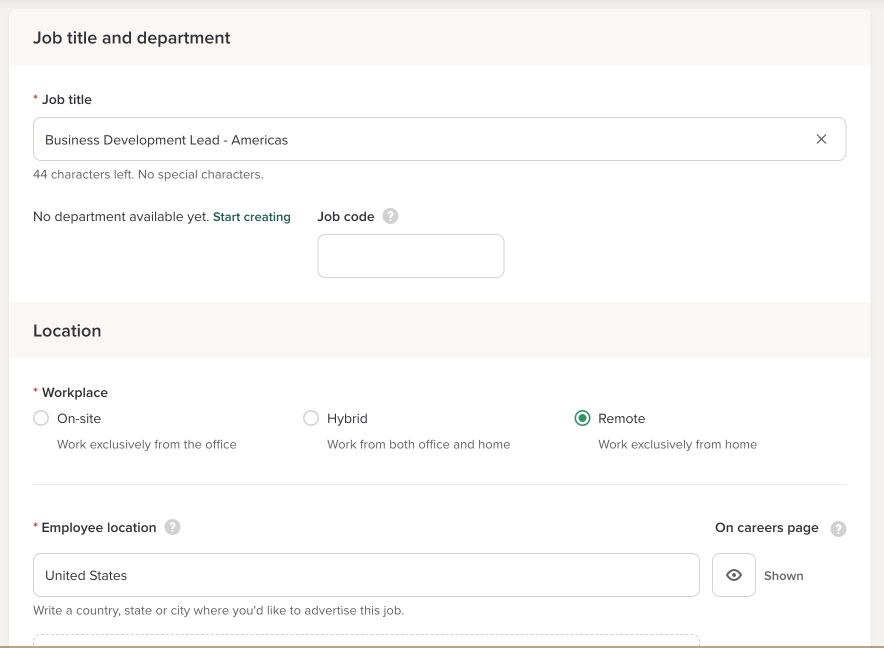
The application form shows you what candidates will see, which I liked
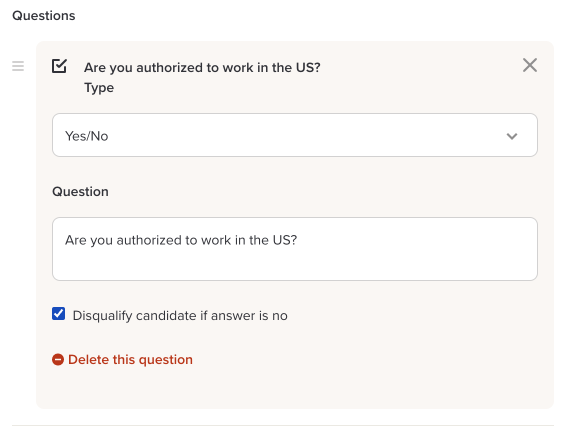
What I didn’t like: when you pull your requirements into the form, they arrive as statements, not questions.
“Five years of B2B sales experience” is not something an applicant can answer. I deleted them all and wrote a yes/no “Are you authorized to work in the US?” with the disqualify box ticked. That part is fine. It’s just knockout questions, the same as every ATS.
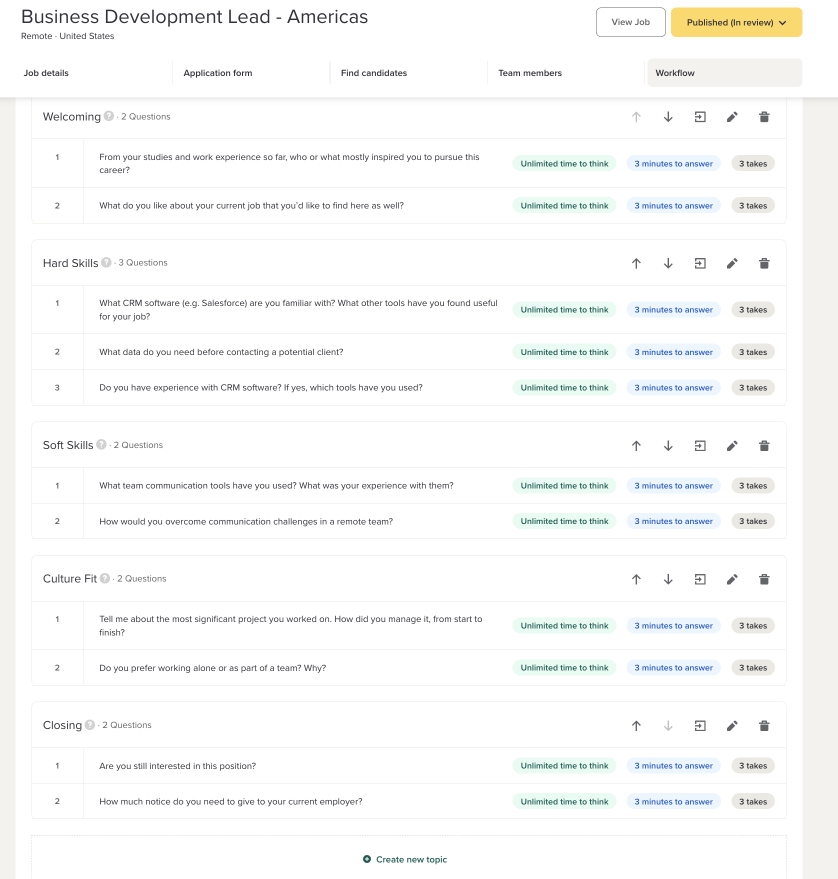
Publishing went to 8 of 17 free job boards automatically
Good. The job sits as “published, in review” while Workable checks it.
The AI-generated interview is the weak spot
One click gave me 11 video questions at 3 minutes each with unlimited thinking time and 3 takes. That’s a 35-minute async interview before anyone has looked at a resume.
Two of the eleven were the same question: “What CRM software are you familiar with?” and, two questions later, “Do you have experience with CRM software?” That’s what the generator produced from a normal sales JD.
You can edit every question, the timing and the takes, so you’ll fix it. But it’s sloppy from Workable.
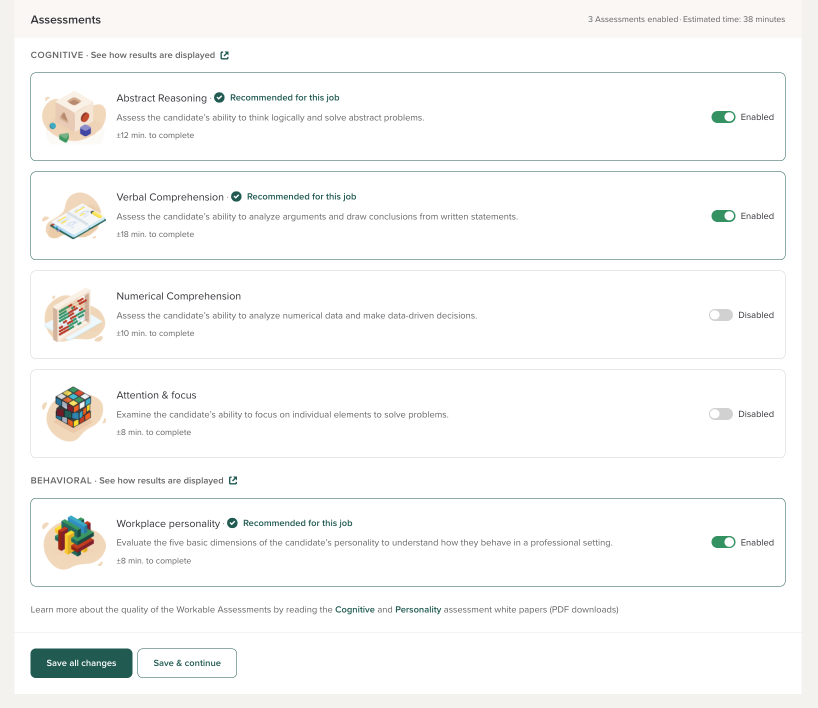
Assessments are solid and long
Four cognitive tests (abstract reasoning, verbal, numerical, attention) and a Big Five workplace personality test, with three recommended for my role.
Those three add 38 minutes. Interview plus assessments is over an hour of candidate time for a first screen, and the candidate pages carry Workable’s branding, not yours.
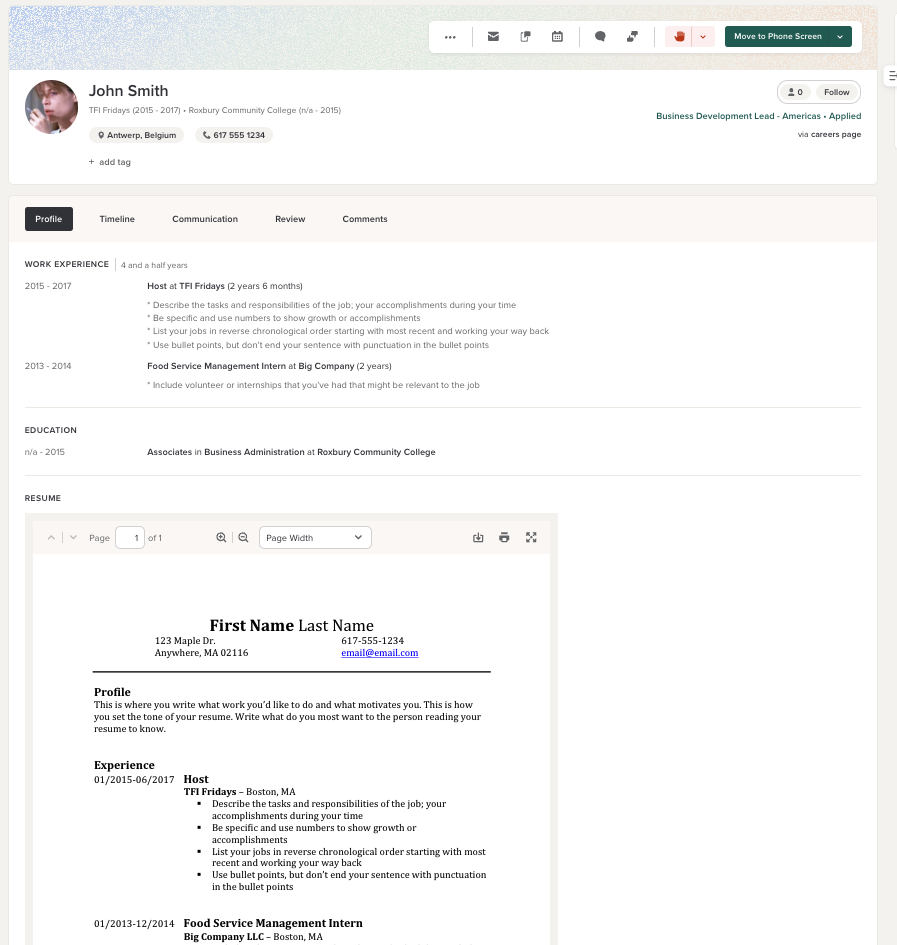
I applied to my own job twice and only one application showed up
It appeared after a noticeable lag. The resume parsed cleanly into a profile with work history, education and the PDF. But I never got the AI resume review to run. The help docs say to toggle it in the job’s workflow settings.
It wasn’t there on my trial account, and emailing uploaded candidates was locked behind “contact support to verify your account.” So I can tell you the ATS works. I can’t tell you what the screening AI does with a real applicant, because the trial wouldn’t show me.
Verdict
Workable is an ATS first. The screening is a set of add-ons that don’t talk to each other well: the interview generator repeats itself, the form builder doesn’t turn requirements into questions, and the AI review is the one piece I couldn’t switch on.
If you already run Workable and want to add video and tests, it’s the path of least resistance. If you came for AI screening, you can find better options for less and then integrate them into Workable if you’re set on it as your ATS.
5. Manatal
Best for: a small team that wants a cheap, clean ATS and will do the screening itself.
Free trial: 14 days, no card. Job board posting, mass email, the AI interviewer and email automations are off until you pay, though.
Price: $15 per user a month, billed annually.
| Criterion | Manatal |
|---|---|
| What it screens | Resume only out of the box. There is an option to add an AI interviewer, but it’s only for paid plans. |
| How it scores | A match percentage on the candidate card and an AI Recommendations tab that ranks your database against the job. My test candidate showed 0% and the recommendations tab returned “no matching candidates.” No criteria shown, no reasoning shown, no way to see why. |
| Who makes the call | Nothing is rejected. Candidates sit in a Kanban pipeline (New, Shortlisted, Submitted, Scheduling, HR interview, Final, Offer) and you drag them. |
| Where candidates come from | 36 job boards listed on the Sourcing tab, plus a career page, a 600 million profile sourcing database and a LinkedIn Chrome extension. None of the boards work on the trial. I had to upload a resume by hand to get a candidate in. |
| Where results go | It is the ATS. Nothing to write back to. |
| Time to first screen | Under a minute to create the position. The problem is there’s then nowhere to go: no boards on the trial, no screening step to configure, one hand-uploaded candidate and an empty recommendations tab. |
| Cost at your volume | $15 per user a month billed annually, 14-day trial, no card. Per seat, not per applicant, so volume is free. Considerably cheaper than Workable, and I prefer per-seat pricing to pricing by company size. |
Signup asks one useful question: agency or company. I picked company and landed on three buttons: create a candidate, a department, a job. I started the clock.
The position took under a minute to create
Title, department, team, done. Then I pasted my whole job description into one field and it took it. After Workable’s nine separate boxes, it was a better experience.
Then I went looking for the screening and never found it
No video interview. No assessment. Not in the job tabs, not in settings, not in integrations. I asked Manatal’s AI copilot whether I could add a video interview or assessment to a job. It thought for 1.7 seconds and told me to visit the support site.
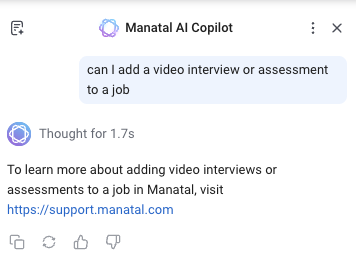
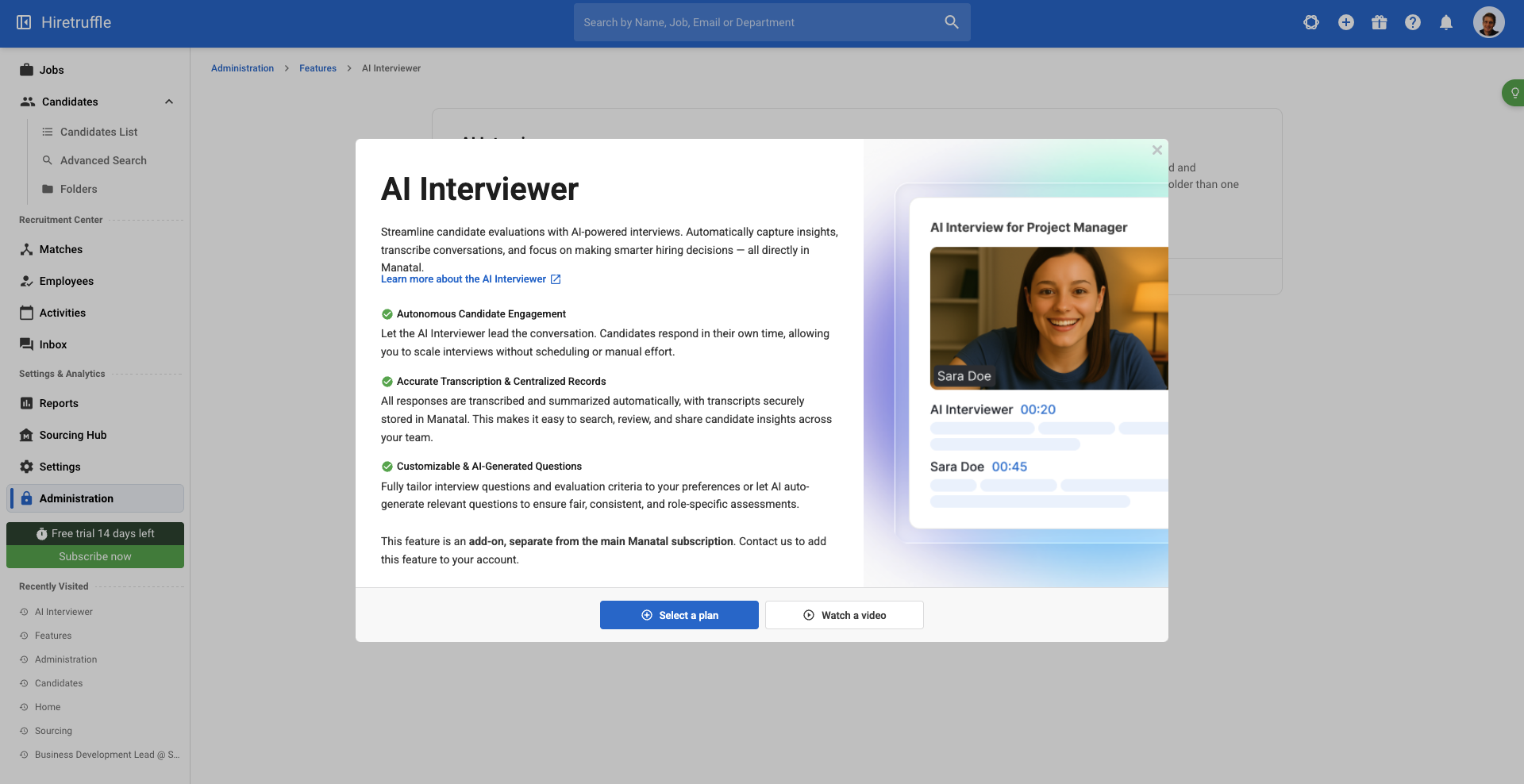
After some back-and-forth I discovered that Manatal does offer an AI interviewer, but it’s something you configure in the admin panel and it’s only available on paid plans.
The Sourcing tab is where the AI lives
Career page, 36 job boards, a 600 million profile sourcing hub, a recommendation engine that ranks your existing database against the job, and a Chrome extension for pulling people off LinkedIn. Manatal’s AI focus seems to be centred on sourcing. None of the job boards work on the trial, so I uploaded a resume by hand.
The candidate card showed 0% and the AI Recommendations tab showed nothing
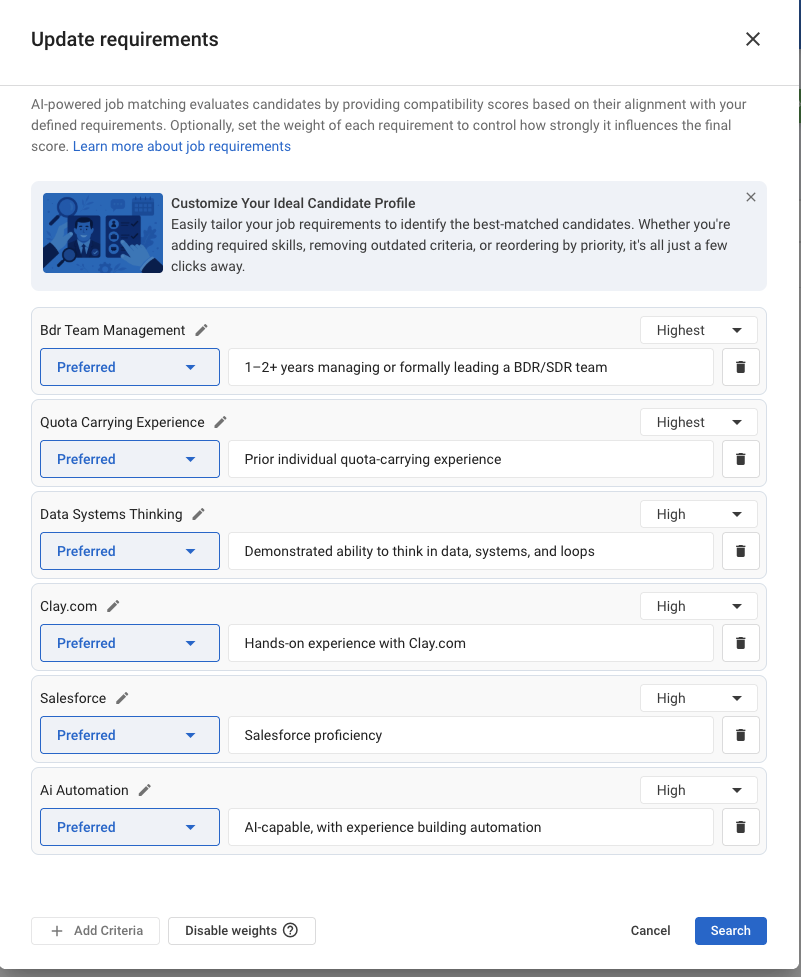
In fairness, my test resume was a restaurant host applying for a sales lead role, so 0% might be the right answer. The problem is I can’t tell. The criteria come from the job description and I never found a place to look at them or change them, which seems problematic.
Verdict
Manatal is a good cheap ATS with a Kanban board I’d happily use and sourcing AI for finding people. Calling it AI screening is a stretch. The resume screening is basic and a bit of a black box. The AI interviewer is gated. There are no assessments. My advice would be to grab a dedicated AI screening tool and integrate it with Manatal.
How the five compare on the criteria
Here’s every tool against every criterion, based on what I could actually run on the trial. Where a feature exists but sat behind a paywall I couldn’t get past, I’ve said so rather than crediting it.
| Criterion | Truffle | TestGorilla | Mokka | Workable | Manatal |
|---|---|---|---|---|---|
| What it screens | Resume, video and assessments, all on the trial | Resume, video, tests and AI interview exist, but AI interview and library video are paid | Resume plus an AI phone screen, no video, forms instead of tests | Resume parsing plus video and assessments as paid add-ons | Resume only, AI interviewer is paid |
| How it scores | Criteria per role, match percentage, evidence per criterion and per question | Editable AI scoring criteria, but scoring your applicants is Plus only | Criteria you set, scoring unseen because the role wouldn’t activate | Parsed resume, no AI review on the trial | Match percentage with no criteria or reasoning shown |
| Who makes the call | Nothing auto-rejected, you decide on every row | Nothing rejected, knockout can’t disqualify | Auto-reject on by default for application questions | Knockouts auto-disqualify if ticked, otherwise manual | Nothing rejected, manual Kanban |
| Where candidates come from | Position Link on any board, invites, CSV, Zapier, Ashby. No job posting | Invite by email or link, or their talent pool. No job posting | Direct apply link. Job boards cost 500 euros per role | Posted to 8 of 17 free boards automatically | 36 boards listed, none work on the trial |
| Where results go | Stands alone. Ashby natively, other ATS via Zapier, API and webhooks. Paid plans only | Stands alone. ATS writeback on Plus only | Stands alone. ATS is an add-on | It is the ATS | It is the ATS |
| Time to first screen | About 10 minutes to a live role with all three methods | Quick wizard, then out of credits on a new account and no way to run it | Quick briefing, then a 500 euro checkout blocked activation four times | About 6 minutes to publish, then AI review and email were locked | Under a minute to a position, then nowhere to go |
| Cost at your volume | Credits across all methods, 12 cents to $1.25 per applicant, from $49 a month | One credit per candidate, about $3.60 each on Core, Plus from $4,800 a year | $0.49 per applicant or flat unlimited, plus 500 euros per role for sourcing | $299 a month, $467 with screening add-ons, priced by employee count | $15 per seat a month, volume is free |
Which AI screening tool should you pick
The honest answer depends on what you already have and what you’re willing to pay for.
If you have more applicants than time, start with Truffle. It’s ours, and I’ve been upfront about that all the way through. It was also the only tool where all three screening methods ran on a free trial, where the criteria and reasoning were visible on every candidate, and where nothing got rejected without me. It doesn’t post jobs, so you bring the applicants, and 7 days is the shortest trial on the list.
If you’re set on Workable or Manatal as your ATS, keep it for the pipeline and add a screening tool on top. Both do the ATS job well. Neither does the screening job well enough to justify the add-on price at Workable or the paywall at Manatal. Zapier gets scores from a screening layer back into either of them.
If skills tests are the point, TestGorilla, but budget for Plus. The scoring design is the best I saw, and it’s all behind a $4,800 a year tier. Don’t judge it by the free plan, because the free plan couldn’t run an assessment for me.
If you want an AI phone screen and can wait, Mokka. The role briefing and the criteria model are right. The checkout isn’t. Try it again in a couple of months.
One thing I didn’t expect going in: the free trial is the review. Every tool on this list tells you what it thinks screening is by what it lets you do before you pay. The ATS let you build a pipeline and hide the AI. TestGorilla lets you build a screen and not run it. Mokka lets you brief the AI and then asks for 500 euros. The tool that lets you screen a real applicant end to end on day one is telling you the screening is the product, not the upsell. That turned out to be a better test than any feature list.
Frequently asked questions about AI screening tools
What is an AI screening tool?
An AI screening tool reads what applicants submit, a resume, a recorded interview, an assessment, and scores it against criteria you set for the role, so you review a ranked list instead of a pile. The good ones show the evidence behind each score and leave the decision to you. I cover the category in more depth in what is AI screening.
Which AI screening tools have a free trial?
Of the tools I tested: Truffle (7 days, 30 credits, no card), TestGorilla (free plan, 10 credits a month), Mokka (30 days), Workable (15 days, no card) and Manatal (14 days, no card). Enterprise tools like HireVue, Paradox and Eightfold are demo only.
Do AI screening tools auto-reject candidates?
Some do. Mokka turns auto-reject on by default for application questions, and Workable auto-disqualifies on knockout answers if you tick the box. Truffle, TestGorilla and Manatal don’t reject anyone on their own. Check this before you buy, because it’s the setting a candidate will complain about.
What does AI screening cost per applicant?
It varies more than the headline prices suggest. Truffle runs 12 cents to $1.25 per applicant depending on the method. TestGorilla is about $3.60 per candidate on its Core plan. Mokka is $0.49 per applicant. Workable and Manatal charge per month or per seat, so the per-applicant cost falls as volume rises, but Workable’s screening add-ons push the entry price to $467 a month.